

GuideGrok Bot
Before You Clone a Feature: Running Evidence-First Reverse Engineering on Grok Bot
TL;DR
- @Serantych's article makes one strong point: a screenshot shows the interface, not the rules. Ask which rule causes the behavior, and make the bot show evidence.
- On Grok Bot, the tool and the target app sit on the computer all your Bots share. Plan for that before you install anything.
- Good candidates: small, deterministic logic that runs in an app you're allowed to inspect. Poor candidates: server-side behavior, anything that needs a real account secret, and plain browser workflows (use Teach a task).
- Save the method as a skill, not a routine. This is one-off investigation work.
- Use the decision checklist below before you start.
What the article says, briefly
@Serantych's X article, "REA + GrokBot: Reverse Engineer Apps and Build Your Own Features (Full Guide)" (https://x.com/i/article/2113301593097449473), pairs a Grok Bot with REA, a third-party reverse-engineering tool. Its core line: "The screenshot showed the interface. It never showed the rules." The question it keeps asking is "which rule causes the behavior I can see?"
The article explains the method using three of REA's published case studies (a Notion clipboard path, an Android login-code generator and a native game function). It says plainly that "they are not presented as experiments I ran with GrokBot." It also sets limits on what any finding proves, including: "Client inspection does not reveal a private server’s source." A companion post turns the method into six prompts, from "pick one feature" to "test where it breaks".
Read the article for the case studies and prompts. The rest of this guide is our own analysis of how that method fits Grok Bot as the docs describe it, where it breaks, and when not to use it. We haven't run REA ourselves, so nothing below is a result.
How the method maps onto Grok Bot
The computer. The docs say "Every Bot on your account uses the same computer": files are visible to every Bot, and "Command-line credentials are shared". The article notes that REA installed on your laptop "does not automatically become available" to the bot. Put those together:
- The target app and REA have to be on the cloud computer, so every Bot on your account can reach them. Don't upload an app or a data file there if another Bot shouldn't touch it.
- Each Bot's screen is "not separate security boundaries", per the docs. Running the investigation in a separate Bot doesn't isolate it.
- When you're done, follow the docs' cleanup advice: "Remove sensitive temporary files after the work is complete."
- Some Update Bot's Computer updates replace the whole computer, and per the docs that kind removes "installed apps and packages." If you installed REA or its dependencies by hand, expect to reinstall after an update. Keep your notes and specs in
/workspace, which the docs say is where durable files belong.
Approvals. Reverse engineering is mostly reading. Building and testing can write files and run commands. Set a boundary in the request, as the approvals page suggests, and add narrow Auto-review rules, for example Ask first before running any command outside /workspace/rea-project. The docs warn that Auto Review "should complement, not replace, least privilege and explicit approval boundaries."
Skills, not routines. Once an investigation works, the docs' advice applies: "Start with a one-time task. Make it reliable, save the method as a skill, and only then automate it." For this method, stop at the skill. A useful skill, per the docs, states when to use it, required inputs and access, the steps, how to validate, what to return, and what requires approval. An investigation needs a person choosing the question each time, so a scheduled routine adds usage without adding value.
REA or Teach a task? If what you want is the clicks (a browser workflow you repeat), the docs' Teach a task records a demonstration and creates a draft skill, with no third-party tool. @0xRafy's post aims REA at the same job ("show it once and let REA capture the rest") and stresses that it "observes one authorized execution". Our rule of thumb: start with Teach a task for visible steps. Reach for REA only when you need the logic you can't see on screen.
Which features are good candidates
| Candidate | Fit | Why |
|---|---|---|
| A rule that runs inside an app you own or may inspect (a timer, a format conversion, a calculation) | Good | The evidence is on the machine, and you can test your version against it. |
| A boundary behavior: what changes at a cutoff, a limit or a time block | Good | Easy to state as input and output, so easy to test with normal, empty, boundary and failure cases, the article's test set. |
| An open-source app's feature | Good, but read the source first | You may not need a reverse-engineering tool at all. |
| Ranking, pricing or recommendations computed on a server | Poor | Per the article, client inspection won't show a private server's source. You'd be guessing. |
| Anything that needs a real login, token or customer data to observe | Poor | It puts a secret on a shared computer. Use test data, as the article's Aegis example does, or skip it. |
| A whole app | Poor | The article says a rebuilt feature "does not mean a whole app has been recreated." Scope to one behavior. |
| An app whose license or terms forbid reverse engineering | No | The article's rule: "Use targets you own or are authorized to examine." |
| A browser workflow you repeat | Use Teach a task | You need the steps, not the internals. |
Where it breaks
These come from reading the docs against the method, not from running it:
- Shared-computer sprawl. Target binaries, extracted files and notes pile up where every Bot can see them. Keep one project folder and delete what you don't need.
- Sign-in walls. If the feature only appears after signing in, the docs say the Bot hands you control for passwords and two-factor codes, and the session is then shared with your other Bots. That's often a reason to stop.
- Expired approvals. An approval card raised by a routine or other background work "expires after 30 minutes". Another reason not to run this as a routine.
- Confident gaps. The article's third case is about a first answer that left out details. Require evidence for each claim, and keep guesses on a separate list.
- Cost. The article notes that "agent usage, hosting and some providers can still cost money." Long investigations are heavy turns. Scope to one feature.
Our template: proved, guessed, decided
Ask the bot to fill this in before it writes any code. This is an empty template, not a finding.
| Statement about the feature | Proved or guessed | Evidence (file, function, test) | Our decision for our version |
|---|---|---|---|
| … | … | … | Keep / change / drop |
If the guessed rows outnumber the proved ones, go back to investigating. The last column keeps your design choices apart from the findings, which the article also recommends.
Decision checklist
Answer each before you start. One "no" is enough to stop or rescope.
- Permission. Do I own this app, or does its license allow inspection?
- One behavior. Can I name the single behavior in one sentence?
- On the device. Does the logic run in the app, not on a server?
- No real secrets. Can I observe it with test data and no real login?
- Shared computer. Am I fine with every Bot on my account seeing the files?
- Not just clicks. Would Teach a task or the app's open source fall short?
- Testable. Can I write a normal, empty, boundary and failure case?
- Worth it. Is building my own version cheaper than the usage and time?
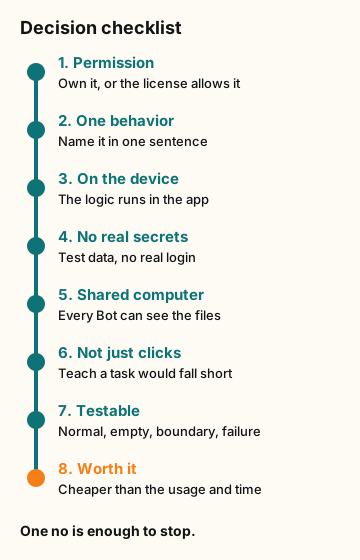
Figure explanation: Eight numbered checks run top to bottom. One: permission to inspect the app. Two: one behavior, named in a sentence. Three: the logic runs on the device, not on a server. Four: test data, with no real login or secret. Five: every Bot on the account can see the files. Six: Teach a task or the app's open source would fall short. Seven: a normal case, an empty case, a boundary case, and a failure case. Eight: building your own version is worth the usage and time. One no is enough to stop. The diagram is our checklist, not a record of a REA run.
What this means for you
- Run the checklist. If it passes, write the question first: When I do X, why does Y happen?
- Put REA and the target in one
/workspaceproject folder, following REA's own instructions. - Set the boundary in your request and add an Ask first rule for commands outside that folder.
- Fill in the proved/guessed table, then write a short spec for your version.
- Build, test the four cases, and save the method as a skill. Don't schedule it.
- Clean up the folder and sign out of anything you signed into.
Credits
- @Serantych, "REA + GrokBot: Reverse Engineer Apps and Build Your Own Features (Full Guide)": https://x.com/i/article/2113301593097449473 (post: https://x.com/Serantych/status/2113332023431405772) and https://x.com/Serantych/status/2113364112990253467
- @0xRafy: https://x.com/0xRafy/status/2113014202226884780
- REA (third-party tool) and its case studies: https://rea.tools · https://rea.tools/showcase/aegis/
- Official Grok Bot docs: https://docs.x.ai/grok-bot/computer-and-apps · https://docs.x.ai/grok-bot/skills-routines-and-automations · https://docs.x.ai/grok-bot/approvals-security-and-privacy
Sources
Quotes checked word for word on Oct 24, 2026. Grok Bot docs rechecked Nov 3, 2026. REA is not an xAI product, and we haven't tested it.
- @Serantych, "REA + GrokBot: Reverse Engineer Apps and Build Your Own Features (Full Guide)", shared Oct 22 in the article post. Six-prompt post: https://x.com/Serantych/status/2113364112990253467.
- @0xRafy, workflow-capture post
- REA and the Aegis case study
- Grok Bot docs, Computer and apps
- Grok Bot docs, Skills, routines, and automations
- Grok Bot docs, Approvals, security, and privacy
- Grok Bot docs, Security
Start from a template
People share Grok Bots you can add and then change to fit your job. Each template opens on x.ai. bot.ski never installs anything.
Comments
Comments are from bot.ski members. They aren't reviewed by xAI.