

GuideGrok Bot
Community Bot Gallery: Pour Decisions, Gas Saver, AccessiBot, Trend Scout and More

All community posts on X, read and quotes checked word for word on Oct 24, 2026: @KSJ_Kreative, @DigitalDaisyX, @pjvann, @ashleyschendel, @BrianRoemmele, @MarioNawfal, @RichSilver. @MinimalDuck's post was read Oct 25, 2026.
Official xAI docs on sharing and adding Bots were rechecked Nov 3, 2026 (see Sources).
We haven't installed or tested these bots. Feature lists are the creators' own words.
TL;DR
- Six community bots from October 2026: a bartender that works from a photo of your shelf, a gas-price finder, an accessibility helper for X, a trend finder, a weekly X Money report, and a bot that removes your number from data-broker sites.
- What they share: one job each, a clear input, a visible output, and approval before anything risky.
- Before you add one: templates are made by other users, not by Grok Bot. Read the preview, check what it connects to, and keep money and send approvals on.
- Made one? Add it to the Botski directory.
The fastest way to learn what a Grok Bot can do is to look at what people actually built. Here are six from October 2026, from cocktails to spam calls, plus the pattern worth copying.
Pour Decisions: a bartender for what's on your shelf
@KSJ_Kreative calls it "my FREE AI bartender". The template link is in Sources [3]. The post's feature list:
- "Snap a photo of your bar"
- "Discover cocktails using what you have"
- "Get mocktails & big-batch party drinks"
- "Scale recipes to your guest count"
- "Create shopping lists"
- "Make personalized drink menus"
Why it works: you send a photo and get back a plan. It needs no account connections, so there's little to go wrong.
Gas Saver: cheaper fuel nearby
@DigitalDaisyX: "It finds cheaper gas nearby, helps maximize fuel rewards, compares Gas vs. EV charging costs, and plans road trip stops." The template link is in Sources [4].
Why it works: one narrow goal, spending less on fuel, with four specific outputs. Caveat: fuel prices change by the hour. Ask it to show where each price came from and when.
AccessiBot: X for more people
@pjvann (bio: "@spacexsi & @x api") built it to make X more accessible. The post does not include a template link. Its features, per the post:
- "Have any @X post, thread, or news read aloud"
- "Generate big, high-contrast text cards"
- "Add captions to any @X video"
- "Create alt text for images"
Why it works: each feature removes a specific barrier. Caveat: generated alt text and captions can be wrong. Read them before you post them under your name.
Trend Scout for X: what to post today
@ashleyschendel: tell it "about your handle one time. Then ask it “what is trending for me right now?”" The post adds: "It skips anything you already posted" and "It even gives you the keywords so your post shows up under the story." The template link is in Sources [6].
The post also gives daily-user numbers for Grok Bot. We couldn't verify those against an xAI source, so we've left them out.
Why it works: set it up once, then ask one question every day.
X Money weekly report
@BrianRoemmele's bot reads an X Money account "Every Monday morning" and builds a weekly report. The listed contents include "Balances across every account, with the week's net change", categorized transactions, "Recurring subscriptions flagged so nothing slips by", and "Three habit tips drawn from my actual numbers". It delivers "a dark-mode dashboard with charts, plus a PDF." The sample report in the post uses example data. The template link is in Sources [7].
The safety line worth copying: "The bot only reads my account by default. No money moves and no trade is placed without my Approve, every time." The post describes an optional investing step that works the same way: "It prepares the buy, I tap Approve, and only then is the order placed."
Why it works: read-only by default, with approval on anything that moves money.
Spam-Call Scrubber
@MinimalDuck made this free bot. The post says: "I got tired of all the spam calls I was getting so I had @bot find my number listed on sites and file the removals. I made it a free skill so you can do the same." The template link is in Sources [8].
@MarioNawfal also posted about a free Spam-Call Scrubber. His post doesn't link this template. It says the bot "tracks down your phone number on data broker and people-search sites, submits removal requests and follows up on confirmations." And: "Because those listings can reappear, the bot can keep checking on a schedule."
Why it works: repetitive form-filling is exactly what a bot with a browser and a schedule is good at. Caveat: to submit removals, the bot has to send your phone number, and often your name and address, to those sites. Decide what you're comfortable sharing, and remember the bot is filling forms as you.
What these have in common
- One job each. None of them tries to be a general assistant. The docs say focused jobs "give a Bot guidance and make its saved context reusable; a General Helper does neither."
- Clear inputs. A photo, a handle, a phone number, an account.
- Visible outputs. A drink menu, a list of fuel stops, a weekly report.
- Approval where it counts. The money bot says so outright.
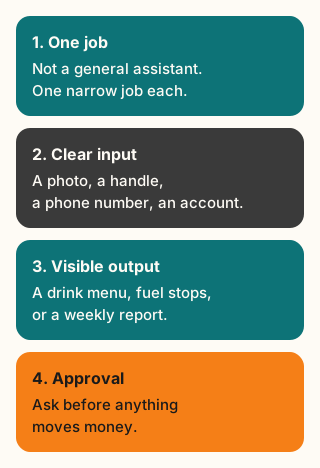
Figure explanation: Four rows. One job means none of these bots tries to be a general assistant. A clear input is a photo, a handle, a phone number, or an account. A visible output is a drink menu, a list of fuel stops, or a weekly report. Approval is the money bot asking before anything moves money. The diagram restates that shared shape.
If you're building your first bot, copy that pattern, not the topic.
What this means for you
To try one:
- Open the creator's template link. The docs say it opens "a preview on x.ai" where you can choose "Add to Grok Bot".
- Read the preview. A public link shows "the Bot's shared configuration: its identity, description, skills, and routines." Check which routines it will set up and what it will ask to connect.
- Know what you're adding. Per the docs, "Adding a shared template creates a copy on the recipient's account. They never get your computer, logins, or conversation history." It works the other way too: the creator doesn't get yours.
- Keep approvals on for anything that sends, buys or deletes, especially in the first week.
To build your own in this style: write one sentence each for the job, the input, the output and the one action that needs your approval. If you can't write the job in one sentence, split it into two bots or cut scope.
Tradeoffs and caveats
- Third-party, not Official. The docs say: "Shared templates are created by other users, not by Grok Bot. Adding one accepts the third-party bot terms shown at that point." The terms add that SpaceXSI "does not verify, endorse, or guarantee the functionality or safety of third-party bots." None of the bots above are Official.
- Untested by us. We're reporting what the creators say each bot does. Behavior can change when a creator updates the template.
- One computer. Any bot you add works on the same cloud computer as your other bots, which shares files and sign-ins.
Share yours
Rich Silver, who runs bot.ski, posted a call in October 2026: "Come share your templates on Botski, the community website for Grok Bot template creators!"
If you made one of the bots above, or something like it, you're invited to add it to the Botski directory. Templates you add from x.ai or a creator's link belong to their creators. Botski just helps people find them. Before you share, the docs say to remove "API keys, internal URLs, customer data, and anything else you would not put in a public document".
Credits
- @KSJ_Kreative: https://x.com/KSJ_Kreative
- @DigitalDaisyX: https://x.com/DigitalDaisyX
- @pjvann: https://x.com/pjvann
- @ashleyschendel: https://x.com/ashleyschendel
- @BrianRoemmele: https://x.com/BrianRoemmele
- @MinimalDuck: https://x.com/MinimalDuck
- @MarioNawfal: https://x.com/MarioNawfal
- @RichSilver: https://x.com/RichSilver
- Official xAI docs: https://docs.x.ai/grok-bot/bots
- Third-party bot terms: https://x.ai/legal/bot-sharing-terms
Sources
Official xAI (rechecked Nov 3, 2026):
Community posts:
- Grok Bot docs: Create and manage Bots
- Third-party bot terms
- @KSJ_Kreative, Oct 23, Pour Decisions template
- @DigitalDaisyX, Oct 21, Gas Saver template
- @ashleyschendel, Oct 20, Trend Scout for X template
- @BrianRoemmele, Oct 20, X Money weekly report template
- @MinimalDuck, Oct 15, Spam-call removal template
Community: @KSJ_Kreative, @DigitalDaisyX, @pjvann, @ashleyschendel, @BrianRoemmele, @MinimalDuck, @MarioNawfal, @RichSilver. Posts read and quotes checked word for word Oct 24-25, 2026.
Start from a template
People share Grok Bots you can add and then change to fit your job. Each template opens on x.ai. bot.ski never installs anything.
Comments
Comments are from bot.ski members. They aren't reviewed by xAI.