
Learn
Engineering


Grok Bot approvals, security, and privacy
GuideSafety & permissions
Grok Bot is built to finish work while keeping sensitive inputs and consequential actions under your control. This page follows official Approvals, security, and privacy docs in plain language. It does not invent policy.
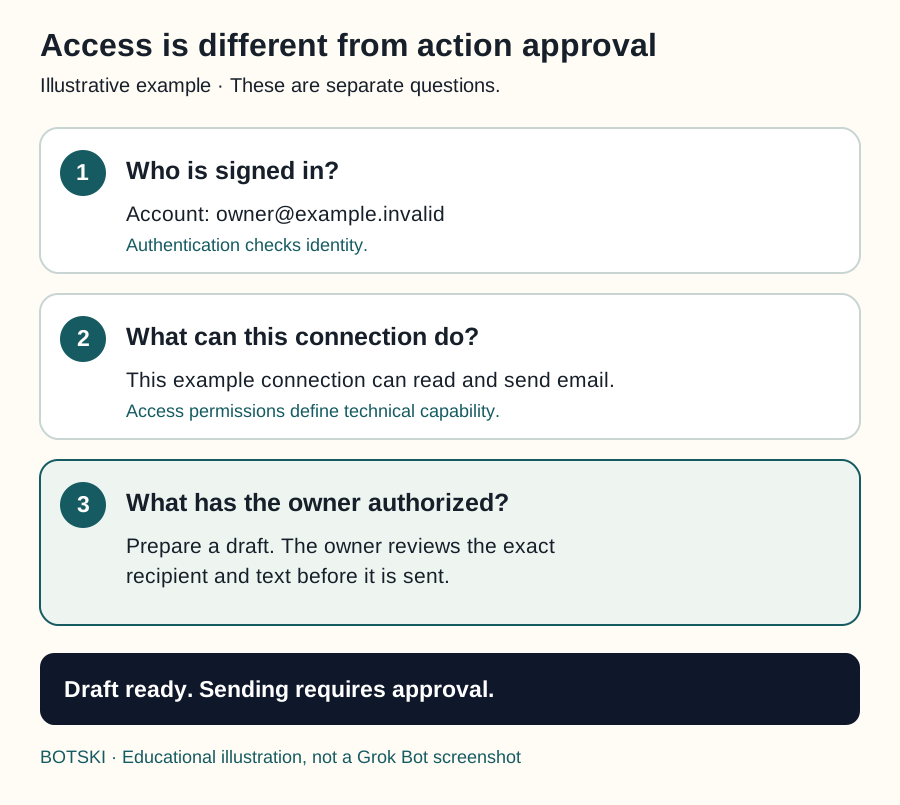
Giving a Bot access to an app and approving a particular action are different decisions. A connection might make sending email technically possible; your request can still limit the job to preparing drafts.
Use three questions: Who is signed in? What can that connection reach? What have I authorized for this job?
Three layers of permission
| Term | Plain meaning | Example |
|---|---|---|
| Authentication | Checking an identity. | You prove that you control your account when you sign in. |
| Authorization | Deciding what access is allowed. | An application receives permission to read certain information. |
| Action approval | Accepting a concrete proposed operation. | You approve sending the displayed message to the displayed recipient. |
Authentication establishes identity. OAuth access can be limited by scopes, which describe the access being requested or granted. Scope names and available choices vary between services.
A broad account permission is not a good substitute for clear task instructions. A read-only connection can prevent writes through that connection. A sentence saying “read only” expresses your boundary, but does not itself change the service’s technical permissions.
Swipe sideways to see the whole diagram, or open it full size.
Figure explanation: Three stacked sections ask who is signed in, what the example connection can do, and what the owner has authorized. The fictional address uses the reserved `.invalid` domain. Although this example connection supports sending, the specific job requires review before sending. The status reads: Draft ready. Sending requires approval. This is an educational illustration, not a screenshot of the Grok Bot interface.
Set a boundary in your request
Tell the Bot what it may do and where it must stop. A strong pattern from official guidance: draft and recommend first; do not send, publish, purchase, delete, change permissions, change production, or accept legal terms without your go-ahead.
Consider a Bot that prepares a weekly website report. You could authorize it to read the specified pages, compare them with last week’s results, and save a dated draft in the named project folder. You could reserve website edits and messages to other people for separate approval.
Read the pages on my list and compare them with last week's results. Save a dated draft report in the project folder. Do not edit the website or message anyone; ask me first for either.That gives the Bot room to finish the preparation. It does not need to interrupt you before each ordinary read within the agreed task.
For unattended work, specify the source, permitted operations, destination, frequency, and stopping conditions in advance. Standing authorization is a bounded decision, not open-ended permission. Product rules or organization policy can still require approval or block an action.
For a new Botski installation, begin with reading and drafting. Broader actions should be the owner’s deliberate choice.
An approval covers the proposed action. It does not undo work already finished.
Review an action
When approval is required, the chat shows the proposed operation and its inputs. Check the target, scope, and values before you approve.
- Desktop: Allow once · Deny · Always allow (can save a matching rule)
- Mobile: Allow · Deny · Always allow when a rule is proposed
Before approving a consequential action, look for:
- The exact account, person, file, or website affected.
- What will be created, changed, sent, or removed.
- The content or before-and-after values.
- Whether the action is a one-time operation or a wider continuing rule.
For example, “Update the page” is too vague to assess. “Replace this paragraph on this page with the displayed text” gives you something concrete to review.
Don’t approve anything whose target or effect you can’t identify.
Auto Review
With Auto Review on, Grok Bot evaluates tool calls and computer actions before they run. In settings, look under Settings → General → Bot → Auto-review (wording and location may vary by app version and by whether computers are registered).
- Ask first rules always stop matching actions for you
- Allow automatically rules proceed only when automated review finds no other reason to stop
- If both match, Ask first wins
- Team-enforced rules (Enterprise) can appear locked; your personal rules may only make behavior stricter
Auto Review uses a model to evaluate actions. It is an additional check, not a promise that every bad action will be caught. The security FAQ says enforcement can let an action proceed, require approval, or deny it, and that some effects, including memory writes and most settings changes, are outside its review coverage. If an admin turns enforcement off, members go back to their own rules only.
Write narrow rules (for example: ask first before external email). Avoid “allow everything in the browser.” “Prepare a report from these sources” gives a reviewer much more to evaluate than “do whatever is necessary.” Auto Review adds a layer; it does not replace least privilege or clear boundaries in the request.
Reading a document does not make it the boss
Prompt injection is an attempt to make an AI follow instructions embedded in material it was supposed to read as data. Outside content can include web pages, documents, or tool results.
Imagine a document about ticket sales contains a sentence telling the assistant to ignore the owner’s format and rename the report. That sentence belongs to the document. It is not a new instruction from the owner.
The Bot should use the document for the requested information and keep following the owner’s task. If outside material creates a genuine uncertainty, it can explain the conflict before taking a consequential action. No single prompt or reviewer makes this risk disappear.
Secrets and taking control
Passwords, passkeys, two-factor codes, CAPTCHAs, and payment confirmations belong in computer takeover — not in ordinary chat. For supported connections, use the product’s secure secret request (masked; kept out of the transcript/model) when available.
Shared-computer privacy
All of your Bots share one cloud computer. Files, browser sessions, and CLI credentials can be available across your roster. Separate Bot profiles are not separate security compartments.
- Don’t use “a different Bot” as a security boundary
- Sign out when access should end; clear sensitive temp files; revoke connectors in the source service
- Deleting a Bot does not wipe shared-computer files or browser sessions. If the Bot is merely silent, wait before you delete — see When your Grok Bot gets stuck
Practical details: shared-computer security and connecting email.
Local computer
Your own desktop is a different computer from the cloud computer, with separate local-execution controls. Typical policy choices: ask every time (default), always allow, or never allow. Official docs lean toward never allow unless you have a specific reason. Team admins can cap the policy; the stricter setting wins.
Sharing a Bot isn’t sharing your computer
A public share link lets others copy configuration. It does not share your computer or logins. Still: don’t put secrets, customer data, or internal URLs in a Bot you share. Adding a third-party bot accepts the third-party bot terms (as-is; the platform does not verify or endorse third-party bots).
Privacy and your account
- Grok Bot needs cloud data storage; Legacy Privacy Mode is not supported and blocks Grok Bot
- Privacy and training follow your Cursor account / team settings
- For current account, team, and data-handling policy, use the official security and privacy pages
Teams (quick pointer)
On Teams / Enterprise plans, admins get extra controls (org-wide enablement, network controls, enforced Auto Review, audit options, and more — availability depends on plan). Self-serve Teams may not see every Enterprise panel. A dedicated Teams guide will come later; until then, use official Teams and security docs for rollout.
End access deliberately
When a project ends, check both the running work and its remaining access. Pause its routines, review completed results, revoke the relevant service authorization, and sign out where appropriate. Removing a Bot does not clean up shared files or browser sessions.
If a task must stop immediately, follow how to stop a Bot task. For ordinary automation setup, read skills, routines, and workflows.
Practical least privilege
Connect only the tools you need · prefer scoped accounts where supported · start read-only / drafts · keep send, publish, purchase, delete, and production changes behind approval · review connectors and routines when sources change · pause routines when workflows shift.
Related Botski pages
Update history
Examples and the recommended starting boundaries are Botski guidance. The permission layers, review checklist, and prompt-injection sections were added from sources checked 2026-09-25 CT. Product-specific instructions above keep their earlier verified wording.
- Fetched 2026-09-23 CT. The approvals page and the security FAQ were re-read as markdown (HTTP 200). This pass did not find a new Auto Review product change. Still as of 2026-09-23 CT: Ask first still stops the matching action, Allow automatically still proceeds only when the review finds no other reason to stop, and Ask first still wins when both kinds of rule match.
Sources
Fetched 2026-09-23 CT.
Approvals, security, and privacy
https://docs.x.ai/grok-bot/approvals-security-and-privacy
Fetched 2026-09-23 CT.
Re-read 2026-09-23 CT. The .md URL returned HTTP 200. No new product change filed.
Grok Bot security FAQ
https://docs.x.ai/grok-bot/security-faq
Fetched 2026-09-23 CT.
What Auto Review checks, and what it still skips
Grok Bot security
https://docs.x.ai/grok-bot/security
Fetched 2026-09-18 CT.
Teams and enterprises
https://docs.x.ai/grok-bot/teams-and-enterprises
Fetched 2026-09-18 CT.
Create and manage Bots
https://docs.x.ai/grok-bot/bots
Fetched 2026-09-18 CT.
Third-party bot terms
https://x.ai/legal/bot-sharing-terms
Fetched 2026-09-18 CT.
Effective Aug 22, 2026
Use the computer and apps
https://docs.x.ai/grok-bot/computer-and-apps
Fetched 2026-09-25 CT.
Shared cloud computer, local-execution controls, takeover for sensitive sign-in
MDN: Authentication
https://developer.mozilla.org/en-US/docs/Glossary/Authentication
Fetched 2026-09-25 CT.
Meaning of authentication in the permission-layers table
IETF: OAuth 2.0 (RFC 6749), sections 1 and 3.3
https://www.rfc-editor.org/rfc/rfc6749
Fetched 2026-09-25 CT.
Authorization and access-token scopes
OWASP: LLM Prompt Injection Prevention
https://cheatsheetseries.owasp.org/cheatsheets/LLM_Prompt_Injection_Prevention_Cheat_Sheet.html
Fetched 2026-09-25 CT.
Outside content is data, not the owner’s instruction
Start from a template
People share Grok Bots you can add and then change to fit your job. Each template opens on x.ai. bot.ski never installs anything.
Comments
Comments are from bot.ski members. They aren't reviewed by xAI.