
Learn


GuideWebsites & apps
How a website works: frontend, backend, and hosting
A website is a collection of connected pages and resources that a browser can display. A web app adds useful interactions, such as saving a reading list or booking a place at an event. The boundary between the two is flexible.
When a bot offers to build your website, you do not need to choose every technology. You do need to know where the page lives, where information is saved, and what “finished” should mean.
Follow one visitor
Imagine a fictional event called Lantern Night. Its website shows a date, a location, and an RSVP button. Here is a simplified journey from opening the page to reserving a place.
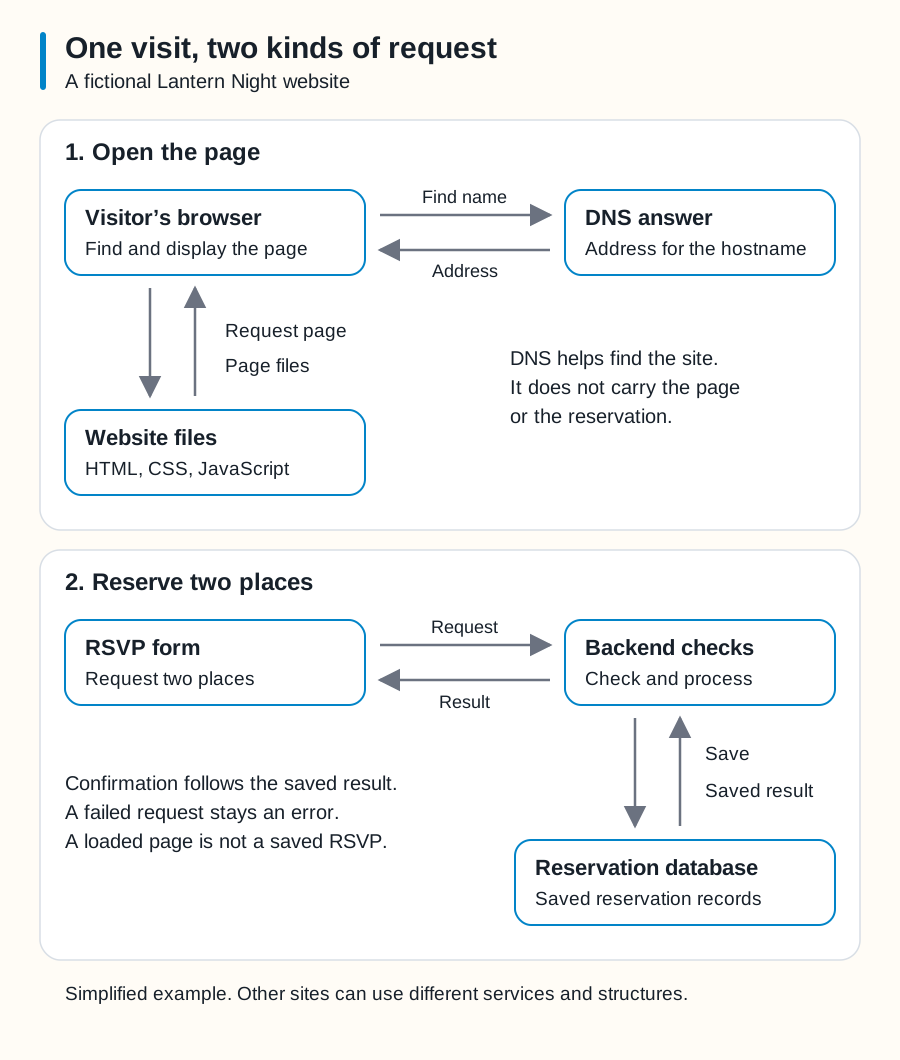
Swipe sideways to see the whole diagram, or open it full size.
Figure explanation: The first panel, Open the page, shows the visitor's browser asking for a hostname's DNS answer and receiving an address. A separate pair of arrows connects the browser to the website files: a page request goes out and HTML, CSS, and JavaScript come back. The second panel, Reserve two places, shows an RSVP form sending a request to backend checks. Those checks save an accepted reservation in a database, receive its saved result, and return a result to the form. Confirmation follows a saved result; a failed request stays an error. This is a simplified fictional website.
1. Find the destination. The visitor enters a web address. DNS, the Domain Name System, helps turn its hostname into an address computers can use. An existing connection or saved DNS answer can shorten this step.
2. Ask for the page. The browser requests resources using HTTP, the communication rules used by websites. HTTPS protects that communication using TLS encryption. The browser may receive content from the site's hosting service or a delivery service in front of it.
3. Display the page. HTML describes its content and structure. CSS controls presentation. JavaScript can add behavior, such as opening an RSVP form. The browser combines these resources into what the visitor sees. [1]
4. Submit a request. In our example, the visitor chooses two places and presses “Reserve.” The browser sends that request to the app's server-side code.
5. Save and answer. That code checks whether two places remain, records the reservation, and returns a result. The page shows “Two places reserved” only after a successful response.
That final distinction matters. A button changing color proves that something happened on screen. It does not, by itself, prove that the reservation was saved.
Frontend and backend
The frontend is the part a visitor sees and uses. For Lantern Night, it includes headings, the form, buttons, and the confirmation message.
The backend handles server-side work. In this example, it enforces the event's capacity and manages saved reservations. A database holds those organized records. A backend can also call another service instead of keeping its own database. [2]
These are responsibilities, not a rule that every site needs three separate products. One service might handle several jobs. A project may also use several services for a single job.
A page listing the event's date and location can be a static site: its prepared files are delivered without generating a new page for each visitor. It can still have JavaScript interactions. It does not need a custom backend or database just to display information. [3]
An RSVP form could use an external form service. That service then handles the submission. Ask the bot to show where the information actually goes.
Hosting is where the website is served
Hosting supplies the infrastructure that makes the site available. Depending on the service, it may serve files, run backend code, or provide several features together.
A content delivery network, or CDN, can keep copies of suitable content in multiple locations and deliver it closer to visitors. A CDN cache is a delivery aid; it is not automatically a backup of your project. [4]
Your domain provider, DNS provider, hosting provider, and database provider can be different companies. Paying for a domain does not mean you have also built or hosted a website.
What to ask your bot
For Lantern Night, a useful request would be:
Build a mobile-friendly event page. Show me a preview first. If you add reservations, explain where they are saved, who can view them, and how we will check that a reservation really worked. Tell me which services are needed and what ongoing costs could apply before creating paid resources.Then try a complete visitor journey. Can you read the page on a phone? Can you use the form with a keyboard? Does a failed save show an honest error? Does a successful reservation appear in the organizer's test records?
A screenshot answers a design question. Those checks answer whether the website does its job.
How we got here
Tim Berners-Lee proposed the Web at CERN in 1989. By the end of 1990, he had a browser and web server working there. In 1991, the software became available more widely. The original aim was to help people share and connect information. [5]
Today's web apps do much more, but a browser requesting resources remains a useful starting point for understanding them.
Continue with domains and going live, or explore where an app saves its data. For a quick meaning, return to the glossary.
Sources
- MDN, How the web works and Transport Layer Security. Checked 2026-09-25.
- MDN, Introduction to the server side. Checked 2026-09-25.
- MDN, What is a web server?. Checked 2026-09-25.
- Cloudflare, What is a CDN?. Checked 2026-09-25.
- CERN, A short history of the Web. Checked 2026-09-25.