
Learn


GuideData & storage
Where your app saves things: databases, caches, and backups
You press “Save.” The button changes. You close the tab. Will your work be there tomorrow? Will it appear on your phone? Could you recover it after a mistake?
Those are different questions. They depend on where the app stores information and how it protects it.
Follow one saved item
Imagine an app called Pocket Shelf. It saves a reading list. We will use one invented item: “Growing herbs on a windowsill,” marked unread.
In an account-based version, the app could send that item to its backend. The backend checks which account is making the request and stores the item in a database. Later, it retrieves the account's items for display.
The item might contain an ID, a title, an owner ID, and a read/unread value. An ID is an identifier that lets the app refer to a particular record even if its title changes.
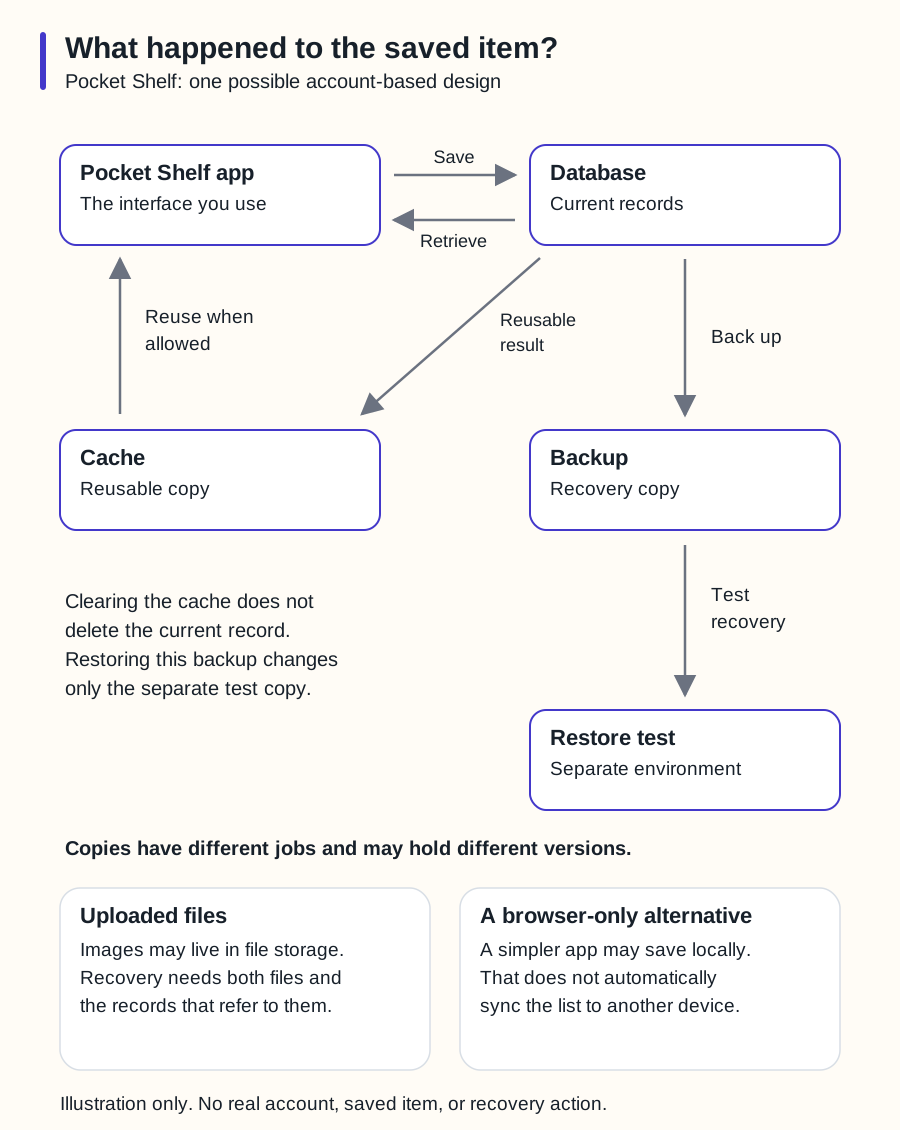
Swipe sideways to see the whole diagram, or open it full size.
Figure explanation: Pocket Shelf, a fictional reading-list app, sends a save operation to a database and retrieves current records. A reusable result can be copied from the database to a cache and reused by the app when allowed. A separate path backs up the database and restores that recovery copy into a separate test environment. Clearing the cache does not delete the current database record. The test restore changes only the separate test copy. Two notes explain that uploaded images may live in file storage and that a simpler browser-only design does not automatically synchronize to another device. This is one possible architecture, not a required structure for every app.
A database organizes working information
A database stores organized information so an application can retrieve and change it. In a relational database, data is organized in tables containing rows and columns. Other database types organize information differently. [1]
For Pocket Shelf, a row might represent one saved item. A query asks the database for something, such as “show this account's unread items.” A schema describes the structure the application expects, including fields and their types.
Saving data is only part of the job. The app must also enforce who may read or change it. Knowing an item's ID should not grant permission to access it.
Your bot should explain these rules through visible behavior: one test account can open its own list, while another cannot retrieve those private items. See the approvals and security guide for the wider permission question.
Browser storage stays with a browser
A small version of Pocket Shelf could save the list locally in the browser. It might not need accounts or a server database at all.
Local storage can persist across normal browser sessions. Session storage is associated with a tab's page session and is cleared when that session ends. Private browsing handles saved data differently. Users can also clear site data. [2]
A local list does not automatically synchronize to another device. If someone saves an item on a laptop, opening the site on a phone may show an empty list. That can be a perfectly reasonable design, provided the interface explains it.
Ask the bot to label the behavior clearly: “Saved in this browser” communicates something different from “Saved to your account.” Avoid promising permanent storage without a recovery plan.
File storage holds files
An app might keep uploaded images, audio, or documents in a file or object storage service. Its database can hold the information needed to find each file and decide who may access it. Object storage is designed around storing and retrieving objects such as files. [3]
For Pocket Shelf, an uploaded cover image and the row describing its reading-list item are two connected pieces. Copying the database alone may leave the actual image behind. A recovery plan must cover everything the app needs.
A cache speeds things up
A cache keeps a reusable copy of information to reduce repeated work. The browser might reuse an image rather than download it again. A server might reuse a recently calculated result. Cached responses follow rules about how long they can be reused or when they must be checked. [4]
A cached reading list might briefly display an older title after an edit. That is a freshness problem, not necessarily a failed database save. The bot should investigate which copy is being shown.
Treat caches as replaceable copies. Clearing a cache should not be the method for deleting the underlying saved list, and a cache should not be your only recovery copy.
A backup supports recovery
A backup preserves data for recovery. A restore uses a backup to recover it. Database systems offer different backup methods, and the correct procedure depends on the system. [5]
For Pocket Shelf, choose how much recent work you could afford to lose and how quickly the app should recover. Those choices help determine backup frequency and the recovery process.
Ask the bot to perform a restore drill in a separate test environment. Can it recover the saved item, its owner relationship, and its uploaded image? Record the backup date, restored result, and time required. Keep the real app untouched during the drill.
A successful backup notification is useful. A successful restore shows that the recovery process worked for the tested case.
Before launch, ask one plain question: “If this saved item disappears tomorrow, where would we recover it from?” The answer should name a real recovery source and an owner.
Continue with how websites work, or return to the glossary.
Sources
- PostgreSQL, Concepts. Relational databases are one database family, not the definition of all databases. Checked 2026-09-25.
- MDN, Web Storage API. Checked 2026-09-25.
- Cloudflare, R2 overview. Used only as a primary example of object storage; no provider recommendation or pricing claim. Checked 2026-09-25.
- MDN, HTTP caching. Checked 2026-09-25.
- PostgreSQL, Backup and Restore. The restore drill described above is Botski's editorial recommendation, not a claim that all services provide automatic recovery. Checked 2026-09-25.