
Learn


GuideHosting & deploymentCompanion to How websites work
Domains, DNS, and deployment: taking a website live
Your bot has shown you a working website preview. How does it become the site people reach at your address?
There are several separate jobs. They may appear in one provider's dashboard, but understanding the jobs makes mistakes easier to spot.
Four things that often get confused
| Term | What it does |
|---|---|
| Domain registration | Gives you the right to use a domain name while its registration remains valid. |
| DNS | Publishes records that help direct requests for your domain and its services. |
| Nameservers | Servers that publish authoritative DNS answers for the domain. |
| Hosting | Serves the website's files and, where needed, runs application code. |
A registrar manages your domain registration. Its settings commonly let you choose which nameservers handle DNS. Changing those nameservers changes where the domain's DNS is managed; it does not upload your website. [1]
An A record maps a name to an IPv4 address. An AAAA record maps it to an IPv6 address. A CNAME record makes one name an alias of another. Use the exact record type and target your hosting provider specifies. Other records can serve different jobs, including email. [2]
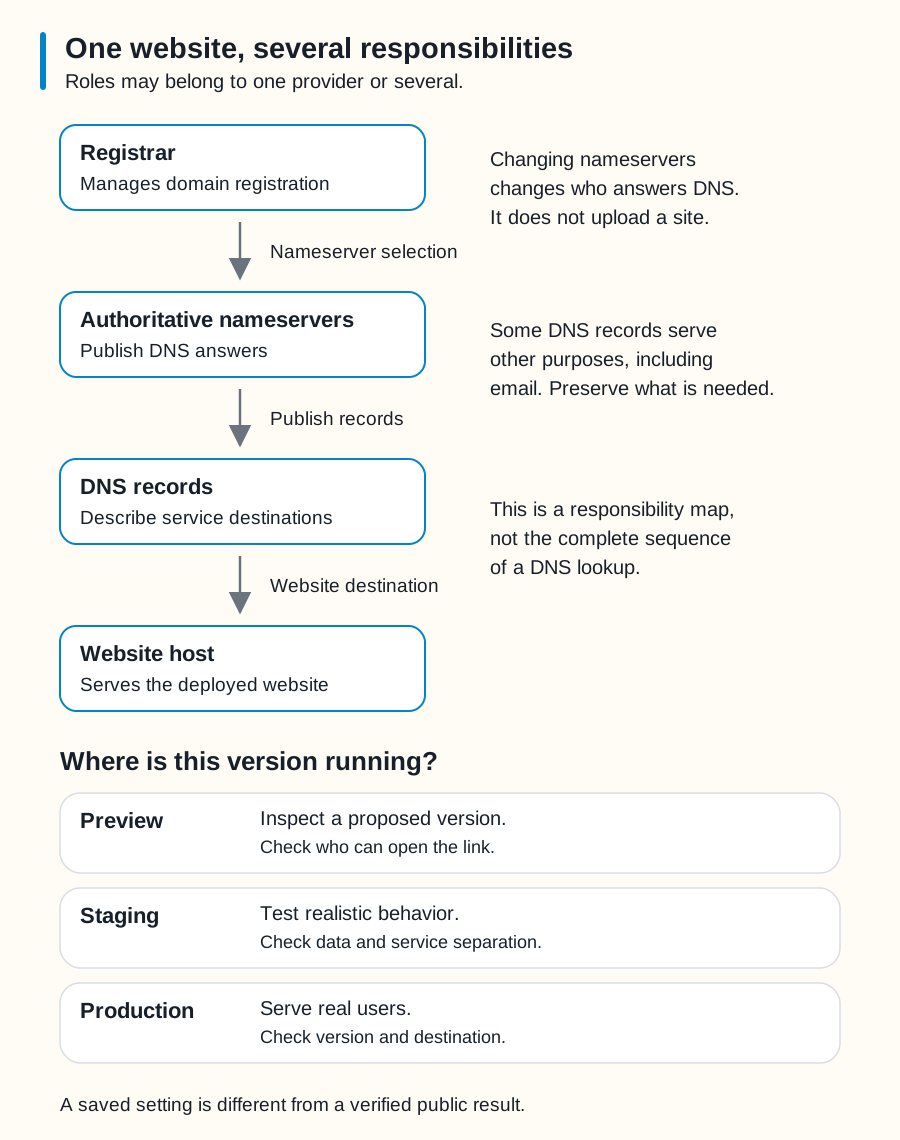
Swipe sideways to see the whole diagram, or open it full size.
Figure explanation: Four boxes form a responsibility map. Registrar manages domain registration. A nameserver-selection arrow leads to authoritative nameservers, which publish DNS answers. A publish-records arrow leads to DNS records, which describe service destinations. A website-destination arrow leads to the website host, which serves the deployed site. Side notes explain that changing nameservers does not upload a site and that some records serve email or other purposes. The diagram is not a complete DNS lookup sequence. A table below distinguishes preview, for inspecting a version and checking link access; staging, for realistic testing and checking separation of data and services; and production, for real users and checking the version and destination.
Preview, staging, and production
A preview lets you inspect a version before making it the main public site. Staging is a testing environment intended to resemble production. Production is the version real users rely on.
Providers use these names differently. A preview URL may be publicly reachable unless access controls are enabled. A separate URL also does not prove that its database, email service, or payment settings are separate. Check those connections. [3]
For our fictional Lantern Night event, use invented reservations in a separate test environment. A test of the confirmation screen should not reserve seats in the real event.
Deployment puts a version of the site into an environment. It can publish a preview or update production. Saving code, making a Git commit, and deploying are different actions, although a project can connect them through automation.
Connect the address and secure the connection
After deploying to the intended host, connect the domain following that provider's current instructions. Preserve existing records for services you still use. Then verify that the hostname reaches the correct site.
HTTPS protects communication between the visitor and the server. It uses TLS and a certificate associated with the hostname. Many hosts manage certificates, but setup and renewal arrangements vary. HTTPS does not prove that the content is trustworthy or that the application has no security problems. [4]
DNS changes are not guaranteed to appear everywhere at once. Different systems may still have older answers cached, including a previous “name not found” answer. A new record in your dashboard is evidence of a saved setting, not proof that every visitor can already use it. [5]
Ask for evidence of a successful launch
Have your bot report the deployed version, destination, live URL, checks performed, and how to return to the previous version if necessary.
Open the public address as a visitor. Check key pages, HTTPS, phone layout, and one complete test of the site's main task. If a form is involved, verify its saved result as well as its confirmation message.
Keep domain and hosting renewals assigned to an owner. “It launched successfully” and “someone is responsible for keeping it available” are separate answers.
Return to how websites work, or read about Git and version control.
Sources
- Cloudflare, DNS NS record and Update nameservers. Checked 2026-09-25.
- Cloudflare, DNS record types. Checked 2026-09-25.
- Cloudflare, Preview deployments. A provider-specific example, not a promise about every host. Checked 2026-09-25.
- MDN, Transport Layer Security. Checked 2026-09-25.
- Cloudflare, General DNS issues. Checked 2026-09-25.