
Learn


GuideAutomation & integrations
Skills, routines, and workflows: what is the difference?
A skill describes how to do a task. A routine starts work at a chosen time or, where supported, after an event. A workflow is the overall sequence that produces a result. In Grok Bot, a routine belongs to a particular Bot; saved skills are available across your Bots. [1]
You can have a useful workflow without scheduling anything. You can also schedule an unreliable workflow. Separating these ideas helps you improve the right part.
One weekly report, three different things
Imagine you run a small website and want a Friday summary of broken links. This is a fictional example you could adapt.
| Part | The question it answers | Our example |
|---|---|---|
| Workflow | What needs to happen from start to finish? | Read the page list, check its links, confirm failures, write a report. |
| Skill | How should the Bot do this well each time? | Use the supplied page list, retry an apparent failure once, group confirmed problems by page, and include evidence. |
| Routine | What starts the work, and which Bot owns it? | The maintenance Bot begins every Friday at 9 a.m. in America/Chicago. |
| Result | What should I receive? | A dated report with each affected page, broken destination, and suggested next step. |
The report is the result. Its procedure is the skill. Friday morning is the schedule. None of those alone is the whole job.
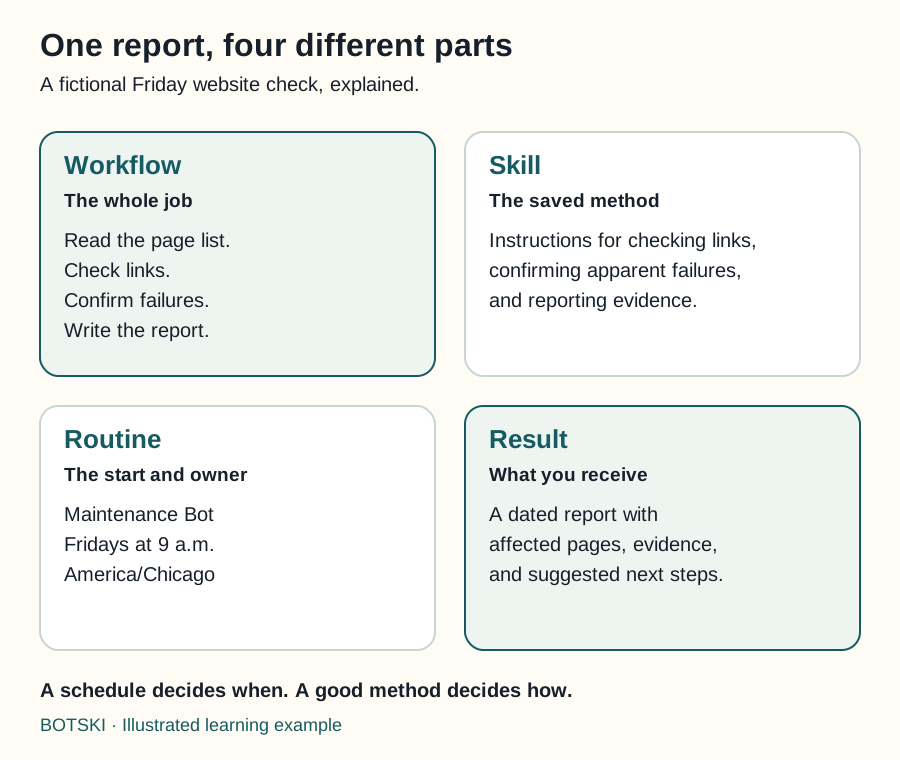
Swipe sideways to see the whole diagram, or open it full size.
Figure explanation: The workflow reads the page list, checks links, confirms failures, and writes a report. The skill contains the reusable checking and evidence instructions. The routine assigns Maintenance Bot to Fridays at 9 a.m. America/Chicago. The result is a dated report with affected pages, evidence, and suggested next steps. The four cards represent different aspects of one example, rather than four sequential operations.
Start by doing the job together
Ask for one report covering a few pages. Review it before making the job recurring.
Did the Bot find the right pages? Did it confuse an intentionally private page with a broken link? Can you open the evidence? Is it recommending a repair or actually editing your website?
Those questions expose missing instructions while the task is small. A timer would only repeat the same ambiguity more often.
Once the example works, describe the procedure clearly enough that tomorrow's run will not depend on remembering today's chat.
What belongs in the skill?
For our link-checking example, the method needs five practical decisions:
- Input: Use the owner's maintained page list, not every URL found anywhere online.
- Checks: Record the observed result; do not label an uncertain result as confirmed failure.
- Output: Include the source page, destination, observation time, and evidence.
- Limits: Read pages and create a report. Do not edit the site or send messages.
- Failure: If the page list is unavailable, explain the blocker rather than quietly checking an old copy.
A skill is reusable instructions, not automatic access. Grok Bot's private skill library is shared across your Bots, but a Bot still needs the relevant connection or login. [1] If another Bot uses this method, check that it has the right website list and destination for its report.
What belongs in the routine?
Give the recurring job a name you will recognize, such as “Friday broken-link report.” Specify its owner, timing, input, output, and stop conditions.
Use a named time zone, such as America/Chicago, and inspect the next run shown by the product. Grok Bot's timezone setting is used for routine schedules. [2] “Nine tomorrow” is less useful to a future reviewer than a visible date, time, and zone.
For event-based work, also define what qualifies. “A new ticket tagged website-error” is a narrower trigger than “anything happens.” Grok Bot's supported event integrations have their own connection flow; installing a similarly named plugin does not itself establish that trigger. [1]
Test the work and the stopping point
Grok Bot's Test run can perform real actions. Use harmless sample inputs and a draft destination. [1] A “test” label does not turn a send or delete operation into a simulation.
Botski's recommended standard is two successful manual runs or drills before unattended work or publication. This is Botski's quality standard, not a Grok Bot platform requirement or a guarantee of reliability.
For this example, try one normal page list and one list containing a deliberately unavailable sample page. Confirm that the Bot identifies the problem without editing anything. Then check that it handles missing input honestly.
Keep a brief record of the inputs, result, and correction. If the method changes materially, repeat the relevant checks.
Give quiet work a clear meaning
Decide whether a clean report should produce a brief confirmation or simply be saved for later. Either is reasonable. A failed check must remain distinguishable from “checked successfully; nothing needs attention.”
Also choose an owner review date. Botski suggests 90 days, with 30, 180, or a custom date available. At review, decide whether the job should continue, sleep, or retire. Pause its routine before removing the setup.
For the controls and setup steps, continue to put your Bot on a schedule. If an expected result does not arrive, use when a routine does not run.
Sources and scope
Product behavior checked September 25, 2026. Examples, the two-run standard, and owner review timing are Botski guidance.