
GuidePublishing & safety
Hosting user uploads: how to protect your site with a DMCA setup
If your site hosts files other people upload, you will eventually get a copyright complaint. In the US, the Digital Millennium Copyright Act (DMCA) gives hosts a "safe harbor": you are generally not liable for a user's infringing upload, provided you have set things up correctly and act quickly when notified. [1]
This applies whether a person uploads a song by hand or an AI agent builds a page that embeds audio, images, or video. Your site still stores and serves the file, so you are still the host.
The safe harbor is not automatic. Here are five steps that cover the basics.
This is general information, not legal advice. For your own situation, talk to a lawyer.
The five steps at a glance
| Step | What you do | Why it matters |
|---|---|---|
| 1 | Register a designated agent with the US Copyright Office | Without it, the safe harbor is not available |
| 2 | Publish a clear DMCA policy | Tells complainants and uploaders exactly how the process works |
| 3 | Add a rights checkbox at upload | Uploaders confirm they have the right to share the file |
| 4 | Put a "Report this" link on every hosted page | Makes complaints easy to send to the right place |
| 5 | Hide, keep, and log on takedown | Lets you act fast and still restore content if needed |
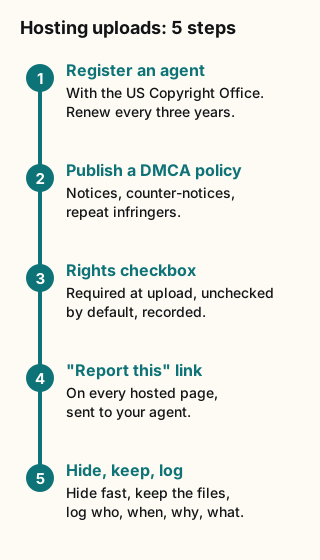
Figure explanation: Five numbered boxes run top to bottom. Box 1: register a designated agent with the US Copyright Office and renew it every three years. Box 2: publish a DMCA policy covering notices, counter-notices and repeat infringers. Box 3: add a required rights checkbox at upload. Box 4: put a Report this link on every hosted page. Box 5: on takedown, hide the content, keep the files and log who, when, why and what.
Step 1: Register a DMCA designated agent
A designated agent is the person, role, or department that receives copyright complaints for your site. To qualify for the safe harbor, a host must do two things: publish the agent's contact details on its website, and file the same details with the US Copyright Office, which keeps a public directory. [1]
How it works today, per the Copyright Office: [1][2][3][4]
- Where: online only, at dmca.copyright.gov. Paper filings are no longer accepted.
- Sign-in: through Login.gov, the government's shared sign-in service.
- Fee: $6 per designation. Payment goes through Pay.gov. Card payments usually clear in minutes; bank (ACH) payments can take about seven days, and the listing only goes live after payment.
- Duration: a designation expires after three years. You renew by amending or resubmitting it, which costs $6 and restarts the three-year clock. The Office emails reminders at 90, 60, and 30 days, and one week before the deadline.
- Who can be the agent: a named person, a job title ("Copyright Manager"), a department, or an outside agent service. Only one agent per service provider.
- Addresses: the agent's mailing address may be a P.O. box. The service provider's own address must be a physical street address. A P.O. box is allowed there only with prior written approval, which the Office grants in exceptional cases such as a real safety risk.
You will also need your full legal name, any alternate names (including your domain names), and a phone number and email for the agent.
Tip: put the renewal date in your calendar the day you file. An expired designation is a common way to lose protection without noticing.
Step 2: Write a clear DMCA policy
Publish a plain page, often called "Copyright Policy" or "DMCA," and link to it from your footer and upload screens. It should cover four things.
What a valid notice must include
Under 17 U.S.C. § 512(c)(3), a takedown notice should be in writing, sent to your designated agent, and include substantially the following: [1][5]
- A physical or electronic signature of someone authorized to act for the copyright owner.
- Identification of the copyrighted work (or a representative list, if several works are involved).
- Identification of the material claimed to infringe, with enough detail to find it, such as a URL.
- Contact information for the complainant: address, phone, and email if available.
- A statement of good-faith belief that the use is not authorized by the owner, its agent, or the law.
- A statement that the notice is accurate and, under penalty of perjury, that the sender is authorized to act for the owner.
When you receive a valid notice, remove or disable access to the material expeditiously. Then tell the uploader what happened and why.
Counter-notices
Under § 512(g), an uploader who believes the takedown was a mistake can send a counter-notice. It must include: [5]
- their physical or electronic signature;
- identification of the removed material and where it appeared before removal;
- a statement, under penalty of perjury, of good-faith belief that it was removed by mistake or misidentification;
- their name, address, and phone number, and consent to the jurisdiction of a US federal district court (as set out in the statute), plus agreement to accept service from the complainant.
After a valid counter-notice, forward a copy to the original complainant and tell them you will restore the material in 10 business days. Restore it no sooner than 10 and no later than 14 business days after receiving the counter-notice, unless the complainant tells you they have filed a court action to stop the infringement. [5]
Repeat infringers
The safe harbor requires you to adopt, reasonably implement, and tell users about a policy for terminating repeat infringers in appropriate circumstances. [5] Say what counts as a strike and what happens at the limit. For example: "Accounts that receive three valid notices that are not successfully countered within 12 months may be terminated." Then actually follow it.
Don't make false claims
Include a short warning based on § 512(f): anyone who knowingly makes a material misrepresentation in a notice or counter-notice can be liable for damages, including costs and attorney's fees. [5] This discourages abuse in both directions.
Step 3: Add a rights checkbox at upload
Before any upload goes live, ask the uploader to confirm they have the rights. Make the checkbox required, unchecked by default, and record when it was ticked and by which account.
Sample wording:
☐ I own this content, or I have permission from the rights holder to upload and share it here. I understand that content reported for copyright infringement may be removed, and that repeat infringement can lead to my account being closed. [Read the copyright policy]If AI agents upload or publish on a user's behalf, show the same statement to the person who owns the agent, and make them accept it before the agent can publish. The responsibility belongs to the person, not the bot.
A checkbox does not make an infringing upload legal. It sets expectations, gives you a record, and supports your repeat-infringer policy.
Step 4: Give every hosted page a "Report this" link
Make the complaint path one click away on every page that shows user content, including pages an agent generated. A small "Report this" link in the footer of each page works well.
The link should open a short form that collects the § 512(c)(3) elements:
- the URL of the page (pre-filled);
- what work is being infringed;
- the complainant's name, address, phone, and email;
- the two required statements as checkboxes (good-faith belief; accuracy under penalty of perjury and authority to act);
- a typed full name as signature.
Send each submission to your designated agent's inbox and to your admin queue. Reply with a confirmation so the sender knows it arrived. Also keep your agent's postal and email details on the policy page; some people will prefer to use them.
Step 5: Hide fast, keep the files, log everything
When a valid notice arrives, the goal is to disable public access immediately without destroying anything.
- Hide, don't delete. Switch the page or file to a "removed" state so the public URL shows a short notice, such as "This content has been removed in response to a copyright complaint." The original files stay in private storage.
- Keep files restorable. A counter-notice can mean you have to put the content back within 10–14 business days. That only works if you still have it.
- Log every action. For each takedown and restore, record:
- who acted (admin account); - when (timestamp); - why (the notice or counter-notice it was tied to); - what was affected (page, files, uploader account).
- Count strikes against the uploader account so your repeat-infringer policy runs off real records.
- Notify the uploader with what was removed, why, and how to send a counter-notice.
A simple admin control does the job: a "Take down" button with a confirm dialog that asks for the notice reference, and a matching "Restore" button that does the same.
Common mistakes
- Never filing the agent, or letting it lapse. Publishing an email address on your site is not enough. It must also be in the Copyright Office directory and renewed every three years.
- Putting a P.O. box as the service provider's address. The agent's address can be a P.O. box; the provider's address normally cannot.
- Deleting content on takedown. You may need to restore it after a counter-notice.
- Restoring too early or too late. The window is 10 to 14 business days, not calendar days.
- Having a repeat-infringer policy on paper only. Courts look at whether you actually enforce it.
- Hiding the report path. If complaints have no obvious route, they tend to turn into emails to your host or registrar, or a lawsuit.
- Assuming AI-built pages are different. If your site stores and serves it, treat it like any other upload.
FAQ
Do I need this if my site is small? The safe harbor has no size threshold. If users can upload content you host, setting up a designated agent is cheap insurance.
Does this apply outside the US? The DMCA is US law. Other places have their own rules, such as the EU's Digital Services Act. If you serve users elsewhere, check the local requirements.
Can I be my own designated agent? Yes. A single person can act as the primary contact, the service provider contact, and the designated agent. [3]
What if a notice is missing required elements? A notice that does not substantially comply may not be effective. If it does identify the material and give contact details, reply and ask for what is missing rather than ignoring it. [5]
Should I remove content before checking whether the claim is right? Generally, yes, if the notice is valid on its face. The safe harbor rewards prompt action. You are not expected to decide the copyright dispute yourself; the counter-notice process exists for mistakes.
Do I need a lawyer? Not for filing the agent. For drafting your final policy, or if a dispute escalates, legal advice is worth it.
Sources
- US Copyright Office: DMCA Designated Agent Directory. Purpose of the directory, the online-only system, and the § 512(c)(3) notice elements. Accessed October 12, 2026.
- US Copyright Office: DMCA Directory FAQs. $6 fee, three-year renewal, reminders, who can be an agent, P.O. box rules. Accessed October 12, 2026.
- US Copyright Office: Login.gov FAQ. Login.gov sign-in for the DMCA Designated Agent Directory. Accessed October 12, 2026.
- US Copyright Office: Designating an Agent for a Service Provider (transcript). Filing steps, Pay.gov payment, processing times. Accessed October 12, 2026.
- 17 U.S.C. § 512 (Cornell LII). Statutory text for notices (512(c)(3)), counter-notices (512(g)), repeat infringers (512(i)), and misrepresentation (512(f)). Accessed October 12, 2026.