

GuideGrok Bot
Pages in Week One: What Bot Builders Made With Them

TL;DR
- What shipped: Pages, announced by @bot on Oct 21 and listed in changelog v0.75.2 (Oct 22). A Page is a report, memo or dashboard that you and a Bot edit together, or that the Bot keeps up to date.
- Sharing: shared Pages have had a title bar with Download (PDF), Try Grok Bot and Share since v0.70.2 (Oct 11). As of v0.75.2 the dashboard lists every Page you've shared so you can unshare or delete it. Teams can share with a whole organization.
- What people built first: burn-down lists, design docs, morning briefs, weekly done-lists, agent-status dashboards and routine audits.
- Not confirmed: that Pages can be published as sites. The changelog says share, not publish, and mentions no domains.
- Start with: one Page that replaces something you ask for every week. Make a routine audit your second.
A week ago, a Grok Bot answer lived in a chat bubble. Now it can live on a Page that you and your bot both keep editing. Below: what shipped, what builders made in the first few days, and the one claim we couldn't confirm.
What shipped
The Official @bot account announced it on Oct 21: "Grok Bot can now build reports, memos, and dashboards." The post adds: "Ask Bot for a page, then edit it together or have Bot keep it up to date."
The changelog entry for v0.75.2 (Oct 22, 2026) puts it in release-note form: "Bots can build Pages, such as reports, memos, and dashboards, that you edit together or have the Bot keep up to date." The same release lists these Page-related changes:
- A Pages section on the dashboard listing the Pages you've shared, "where you can unshare or delete them."
- Pinned Library items. Pages, files and links can go in a Pinned section that stays at the top and syncs across your devices.
- Library previews. Hovering over a Library row shows who sent the item, when, and who can see a Page.
- Teams sharing. Page owners can share a Page "with their whole organization or with another team in it." Team admins can limit who can share Pages with everyone on the team.
- Full-screen Pages. "Pages can capture the pointer and fill the screen." That matters for dashboards and anything interactive.
- Fixes that show it's built for live use: a Page's Share menu shows its current visibility "even after it changed on another device or the dashboard", and Page cards update as soon as the Bot renames a Page.
Sharing itself isn't new. The v0.70.2 (Oct 11, 2026) entry says: "Shared pages have a title bar with Download, which saves a PDF, plus Try Grok Bot for visitors and Share for the owner." That release also let you rename a Page from its title and search an open page with Cmd+F or Ctrl+F, and it labeled both canvases and documents "Page".
What builders made
A staff member's working list
@ericzakariasson (bio: "tinkering @spacexsi") shared "some pages ive been finding useful":
- "launch burn-down lists"
- "design docs i iterate on with @bot"
- "morning briefs"
- "what did i get done this week"
Notice the pattern: everything on that list changes over time. That's where Pages pay off. A one-off answer can stay in chat. Something you check every morning belongs on a Page.
A dashboard for the bots themselves
@ashnichrist had hand-built a dashboard for "my 15 @grok @bot agents" the day before launch. The first three Pages plans in the post:
- "remaking my agent dashboard to track blocked, busy, & inactive agents natively"
- "a new live X dashboard tracking every post against my median"
- "content dashboard to track account growth by-platform"
These were plans when posted, not finished builds, so treat them as ideas.
A routine audit you can see
@melvindvivas's tip: "Ask Grok Bot to put all your routines run by all your bots in a dashboard". The reason given: "This makes it easier to see which ones you still need and which ones you can turn off".
This is probably the most useful first Page for anyone with more than two bots. It matters more since v0.75.5 (Oct 23) raised routine limits to "300 times an hour in total instead of 100, and each routine up to 200 times." More headroom means a forgotten routine can run, and bill, longer before anything stops it. Our guide The Grok Bot Bill covers the cost side.
Work status, shared
@shubgaur, whose bio also lists @spacexsi, posted a break-time clip of what the bot was handling, captioned "All in shareable pages btw".
Are Pages "sites" now? Not confirmed
@shubgaur also wrote: "Most underrated release ever btw... you can publish these pages as sites! 🔥"
We can't confirm calling them "sites". The changelog talks about sharing, unsharing and organization-wide sharing, plus a shared-Page title bar with Download and Share. No changelog entry says Pages can be published as sites or on a custom domain. Until xAI says otherwise, treat a shared Page as a share link, not a website.
What this means for you
- Pick something you ask for every week. A status list, a brief, a weekly done-list. If you'd read it more than once, it should be a Page.
- Ask for a Page, not an answer, and spell out the job. For example: "Make a Page called Monday Brief. Sections: calendar, open drafts, three things at risk. Update it every weekday at 7am." Name the reader, the sections and how often it refreshes.
- Keep it private first. Check the dashboard's Pages section to see everything you've shared, and unshare anything you didn't mean to. On a team, check who can see the Page in the Library preview before you send the link.
- Make the routine audit your second Page: every routine across every bot, with its schedule and the last time it did something useful. Turn off the ones that wake up with nothing to do.
- Pin the Pages you open every day so they stay at the top of the Library on every device.
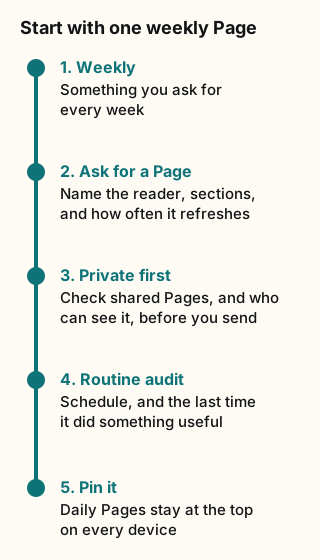
Figure explanation: Five steps run top to bottom. One: pick something you ask for every week, such as a status list, a brief, or a weekly done-list. Two: ask for a Page, not an answer, and name the reader, the sections, and how often it refreshes. Three: keep it private first, check the dashboard Pages section, and on a team check who can see it before you send the link. Four: make a routine audit the second Page, with each routine's schedule and the last time it did something useful. Five: pin the Pages you open every day so they stay at the top of the Library on every device.
Tradeoffs and caveats
- A Page that refreshes on a schedule needs a routine, and routines cost usage. A dashboard that refreshes every 5 minutes uses far more than one that refreshes daily. Choose the slowest refresh that's still useful.
- Shared means visible. A public share link shows anyone who has it what's on the Page, and visitors also get a Try Grok Bot button. Don't put customer data, keys or private notes on a Page you plan to share.
- Pages aren't the source of truth. A dashboard is a view of other systems. For important decisions, have the bot check the live source instead of trusting what the Page said the last time it refreshed. The docs give the same advice about bot memory.
- Early days. Most examples above are from the first 72 hours, and several are plans. Expect the patterns to change.
Credits
- @bot (Official xAI): https://x.com/bot
- @ericzakariasson: https://x.com/ericzakariasson
- @ashnichrist: https://x.com/ashnichrist
- @melvindvivas: https://x.com/melvindvivas
- @shubgaur: https://x.com/shubgaur
- Official xAI changelog: https://x.ai/changelog/bot (Oct 11, Oct 22 and Oct 23, 2026)
Sources
Official xAI (checked Oct 24, 2026):
- Grok Bot changelog: v0.75.2 (Oct 22, 2026) and v0.70.2 (Oct 11, 2026)
Community: @ericzakariasson, @shubgaur, @ashnichrist, @melvindvivas. All posts read and quotes checked word for word on Oct 24, 2026.
Start from a template
People share Grok Bots you can add and then change to fit your job. Each template opens on x.ai. bot.ski never installs anything.