

GuideGrok Bot
Trading Desks on Grok Bot: The Best Agent Is the One That Says No
Official xAI (checked Oct 24, 2026): Grok Bot changelog, https://x.ai/changelog/bot (v0.75.5, Oct 23, 2026); docs, https://docs.x.ai/grok-bot/. Community: @0xTimQ, @SolSt1ne, @0x_rody. All posts read and quotes checked word for word on Oct 24, 2026.
Most people's first trading bot does everything: find a coin, check it, buy it, sell it. @0xTimQ's article starts at the other end: "the best agent on a trading desk has never placed a trade." Then: "its whole job is to say no."
The article explains why the all-in-one bot fails: "it works for a week. then it buys a token that was dead before it got there, and you can't even tell which part of the prompt failed." This guide combines three community methods for a desk that mostly says no.
1. Split the steps
@0xTimQ's desk runs every trade through four steps, SCAN, VERIFY, EXECUTE and EXIT: "a different agent holds each one. nobody skips a step."
The one-line summary: "scanners find, verify skips, execute sizes, exit sells, you sign."
Details worth copying:
- Roles, not bots. "the four agents are roles in code, not four bots. one bot runs them all." That avoids the handoff overhead of a multi-bot team.
- Most tasks end in a skip. "on a good desk, almost every task ends in a skip." The free checks run first: the article uses public contract, pool and wallet data. Only a token that passes every free check costs a model call.
- Write the exit before the entry. "on this desk every exit exists before the entry". The sell rules are written down before any buy. The article lists specific percentages, but labels its numbers "paper-mode starting points, not a recommendation." We aren't repeating them.
- Log every skip. The article asks for "a row in tasks.csv for every task any agent does, skips included". Its comment: "tasks.csv will be long. trades.csv will be short. that's the desk working."
- Paper first. "week one runs on paper, and the bot never holds a key." Going live means a trading wallet that holds nothing else, and "every buy and sell becomes an APPROVE line you sign in your own wallet."
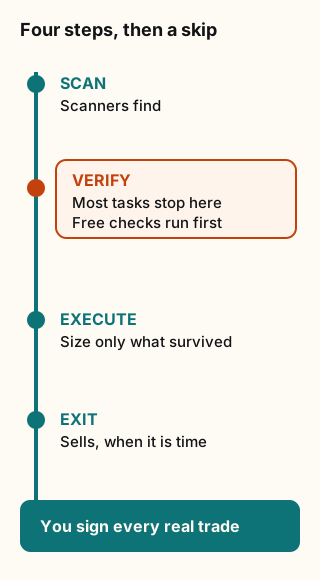
Figure explanation: Four steps run top to bottom: SCAN, VERIFY, EXECUTE, and EXIT. A different role holds each step, and nobody skips one. Most tasks stop at VERIFY, drawn as the step where free checks end a task. Only what survives continues to EXECUTE and EXIT, and you still sign. The diagram summarizes the community method. It is not a record of a live desk.
The article also warns about trusting paper results: "a paper fill happens at the screen price, a live one never does. treat paper as the ceiling, not the forecast."
2. Check that the limit is real
A risk setting on a screen isn't the same as a risk check in the code that sends the order. @SolSt1ne explains why an account blew past its limit: "Because the limit lived in the UI, and the code that actually sent the order never asked it."
One clarification first: the article writes as if Grok Bot shipped a trading dashboard with risk settings. It doesn't. Read "the UI" as whatever settings screen your own desk code shows. The method still applies.
The fix is a loop, "Budget about 30 minutes per rule":
- Pick one rule, such as a max position size. Keep it to one sentence and one claim.
- Take what actually runs: "The build and the logs on the machine that trades", not the docs.
- Trace one real order backward from the point where it leaves the desk.
- Compare the rule with what the order path actually checked. Is it checked at all? Before or after sizing? On every order, or only the first?
- Write the rule into the path, "plus a test that fails if it ever leaves."
The gaps listed are the ones to check first: "a stop set in the UI but checked only once per polling cycle", "a position cap applied to the first buy, not the averaged-in buys" and "a kill switch that stops new orders but not the ones already queued".
The article's worked example, labeled as one example run, shows what's at stake. On a $10,000 account with a 2% cap, the bot averaged in to $350 on one token (3.5%), and a stop that checked every 30 seconds sold at −31%, a $108 loss. With the cap and stop enforced, the same trade loses $30. The article calls that "3.6x the loss, because two rules lived only in the UI."
The article's own honest caveat: "This does not make Grok Bot profitable." It recommends starting with the kill switch, because "It is the one rule you will only test once in real life, at the worst possible moment."
3. Run it in shadow first
@0x_rody's guide isn't about trading. It's about a cheap router that decides when to stop retrying. But its rollout rule fits any desk: "leave it logging for a week before it can act, and keep a kill switch."
The reasoning: "Shadow mode exists because a cheap judge can be wrong." Read the log for cases where the judge would have been wrong before you let it act. The guide adds: "Keep logging after you flip."
4. Watch the routine bill
A scanner that wakes every minute adds up. The changelog for v0.75.5 (Oct 23, 2026) raised the limit: "Your routines can run up to 300 times an hour in total instead of 100, and each routine up to 200 times." A higher cap isn't a target. Every run uses your allowance, and @0xTimQ points out that model calls cost money per token that passes the free checks. Set your own cadence well below the cap.
5. Keep keys out of the chat
Both @0xTimQ and @0x_rody warn about keys. @0xTimQ: "everything you type to a bot lands in a transcript." @0x_rody notes that on one cloud computer "every bot you run on it sees the same files, sessions and logins."
The Official docs agree on the second point: all your Bots share one computer, so "treat anything placed on it as available to every Bot you run".
So: no keys in chat, no keys in shared skills, and no wallet in week one. Enter API keys in a masked secret prompt or type them into a file yourself, never into a message.
What this means for you
A week-one plan:
- Day 1: have one bot build the four roles in a folder, in paper mode, with no wallet. Use @0xTimQ's wording: "ask me before anything touches a wallet."
- Days 1 to 7: let it scan and log. Don't change thresholds yet.
- Day 7: read the task log as if someone else wrote it. Which skip fires most? Would you have taken the fills? Did any exit fire late?
- Before any live trade: run @SolSt1ne's 30-minute loop on the kill switch, the position cap and the stop. Each one needs a test that fails if the check disappears.
- Live: a separate wallet with a small balance, and you sign every buy and sell. Add Auto-review rules so the bot stops and waits for you before anything touches money.
Tradeoffs and caveats
- Good checks don't make a good strategy. "A desk with perfect risk rules can still lose slowly and correctly", in @SolSt1ne's words.
- Paper results overstate live results, for the fill-price reason above.
- Speed vs. approval. Signing every trade yourself means missing fast moves. That's the cost of not handing a bot your money.
- Only audit your own system. @SolSt1ne: "Other people's terminals, paid features and licence checks are not" yours to take apart.
- Disclosure: @SolSt1ne's article ends with a referral link to a trading platform. We cite the method, not the link.
What we left out
- Profit screenshots and P&L claims. We can't verify returns from a post, so we don't repeat them.
- Specific tokens, platforms and config numbers. @0xTimQ calls the article "a framework, not a strategy" and says "copy the shape, not the constants."
The checklist
- Four steps, separate roles, no skipping.
- Every exit rule written before the entry.
- Every limit traced to the order path, with a test.
- A week of shadow logging before anything acts.
- Your own routine cadence, far below the cap.
- No keys in chat. Paper first. You sign every real trade.
Credits
- @0xTimQ: https://x.com/i/article/2112548047016091649
- @SolSt1ne: https://x.com/i/article/2112034889239306241
- @0x_rody: https://x.com/i/article/2112502959699275776
- Official xAI changelog: https://x.ai/changelog/bot (Oct 23, 2026) · docs: https://docs.x.ai/grok-bot/
Sources
- Official xAI, Grok Bot changelog (v0.75.5, Oct 23, 2026). Checked Oct 24, 2026.
- Official xAI, Grok Bot docs. Checked Oct 24, 2026.
- @0xTimQ
- @SolSt1ne
- @0x_rody
Start from a template
People share Grok Bots you can add and then change to fit your job. Each template opens on x.ai. bot.ski never installs anything.