

GuideData & storage
There's no "apply all" button: one change, one backup, one yes
TL;DR
- A run-all-pending command (in Prisma,
prisma migrate deploy) runs every waiting change, approved or not. - In mid-October the Botski build had one change waiting on an unlock and three waiting on their own yes. One run-all would have applied all of them.
- Botski's habit: list what's waiting, back up before each change, apply one approved change, check the live site, stop.
- Parked changes are fine. Running the wrong one is the risk.
When four database changes are waiting, there's one line that feels like the answer: "Apply everything that's pending."
It's short. It sounds efficient. And it's the one line Botski won't type.
This guide covers why, using what actually happened on the Botski build in mid-October. Then it shows how to get your own bot to work through waiting changes the safe way: one change, one backup, one yes.
The tempting shortcut
Most database tools have a "run all pending changes" command. In the Prisma setup Botski uses, that's prisma migrate deploy. It looks at every migration that hasn't run yet and runs all of them. [1]
That's fine when every waiting change has been approved. It's a problem when even one hasn't, because the command doesn't ask. It just runs whatever is in the pile.
What really happened at Botski
Oct 11: three changes in, backup first
The site owner said yes on a voice call to a backup method and to specific migrations. The backup method was a Neon branch, which is a copy of the database, chosen by Botski as the safest option that needed nothing installed.
Here's the order things happened in:
- A backup branch called
backup-2026-10-11-pre-blog-commentswas made first. - Then, around 1:08–1:09 PM CT, three migrations were applied:
202610010002_blog_comments202610030001_mesh_inbox202610030002_mesh_pre_activation
- The feature flags stayed off.
- The live site was checked afterward. The post-migration check passed at tip
587e25aaround 1:12 PM CT. The new APIs returned 404 with their flags off, there were no 500 errors, and no data leaked.
The log notes one more thing: migration 202609230004 (LEARN_PATHS) stayed held, waiting on the site owner to unlock it. It was in the pile, and it didn't run.
Oct 14: PR #410, merged but not applied
PR #410 (tip 53f2134) added a templates migration, 202610140001_templates_front_rev3. The code merged. The migration did not get applied.
The build log spells out why with a warning: don't run a blanket prisma migrate deploy, because it would also hit the held 202609230004. The templates change needed its own approval and its own Neon backup.
Oct 15: PR #442, two more held
PR #442 (main 6621dea) brought two more migrations:
202610150001_directory_template_public_slug202610150002_botski_templates_not_official
Both landed on main. Neither was applied. The log says each one needs the owner's individual yes plus its own Neon backup. A backfill script that depended on them, scripts/directory/backfill-template-slugs.ts, was held too. The entry ends with three words: "Merged, not deployed".
So by Oct 15 the pile held one change waiting on an unlock plus three newer ones waiting on their own yes. One "apply all" would have run every one of them, including the one that hadn't been unlocked.
On Oct 15 at 5:42 PM CT, the site owner said yes to all of them. Even then, each change was queued to run on its own, after its own review and backup. A yes to the list is not a yes to run them together.
Make a list first
Before you apply anything, ask your bot to tell you what's waiting. You want a short list, not a wall of logs. For each change, ask for:
- Its name (the migration folder name is fine)
- What it touches, like a new table, a new column, or a rename
- Whether it's approved, and who said yes
- What depends on it, like a script that has to run after
That list is where you catch a change like 202609230004, one that's sitting there but isn't cleared to go.
Back up before each change
At Botski the backup came first, every time: a database copy made before the migration ran, named with the date and what it was protecting against.
For you, the habit is:
- Make a copy before each change, not one copy for the whole day.
- Name it so you'll recognize it later, with the date and the change.
- Treat it as throwaway. You can rehearse on a copy, and you can delete it once you're confident.
The general how-to of backups and restore drills is in Data and storage. This guide is about when: before each change.
One change, one yes, then check
The Botski build queue has a standing rule from the site owner for handing out build jobs: wait until the running job is done and live, re-check the live site, then hand jobs "ONE AT A TIME".
The same shape works for database changes:
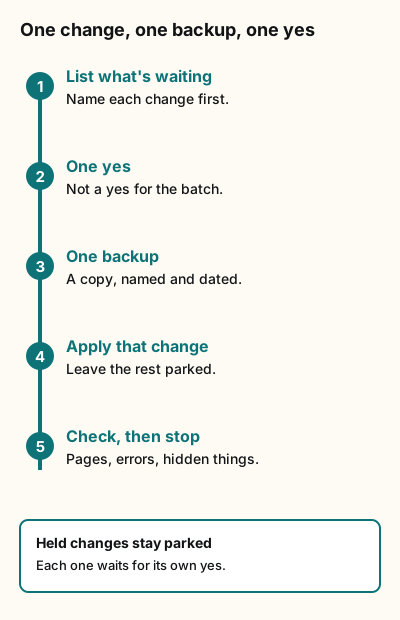
Figure explanation: Five numbered steps run down a line. One: list what's waiting and name each change first. Two: get one yes, not a yes for the batch. Three: make one backup, a copy named and dated. Four: apply that change and leave the rest parked. Five: check pages, errors and hidden things, then stop. A box at the bottom says held changes stay parked, and each one waits for its own yes.
- List what's waiting. Every change, including ones that aren't approved.
- Get a yes for this one change. Not for "the batch."
- Back it up. One copy, named with the date and the change.
- Apply only that change. Leave the rest parked.
- Check the live site, report, then stop. Do pages load? Any errors? Do things stay hidden that should stay hidden? The next change starts the loop over.
On Oct 11 that check was concrete. With the flags off, the new APIs should return 404, and they did. Decide what "passing" means before you apply, so you know it when you see it.
Leaving changes parked is fine
It can feel messy to have finished code sitting on main with its migration unapplied. At Botski that's normal. The Oct 14 and Oct 15 changes merged with their migrations parked, waiting their turn. The Oct 14 code was built to be safe without its migration: with its flags off it doesn't query the new columns, and with a flag on but the migration missing it "fails closed". That mattered, because an afternoon live check found the templates page flag appeared to be on after deploy while the migration was still unapplied.
Parked isn't broken. It's just not switched on yet. For more on that idea, see Ship it switched off.
Tradeoffs and caveats
- It's slower. One change at a time means more yeses and more checks. For a solo project with a single fresh migration, that's a few extra minutes.
- Order still matters. Some migrations depend on earlier ones. Applying one at a time doesn't let you skip ahead; it lets you stop between steps.
- Backups cost a little. Each database copy uses storage until you delete it. Delete them once the change has proven out.
- Code has to tolerate a parked migration. If the new code breaks without its migration, parking isn't safe. Build it to fail closed, as the Oct 14 change did.
- This is Botski's own build history, from internal logs, not an xAI feature or recommendation.
What this means for you: a copy-paste prompt
Give your bot this when you have changes waiting:
List every pending database change. For each one, tell me its name, what it touches, whether I've approved it, and anything that depends on it. Don't apply anything yet.
When I name ONE change: make a backup copy first and tell me its name. Then apply only that change. Then check the live site and tell me what you checked and whether it passed. Then stop and wait for me.
Never run a command that applies all pending changes.
The short version
- There's no "apply all" button, because "all" can include something you didn't approve.
- Make a list before you touch anything.
- One change gets one backup and one yes.
- Check the live site after each one, then stop.
- Parked changes can wait. Running the wrong one is the risk.
Sources
Checked October 24, 2026.
The October examples come from Botski's internal build log (not public) for Oct 11, Oct 14 and Oct 15, 2026, and from the Botski build queue (internal build log, not public).
Start from a template
People share Grok Bots you can add and then change to fit your job. Each template opens on x.ai. bot.ski never installs anything.
Comments
Comments are from bot.ski members. They aren't reviewed by xAI.