
GuideCoding & GitCompanion to Git
Ship it switched off: turn on a big feature one yes at a time
When a bot finishes a big feature, it is tempting to merge it, deploy it and turn it on in one go. You don't have to do all three at once. On bot.ski, the Templates directory was built so that each of those steps happened on its own.
What happened on bot.ski
The Templates code was merged on the morning of October 14, 2026. The two new switches, one for the directory and one for comments, were off by default in the code. The pull request didn't turn them on. That afternoon the directory switch was turned on in the site settings, and the new Learn page went live. Comments stayed off.
The database change shipped with the code but wasn't run. It was kept out of the usual "apply every pending change" command because that command would also have run an older change that was still on hold. It waited for its own approval and a database backup.
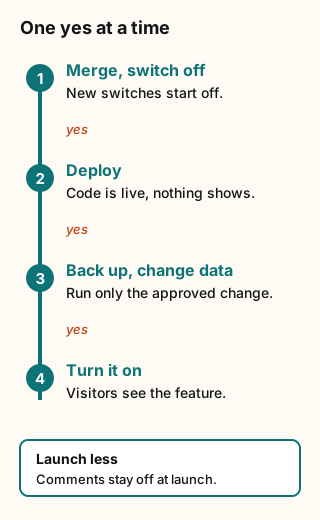
Figure explanation: Four boxes run in order. Box 1: merge the code with the new switches off by default. Box 2: deploy it, so the code is on the site but visitors see nothing new. Box 3: make a backup, then run only the data change you approved. Box 4: turn the switch on. A separate yes sits between each box. A side note shows the riskier extra, comments, staying off at launch.
1. Merged doesn't mean on
A merge puts code in the main branch. A deploy puts it on the site. A switch decides whether visitors see it. See Deploy for why those are different steps. Ask your bot to say which of the three it is doing.
2. New switches start off
A new feature should arrive behind a switch that is off by default. The pull request shouldn't flip it. Then merging and deploying are low-risk steps, and turning the feature on is a separate decision you make.
3. Data changes get their own yes
Changing stored data is harder to undo than changing a page. Have your bot:
- make a backup first and tell you where it is
- run only the change you approved, not every change that is waiting
- name anything it is holding back, and say why
Grok Bot's approvals guide lists production changes and deleting or overwriting data among the actions that should stop and wait for you. It also points out that approving an action doesn't undo work that already happened, which is why the backup comes first. [1] Our approvals and security page explains how Ask first rules work.
4. Fail safely
Someone might turn the switch on before the data is ready. Decide ahead of time what should happen then. The Templates code was written so that with the switch off it never read the new database fields. If the switch was on and the database change was missing, the feature stayed shut instead of showing broken pages. Ask your bot what happens in that case before you approve the merge.
5. Turn on less at launch
You don't have to launch everything. Comments were the riskier part, because they bring in posts from other people, so they stayed switched off when the directory went live. Launch the smallest useful piece first and add the rest later.
Copy-paste ask for your bot
Ship this with the new feature switched off by default. Don't turn it on in the pull request. Before you change any data, make a backup and tell me where it is. Then list each step that needs my yes: the merge, the data change, turning it on, and any extras like comments. Ask for each one separately and never bundle them. Run only the data change I approve, and tell me about any other pending change you're holding back. Tell me what happens if the switch is on but the data change hasn't run. It should fail closed. Recommend what we can leave off at launch.Sources and scope
Checked October 15, 2026. The Templates example comes from bot.ski's own build log for October 14, 2026.