

GuideProducts
Grok Bot phone calls: what we know so far
On November 4, 2026 (12:13 PM America/Chicago), the official @bot account posted that Grok Bot can now make phone calls, with a demo video. [1]
This Learn note is a short field guide from that post and public demos the same week. It is not a substitute for official docs. As of November 5 we have not found a dedicated outbound-call page under the Grok Bot docs overview, and the changelog still leads with the October 27 shopping release. [2][3]
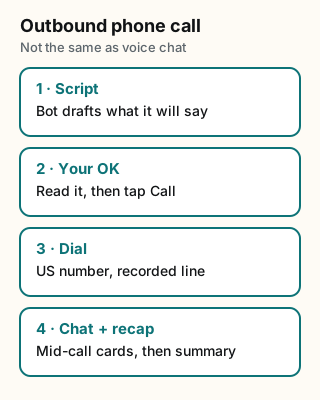
Figure explanation: Four steps run top to bottom. One: the Bot writes a script for what it plans to say. Two: you read it and tap Call (or deny). Three: the Bot dials a US number, identifies a virtual assistant on a recorded line, and talks. Four: mid-call question cards stay in chat, and a recap lands after hangup. Voice chat with a Bot is a different feature. The diagram is a simplified field guide, not a screenshot of the app.
Voice chat vs phone call
| Voice chat | Outbound phone call | |
|---|---|---|
| Who is on the line | You talk to your Bot | The Bot dials a person or business |
| Docs | Voice chat help is separate | Outbound-call docs page not found yet (Nov 5) |
| Source this week | Existing help and our voice-chat note | @bot announcement [1] |
Do not mix the two when you write instructions for a Bot. For talking to the Bot, see Grok Bot voice chat. For early real-call demos, see phone calls field report and the Nov 5 phone-calls blog note.
Pattern from public demos
Sourced claims only:
- Script first, dial after approval. Teslaconomics (Nov 3, 4:53 PM CT): the Bot wrote what it planned to say, showed it, and dialed only after a tap on Call. Opening line identified a virtual assistant on a recorded line. Recap landed in chat after hangup. Elon reposted that demo. [4][5]
- Mid-call answers stay in chat. Texas_Twins_Dad (Nov 3, 2:59 PM CT): on an insurance call, a question card appeared in chat; typed answer; Bot kept the call going. [6]
- Usage can be small for a short call. Same account measured an 85-second installer call at about 0.2% of weekly usage (5.8% → 6.0%). Elon reposted that check. Treat as one user's reading, not a published rate card. [7][8]
- Region limits appear in user reports. Posts this week say outbound calling is limited to US numbers. Confirm on your own account before you promise a call abroad. [9]
Practical checklist (until docs catch up)
- Update Grok Bot, then ask one Bot: Can you make an outbound phone call for me?
- Prefer a low-stakes US number first.
- Require a written script and your OK before dial.
- Stay in the chat for mid-call cards.
- Save the chat recap; do not trust memory alone for account numbers or confirmation codes.
- Watch weekly usage the same week you tighten routines.
Credits
- @bot (Official xAI): https://x.com/bot
- @Teslaconomics: https://x.com/Teslaconomics
- @Texas_Twins_Dad: https://x.com/Texas_Twins_Dad
- @elonmusk: https://x.com/elonmusk
- @techdevnotes: https://x.com/techdevnotes
- Official xAI changelog: https://x.ai/changelog/bot
Sources
Official xAI and public demos (checked Nov 5, 2026):
- Grok Bot changelog (shopping release still leads; phone calls not listed yet)
- Grok Bot docs overview
- @elonmusk repost of the Teslaconomics demo (Nov 4, 8:43 AM CT)
- @elonmusk repost of the usage check (Nov 4, 12:39 PM CT)
- @techdevnotes US numbers note (Nov 4, 5:52 PM CT)
Start from a template
People share Grok Bots you can add and then change to fit your job. Each template opens on x.ai. bot.ski never installs anything.
Comments
Comments are from bot.ski members. They aren't reviewed by xAI.