
Learn


GuideCoding & Git
Git explained: follow a website change from draft to live
Git keeps a history of recorded changes to a project. That history helps you compare versions, work on separate ideas, and understand what changed when something goes wrong. The project and its Git history form a repository, often shortened to repo. [1]
You do not have to memorize Git commands to make useful decisions about your bot's work. You do need to know which changes are still drafts, which have been shared, and which are running on your website.
Our fictional example is a neighborhood plant-swap page. Its heading says “Saturday plant swap.” You ask a bot to add the time. A second bot is improving the directions.
Follow one change
These actions have different jobs. Some apps combine several behind one button, so ask what a button actually does.
| Action | What it means | In our plant-swap example |
|---|---|---|
| Save | Write an edit into a file. | The heading now includes “10 a.m.” in the working file. |
| Stage | Choose the version of a change to include in the next commit. | Select the heading change, leaving an unfinished map edit out. |
| Commit | Record the selected state in local Git history. | Create a checkpoint called “Add plant-swap start time.” |
| Push | Send commits to a remote repository, such as one hosted on GitHub. | The team can access the committed heading change. |
| Merge | Incorporate one line of development into another. | Bring the reviewed heading change into the agreed destination branch. |
| Deploy | Put a version into a running environment. | Update a preview site or the public plant-swap site. |
Saving, staging, and committing are separate steps in Git's file workflow. A push shares committed work with a remote repository. [2][3] Deployment belongs to your hosting setup; it may run automatically after a push or merge, or require a separate action.
Notice the gap between committed and live. “I committed it” tells you about project history. It does not establish what visitors can see. For the website side, read how websites work.
Why branches help
A branch gives a line of development a name. It lets work move forward separately from another branch. Creating one does not mean making a completely separate copy of every file. [4]
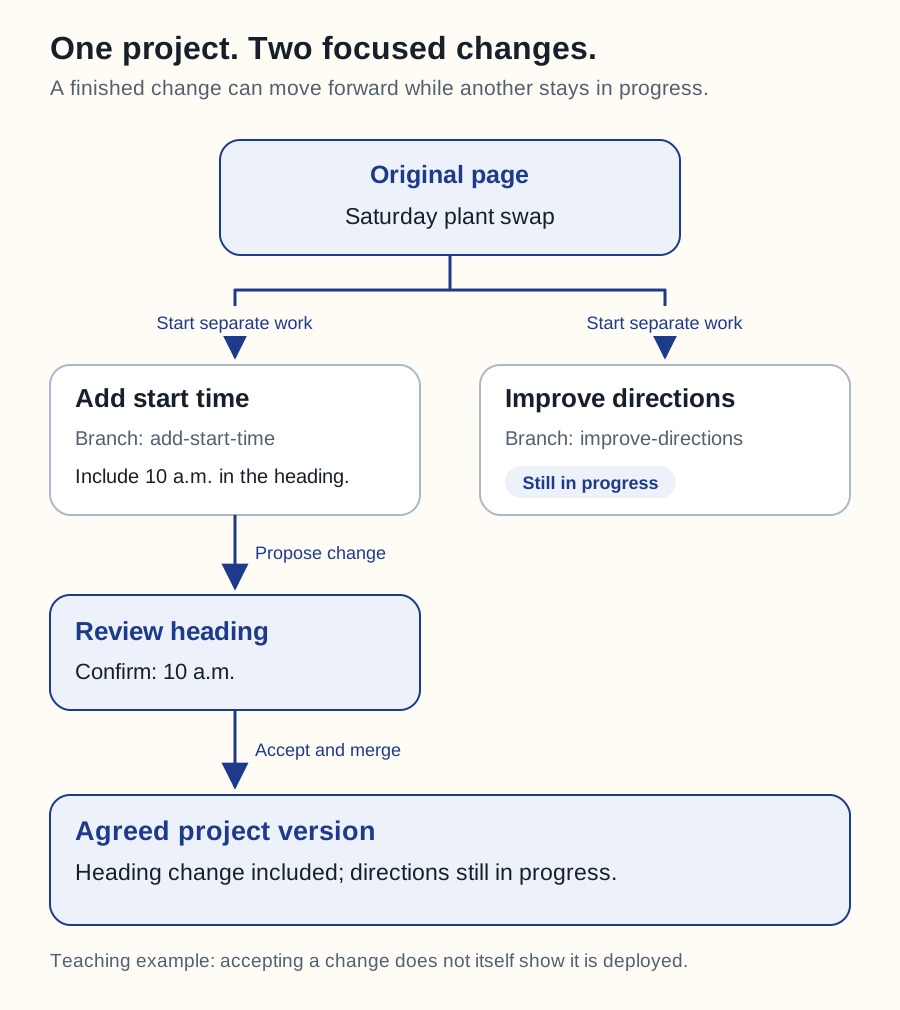
In our example, add-start-time is the heading branch. improve-directions is the directions branch. Both start from the same recorded version. One bot can finish its small job without including the other's unfinished work.
Swipe sideways to see the whole diagram, or open it full size.
Figure explanation: The original page says “Saturday plant swap.” One branch adds 10 a.m. to the heading. A second branch updates directions. The start-time branch is reviewed, then included in the agreed project version. The directions branch remains separate. The diagram also explains that accepting a change does not establish that it has been deployed. It shows a teaching workflow rather than every possible Git operation.
The team reviews each change before combining it. Branches reduce interference, but they cannot decide whether two edits make sense together. If both bots rewrite the same heading differently, someone must choose the intended result.
Give each bot a clear job: “Add the start time to the heading” is easier to review than “Improve everything.” Ask it to explain unexpected file changes before accepting them. Separate branches also require separate working areas or coordination when bots run at the same time; a branch name alone does not isolate simultaneous edits in one folder. Git worktrees are one way to provide separate working areas. [8]
Git, GitHub, and pull requests
Git is the version-control software. GitHub is a service that hosts Git repositories and adds collaboration features. [9]
A pull request, or PR, proposes bringing changes from one branch into another. On GitHub it provides a place for discussion, checks, and review. Its destination is called the base branch. That destination could be main, a release branch, or another branch the project uses. [5]
For the plant-swap change, a useful PR says what time was added, shows the updated page, and explains what was checked. Read how to review a pull request for a walkthrough you can use even if you do not write code.
What a version number can tell you
A commit has an identifier, often called a commit hash or SHA. This helps you name the exact recorded checkpoint being discussed. [1]
Two bots can report the same commit identifier while one has additional uncommitted edits. Ask for the commit identifier and the working-folder status. Git status distinguishes staged changes, unstaged changes, and untracked files. It normally leaves ignored files out. [6]
For a published change, also ask which version the hosting service deployed. A tidy repository does not prove the deployment succeeded, and Git does not back up everything an app owns, such as its live database.
How we got here
Git began in 2005 during Linux kernel development. Its creators needed a fast, distributed system that could support many parallel changes after the project's previous arrangement with BitKeeper ended. That history helps explain why independent work and combining changes are central to Git. [7]
A useful request for your bot
Make the agreed change in a separate branch. Preserve existing work. Show me the result, explain the changed files, and report the checks you ran. Include the commit identifier and any uncommitted changes. Prepare it for review and explain whether merging would automatically deploy it.If an edit collides with another change, continue with conflicts and undoing mistakes.
Sources
All sources checked September 25, 2026. The plant-swap project and suggested review practices are original teaching examples.