
Learn


GuideAI & agents
AI agents: how a bot turns a goal into actions
An AI agent is software that uses an AI model to choose and carry out steps toward a goal. It can use available tools, inspect what happened, and decide what to do next. Agentic AI is a broader label for systems with this kind of goal-directed behavior. People use the labels differently, so ask what a particular product can actually do. [1]
The useful question is: Which parts of this job can the bot handle, and which decisions remain mine?
Follow one small job
Imagine you run a neighborhood plant swap. Its website has yesterday’s event details. You ask a bot:
Update the draft event page using the new event note. Check the date, location, and mobile layout. Show me a preview. Leave publication to me.This example assumes the bot has tools to read the note, edit a draft copy, and open a preview. Those tools are part of the example, not a promise about every bot product.
The bot reads the event note and finds a new date but no start time. It should keep the existing time only if a reliable source confirms it still applies. Otherwise, it should flag the missing detail. A polished page with an invented time would fail the job.
Once the information is complete, the bot edits the draft. It opens a phone-sized preview and discovers that the address runs off the screen. It adjusts the layout, checks again, and gives you the preview with a brief account of what changed.
Notice that the next step depends on the result of the previous step. This feedback is what makes an agent useful for jobs that do not follow a perfectly predictable path. [1]
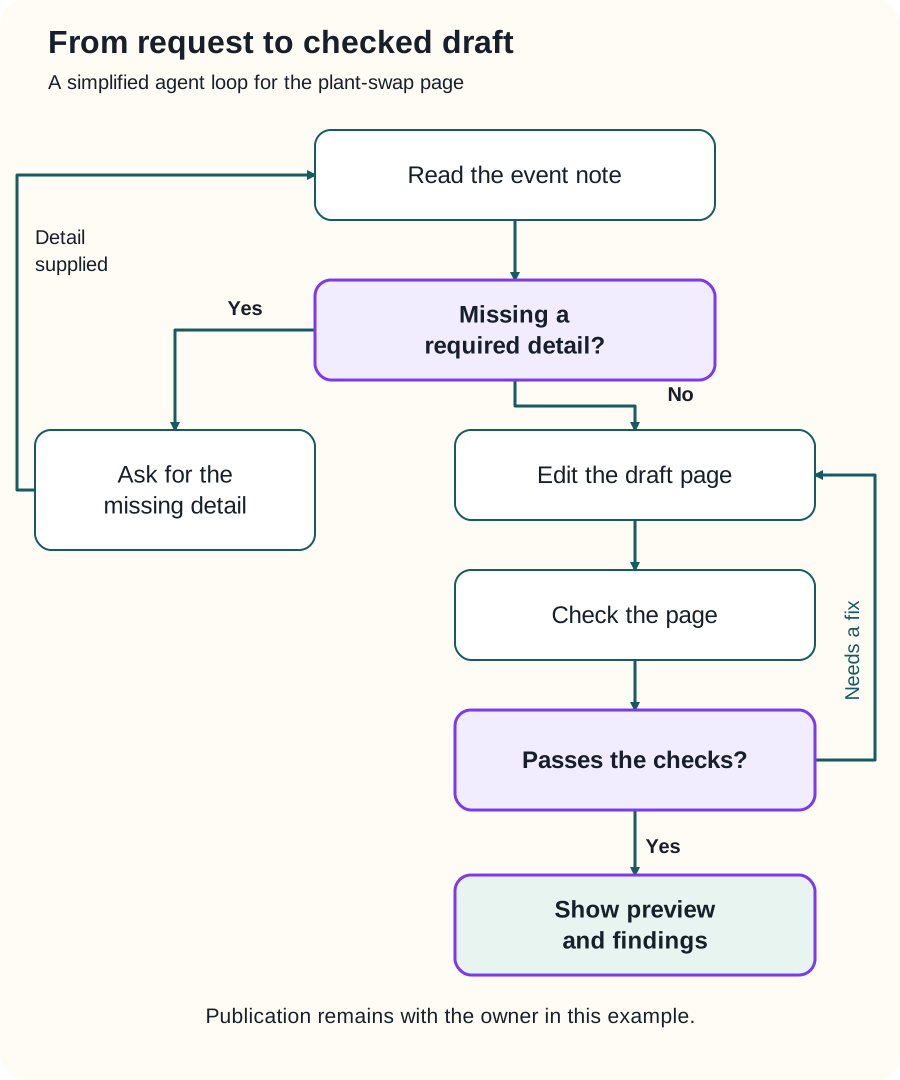
Swipe sideways to see the whole diagram, or open it full size.
Figure explanation: The bot reads the event note and checks for missing required information. If a detail is missing, it asks for that detail and reads the note again when the answer is supplied. When the information is sufficient, it edits the draft page and checks the page. A failed check returns it to editing. A successful check leads to showing the preview and findings. The diagram is a simplified example, not a record of an actual Grok Bot run.
What the parts do
| Part | Its job in the plant-swap example |
|---|---|
| Goal | Produce an accurate draft event page that works on a phone. |
| Model | Interpret the request and choose a next step. |
| Context | Supply the event note, current page, instructions, and recent results. |
| Tools | Read files, edit the draft, and inspect its preview. |
| Permissions | Restrict which files and actions are available. |
| Checks | Compare the page with the note and inspect its layout. |
| Stop condition | Finish with a checked preview, or report the missing information. |
The model and the whole agent are different things. The model helps choose actions. The surrounding application provides tools, manages access, and carries out supported requests. Clear tool descriptions and useful results help the model choose appropriately. [2]
Agent, chatbot, or automation?
A chatbot is a conversational interface. It may give answers, or it may also contain agent features. A chat window alone does not tell you how much action is possible.
A fixed automation follows a defined sequence. For example: every Friday, copy new signups into a weekly list. An agent can choose intermediate steps based on what it finds. Many useful systems combine the two: a schedule starts a job, then an agent investigates unusual cases. [1]
You do not need the most independent system for every task. If the job is simply copying approved information between two known places, a small, predictable process may be easier to maintain.
Give it a finish line
“Improve my website” leaves too many decisions open. Try naming what successful work looks like:
Change only the event page. Use the approved note as the source. Keep the current site colors. Confirm that the date and address match the note. Show the phone and desktop previews. Tell me about anything you could not check.This gives you something concrete to review. The bot’s confidence is less useful than a preview, a checked comparison, or a reproducible result.
For this example, publication needs a separate action because the owner explicitly kept that decision. A different owner could authorize publication within clear limits. The permission should come from the owner and the product’s access controls, not from the agent deciding it deserves more access.
Three common misunderstandings
“It worked once, so it can run forever.” Botski recommends two successful manual runs or drills before unattended work. Include a missing field or unavailable source; that drill succeeds when the bot reports the gap appropriately.
“More bots means better work.” Give an additional bot a specific purpose, such as independently checking dates. Otherwise, you may add coordination without improving the result.
“A tool call proves success.” A tool can return an error, incomplete information, or a result that misses your goal. Review the outcome as well as the attempted action. [2]
Try a small first task
Choose one reversible job. Name the source, permitted changes, expected result, and stopping point. Then review what actually happened.
Continue with context and memory, writing better instructions, or approvals and security. For product-specific details, use What is Grok Bot?; this guide explains general concepts rather than a verified list of Grok Bot features.
Sources
- Anthropic, Building effective agents, published December 19, 2024; checked September 25, 2026. Supports the agent/workflow distinction and feedback loop. The plant-swap scenario and suggested task instructions are original Botski teaching examples.
- Anthropic, Writing effective tools for AI agents, published September 11, 2025; checked September 25, 2026. Supports the role of tool descriptions, returned results, and evaluation.