
GuideCoding & GitCompanion to Git
Undo first, then redo: when a change goes live before you say stop
Sometimes a change reaches your live site just before you say stop. The tempting fix is a quick patch on top. A calmer order works better: undo the change cleanly, write down what was wrong, then redo it properly.
What happened on bot.ski
On the evening of October 14, 2026, a homepage layout change was merged at 10:18 PM Central. It moved the Templates band above the hero banner, so the big opening image no longer came first. The site owner didn't want that. The hero belonged at the very top, with the rest of the page clearly sectioned below it. By the time the stop came, the change was already merged.
At 10:33 PM a pure revert was merged. It changed nothing else. Afterward the code matched the commit from before the layout change exactly, so the homepage was back to a known-good state.
At 11:43 PM the layout work was merged again as a new change, after review. This time it followed a written rule: the hero is the first block, the Templates band sits directly under it, and nothing goes above the hero whether the Templates switch is on or off.
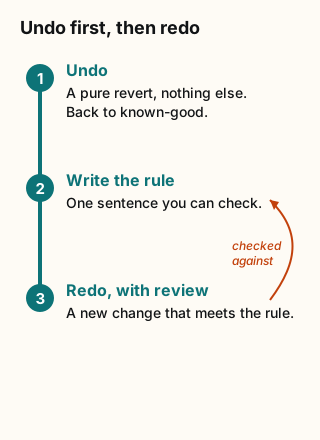
Figure explanation: Three boxes run in order. Box 1: undo, with a pure revert that brings the site back to exactly how it was before the change. Box 2: write the rule, turning the objection into one sentence the next attempt must meet. Box 3: redo the change through normal review. An arrow from box 3 points back to box 2, because the redo is checked against the written rule.
1. Undo before you fix
A patch on top of a wrong change mixes two jobs: getting back to safety and getting it right. A revert does only the first. Git's revert applies the inverse of a recorded change as a new commit and keeps the history. [2] Ask your bot for a revert that touches nothing else, and to confirm the result matches the version from before.
2. Turn the objection into a rule
"I don't like it" is hard to check. "Nothing sits above the hero" is easy to check. Before any redo, ask your bot to write your objection as one testable sentence and repeat it back to you.
3. Redo through normal review
The redo is a new change, so it gets the same review as any other. Ask your bot to show you how the redo meets the rule, including the case where a feature switch is off. Then deploy it as its own step.
4. Approval doesn't rewind time
Grok Bot's approvals guide says that approving an action controls what happens next. It doesn't reverse work that has already been completed. It also suggests keeping production changes behind approval. [1] So if something shipped too early, a later yes or no won't undo it. Undoing it is a separate job. To catch the next one earlier, see Ship it switched off.
Copy-paste ask for your bot
That change went live and it's wrong. Revert it exactly, touch nothing else, and confirm the result matches the version from before the change. Then write my objection as one rule the redo must meet and show it to me. Propose the redo as a new change for review, explain how it meets the rule, and wait for my yes before you deploy.Sources
Checked October 15, 2026. The homepage example comes from bot.ski's own build log for October 14, 2026.