
Learn


GuideCoding & GitCompanion to Git
Git conflicts and undoing mistakes: a beginner's decision guide
A merge conflict means Git cannot combine competing changes automatically. It needs someone to decide what the finished result should be. A conflict can arise when two changes edit the same lines, or when one deletes a file that the other edits. [1]
Git has identified a disagreement. The next job is understanding it.
Two sensible edits can collide
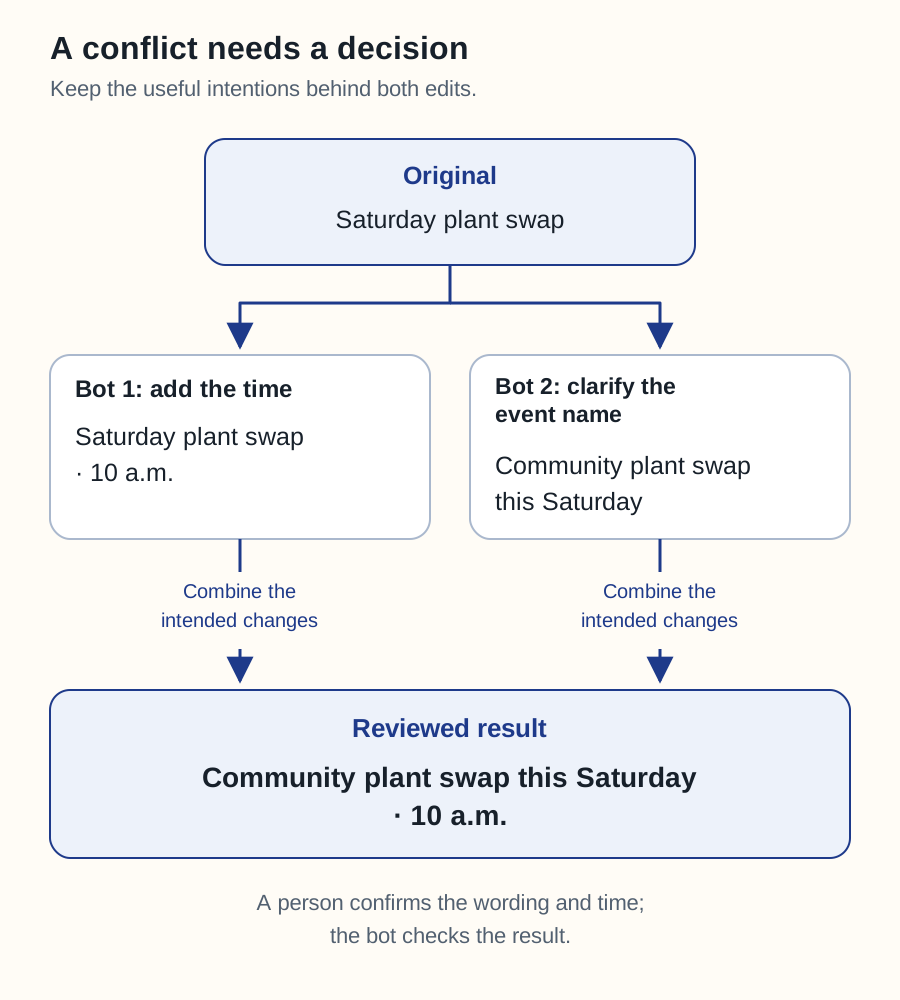
Our fictional plant-swap page begins with the heading “Saturday plant swap.” One bot adds the time: “Saturday plant swap · 10 a.m.” Another changes the heading to “Community plant swap this Saturday.”
The intended result might combine both ideas: “Community plant swap this Saturday · 10 a.m.” Choosing one bot's entire version would lose the other's contribution.
Swipe sideways to see the whole diagram, or open it full size.
Figure explanation: The original heading says “Saturday plant swap.” Bot 1 adds “10 a.m.” Bot 2 changes the heading to “Community plant swap this Saturday.” The reviewed result combines both useful intentions: “Community plant swap this Saturday · 10 a.m.” A person confirms the wording and time; the bot checks the result.
Ask the bot to show the original, both proposed versions, and its suggested result. It should explain what each version was trying to accomplish. If the intentions disagree, make that product decision before asking it to finish the merge.
Some editors offer choices such as keeping the current change, incoming change, or both. These are editing shortcuts. “Keep both” may duplicate content or produce invalid code. The finished result still needs review and relevant checks. [4]
First identify where the mistake lives
“Undo it” is incomplete without knowing what has happened since the change was made.
| Where the change is | What to ask the bot |
|---|---|
| Edited but not committed | Show the changed files. Preserve unrelated work. Identify the exact edit to reverse. |
| Committed locally | Show the commit and anything added afterward. Propose a correction that preserves later work. |
| Shared or merged | Prepare a reviewed correction, often a revert or a new fixing commit. Explain its effect on collaborators. |
| Deployed | Identify the running version. Propose a fix or rollback and check whether data or settings also changed. |
The table is a decision aid, not a command recipe. Recovery depends on the current state of the project.
A revert records a correction
Git's revert operation applies the inverse of a recorded change and normally creates a new commit. The earlier commit remains in history. A revert can itself encounter conflicts, and reverting a merge needs additional care. [2]
For our example, a correction might simply restore the correct start time. If the bot also fixed a broken directions link in a later commit, you probably want to keep that fix.
Ask what the proposed recovery would remove or alter. Avoid accepting instructions that erase local changes or rewrite shared history without a clear explanation of the consequences and agreement from the affected owners.
Check the recovered result
Have the bot inspect the working folder before and after recovery. Git status reports differences involving the staged state, working files, and untracked files; ignored files need separate attention when relevant. [3]
Then verify the behavior you care about. Does the heading show the correct time? Does the directions link still work? If a public deployment was involved, check the public page too. Replacing application code does not automatically restore a database or undo messages already sent.
A recovery prompt to reuse
Diagnose this conflict or mistake first. Show what changed, what later work depends on it, and what remains uncommitted. Preserve unrelated work. Propose the smallest correction, explain any lost work or external effects, and show how you will verify the result before carrying out a destructive step.Return to Git explained or reviewing a pull request.
Sources
All sources checked September 25, 2026. The fictional example, decision table, and recovery questions are original editorial guidance.