



Some Grok Bot users are seeing Introducing Primary Bot, a dialog offering one Bot as a proactive go-to for everyday tasks. Botski captured it on September 30. Here is a clearer look at the Primary Bot role, with the observed details separated from the open questions.
Now rolling out (Oct 1)
On October 1, the official Grok Bot account said your Primary Bot "will spot work it can take off your plate and offer to handle it." The post says it was rolling out over the next few hours, and that suggestions don't count against your usage.
That post replies to one that opens the thread: "Grok Bot can now suggest ways to help without you needing to ask." It doesn't say which accounts get it first, and as of our October 2 check there is still no Primary Bot page in the official docs.
The short version
- What is visible: the dialog offers Use an existing Bot or Create Primary Bot.
- What is already documented: Grok Bots can coordinate work, share context, and delegate to specialists.
- What is still unclear: whether the Primary Bot designation changes memory, permissions, or which Bots are eligible.
A useful way to think about it: one go-to Bot, with specialists when needed. That is a documented workflow, not yet a complete specification for Primary Bot.
What the dialog says
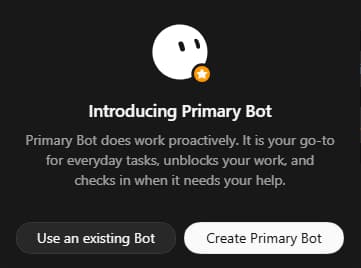
The dialog describes a Bot that proactively helps with everyday tasks, unblocks work, and checks in when it needs your help.
The two buttons suggest you can choose a Bot you already have or create one for the role. They do not explain what happens to existing memory, whether you can switch later, or whether other Bots change.
Primary Bot, regular Bot, or Team Bot?
These labels describe different things. A regular Bot is the basic teammate; a Team Bot serves multiple people; Primary Bot appears to name a go-to role. That last interpretation comes from the dialog, not a dedicated official guide.
| Bot or role | What it is for | What backs this up |
|---|---|---|
| Regular Bot | A continuing teammate with its own role, conversation, and remembered context | Official Bots documentation |
| Primary Bot | Your proactive go-to for everyday tasks | Observed dialog; extra capabilities are not documented |
| Team Bot | One Bot serving teammates in separate private chats, with shared team memory and private notes for each person | Official Team Bots documentation |
On a phone, swipe the table sideways to see all three columns.
The Team Bots guide recommends a personal Bot for an everyday assistant using your own accounts and memories. It does not establish whether a Team Bot can take the Primary Bot role.
One go-to Bot, specialists when needed
The coordinating-Bot idea predates this dialog. SpaceXAI’s August 11 Grok Bot launch post described people using a lead Bot to coordinate specialists. The Create and manage Bots guide also recommends giving one Bot an end-to-end outcome, then adding specialists only when the work has a stable specialist role.
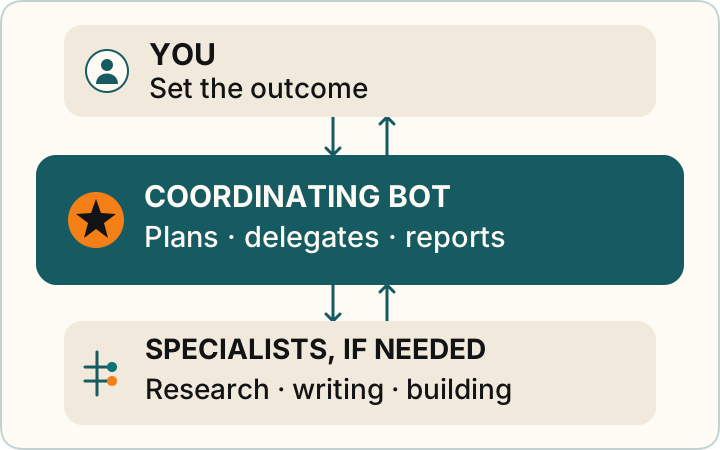
For example, you could ask one Bot to coordinate a launch checklist, bring in a research Bot for open questions, and return with a summary. This is a teaching example.
The general docs say Bots can message each other and share context in group chats. Your Bots also share one cloud computer. None of that, by itself, proves the new designation gives a Bot extra access.
What early users are reporting
On September 30, @melvindvivas posted that Primary Bot had appeared. In a later post, he described using a Chief of Staff Bot to summarize activity across his Bots and delegate work. That is one person’s reported setup, not a guaranteed feature list.
@senb0n22a replied that people were already using a coordinating Bot and saw the new entry point as a useful shortcut. The original posts are collected below.
What we still do not know
As of our October 2, 2026 source check, the October 1 rollout post above is the only official word we found. There is still no dedicated Primary Bot documentation in the official overview, Bots, Team Bots, approvals guide, or news listing reviewed. We will update this note as official details become available. We wrote up how we handle a feature that arrives before its docs in When a Grok Bot feature shows up before its docs.
- Availability: which accounts receive the dialog, and when everyone might get it
- Changing roles: whether you can switch your Primary Bot later, and which Bots qualify
- Memory and access: how choosing an existing Bot affects its context, and whether the role adds any capabilities or permissions
The September 30 screenshot and user reports were early sightings. The October 1 post confirms the rollout, but not which accounts get it first.
If the dialog appears for you
- Already have a go-to Bot? “Use an existing Bot” appears to let you choose it. Afterward, check the Bot’s settings to confirm what, if anything, changed.
- Starting fresh? “Create Primary Bot” is the other offered path. Begin with one concrete task and a clear definition of done.
- Set a stop line. The dialog says nothing about changing approvals. Follow the general approvals guidance: give only the access needed, set explicit boundaries, and review consequential actions.
A simple first task could be: “Help me keep track of this week’s priorities. Summarize what needs my attention, and ask before sending messages or changing anything.” Use it as a starting point and adjust it to your needs.
For the basics, continue with What is Grok Bot? or the Primary Bot glossary entry. The original posts and official sources follow below.