

GuideGrok Bot
The Grok Bot bill: why routines, not bots, eat your usage

TL;DR
- Routines cost per wake, not per event. A 5-minute watcher wakes 8,640 times a month; an hourly one wakes about 720 times.
- xAI publishes no per-wake price. The Oct 23 changelog raised the ceiling to 300 routine runs an hour in total. That's a ceiling, not a budget.
- Swap clocks for triggers where you can (webhooks, email tags). Where you can't, gate each run with a cheap yes/no check.
- Audit every routine on one Page, then keep, slow down or remove each one.
- The Grok Bot Terms put spending limits and monitoring of unattended activity on you.
1. Running out five days early
Rich Silver, who runs bot.ski, said it plainly this week: he enjoys using Grok and its tools and wants to keep using them, but hitting his usage limit five days early every week makes that hard. In his words:
I’m on the highest tier and still run out with five days left.
That's a common complaint right now, and the usual first guess is that you have too many bots. This guide argues for a different suspect. A bot that sits idle costs you little. A bot that wakes up on a schedule, looks around, finds nothing, and goes back to sleep can cost you a lot, because it does that over and over whether or not anything happened.
So the question to ask isn't how many bots you have. It's how many times a day your bots wake up, and how many of those wakes do real work.
2. A routine costs per wake, not per event
The arithmetic is simple and easy to forget. A routine that runs every five minutes runs 12 times an hour, 288 times a day, and about 8,640 times in a 30-day month. An hourly routine runs about 720 times in the same month. Same bot, same job, twelve times the wakes.
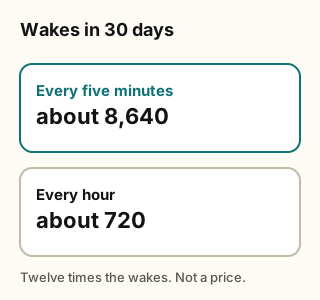
Figure explanation: Two counts for a 30-day month. A routine every five minutes wakes 12 times an hour, 288 times a day, and about 8,640 times in the month. An hourly routine wakes about 720 times. The diagram shows those wake counts. It is not a price, and the changelog and Grok Bot docs checked on October 24, 2026 do not list a per-wake price.
@gippp69 made this point in a widely shared post and a longer article. The post's framing: "same bot. same job. 12x the cost", with a five-minute watcher waking 8,640 times a month.
same bot. same job. 12x the cost
The article also puts dollar figures on it, roughly $400 a month against about $33, and says the costs are "my math at API rates, used as a yardstick". Treat those as the author's estimate. They're a useful sense of scale, not a price list. @fleyta88 put the same idea more bluntly, saying routines are "quietly billing you for every wake, even the ones that find nothing".
quietly billing you for every wake, even the ones that find nothing
What xAI actually publishes. Neither the changelog nor the Grok Bot docs we checked on Oct 24 lists a per-wake price. [1][2] What the Official changelog does say, in v0.75.5 (Oct 23), is: "Your routines can run up to 300 times an hour in total instead of 100, and each routine up to 200 times." That's a ceiling on how often routines may run. It isn't a statement about what each run costs. The wake count is the part you control, and the 12x ratio holds whatever a single wake turns out to cost you.
3. Don't poll what can ping you
Polling means waking up to ask "anything new?" A trigger means something tells your bot when there's news. If a source can notify you, polling it is paying to ask a question someone would have answered for free.
Grok Bot has two Official trigger types worth knowing.
- Webhook routines. The Aug 19 changelog entry says: "Routines can start from a webhook, with their own Webhook URL and Webhook key". A later entry adds: "Routines started by a webhook receive the request body, so your Bot can act on what was sent." [1] If a service can send a webhook, the routine runs when it does, and not otherwise. Keep the webhook key private. Per v0.75.2, "the key stays hidden until you reveal it".
- Tag routines on bot email. The v0.71.2 entry (Oct 14) says: "Bots can send from a tagged form of their email address, like name+shop@, and a routine on that tag runs only for its mail." [1] A routine bound to a tag stays quiet until mail arrives at that tag. Our companion guide, One Inbox, Many Doors, covers this setup.
@irongiantXBT described a setup built on the same idea: one router and four specialist bots, "no polling, no wasted runs, nothing fires until something actually needs it".
no polling, no wasted runs, nothing fires until something actually needs it
You don't need five bots to use the lesson. Every routine you have should pass one test: could this be triggered instead of scheduled? If yes, switch it.
4. Check cheap, act rarely
Some things really can't ping you. A price on a store page, a public list, a page that changes without notice. For those you do need to poll. The trick is to make the poll cheap.
@0xTimQ's trading-desk article makes an observation that applies far outside trading: "on a good desk, almost every task ends in a skip."
on a good desk, almost every task ends in a skip.
Most checks find nothing worth acting on. @fleyta88 then applied the "separate checking from doing" rule to watchers.
In practice that means splitting a routine into two steps:
- The gate. A small, fast check with a yes/no answer. Did the price move past my number? Is there a new row since the last run? Did the file change? Write down what "changed" means so the bot doesn't have to reason about it each time. Keeping the last-seen value in a small file on the bot's computer makes this simple.
- The work. Research, writing, drafting a message, building a Page. This only runs when the gate says yes.
If a routine's instructions read like check X, then summarize everything, then write me a report, it's doing the expensive part every time. Rewrite it as: check X against last time; if nothing changed, stop and say nothing.
5. Audit what you already run
Most people who run out of usage didn't plan an expensive setup. They added routines one at a time, each sensible on its own, and never looked at the total. @BrianRoemmele wrote frankly about this, under the title "I Had The Grok Bot Bloat. So I Fixed It." With so many bots, some personal ones got careless and sloppy, so they were cleaned up.
@melvindvivas offered a simple fix: ask Grok Bot to put all the routines run by all your bots in one dashboard, so you can see which ones you still need.
Pages make this practical. The v0.75.2 changelog (Oct 22) says bots "can build Pages, such as reports, memos, and dashboards, that you edit together or have the Bot keep up to date." [1] Here's a prompt you can paste. It's Botski's own wording, not xAI's.
Botski audit prompt (copy and edit):
Build me a Page called "Routine audit." List every routine across all my bots. For each one, show: the bot, the routine name, what triggers it (schedule, webhook, email tag, or other), how often it runs, roughly how many times it ran in the last 7 days, and how many of those runs led to a message, a file, or an action. Sort by run count, highest first. Flag any routine that runs more than once an hour, and any routine where most runs did nothing. Don't pause, change, or delete anything. Just show me the list.
When the Page comes back, go down the list with three choices for each routine: keep, slow down, or remove. Then do it yourself, or tell the bot exactly which ones to change. If you can't remember why a routine exists, that's usually your answer.
6. Know the new ceilings, and whose job they are
The v0.75.5 change raised the total routine ceiling from 100 to 300 runs an hour, with up to 200 for any single routine. @ericzakariasson, who posts the release notes on X, summarized the full 0.75.5 changelog here:
Higher ceilings are good for people with real high-volume jobs. They also mean a routine with a mistake in it, say one meant to run hourly that's set to every minute, can now run longer and more often before it hits a wall. Don't treat the ceiling as your budget.
The terms are clear about whose job this is. The Grok Bot Terms say the customer is responsible for "configuring appropriate permissions, approval requirements, and spending limits, and monitoring recurring or unattended activities." [3] In plain terms: xAI provides the controls, and setting them and watching scheduled work is on you. The third-party bot terms add that a bot you add from someone else may act on your behalf, and that xAI doesn't verify or guarantee third-party bots. [4] So when you install a template, read its routines before you turn them on. They run on your usage, not the creator's.
7. Calibrate
You can't manage what you never measure. @RangerSyl suggested a simple way to do it: ask a trivial question, like "what is the sum of 2+2?", several times in a row and see how much each one moves your usage. That gives you a baseline overhead per turn, which you can compare against a routine's run count.
That won't give you an exact price, and your results will vary by plan and by task. It does tell you whether your problem is a few heavy jobs or many small wakes, and that's the decision that matters.
The community is still collecting numbers. @MarsHomestead hosted an X Hot Topics Space on Grok Bot usage ("Rich is hitting his limit. I'm not."), which is a good place to compare notes.
Rich is hitting his limit. I'm not.
8. Tradeoffs and caveats
- The dollar figures are estimates. @gippp69's $400 and $33 are API-rate math, used as a yardstick. Your plan bills against its own limits, and xAI doesn't publish a per-wake price.
- Triggers need a source that can send them. Many sites can't send a webhook or an email, so some polling stays.
- Slower cadence means later alerts. An hourly price watcher can miss a 20-minute dip. Pick the slowest cadence you can live with, not the slowest possible.
- Gates can be wrong. A check that's too strict stays quiet when something did change. Test the gate on a known change before you trust it.
- Third-party templates run on your usage. Read their routines before you turn them on.
9. What this means for you: the one-screen checklist
For every routine you run:
- Cadence. Does it need to run this often? Would hourly, daily, or weekly do?
- Trigger. Could a webhook or an email tag start it instead of a clock?
- Gate. Does it stop early, and silently, when nothing changed?
- Audit. Is it on your routine Page, and did you review that Page this month?
- Caps. Have you set the limits and approvals your plan offers, rather than leaning on the 300-per-hour ceiling?
Five yeses and the routine has earned its wakes. Any no is a quick fix.
Next step: Browse cost-saving templates in the Botski directory. Before you turn on a template from the directory or the x.ai Marketplace, read its routines against this checklist.
Credits
Checked Oct 24, 2026. Community posts are estimates and opinions, in the writers' own words where quoted.
- Grok Bot changelog (Aug 19 entry; v0.71.2, Oct 14; v0.75.2, Oct 22; v0.75.5, Oct 23)
- Grok Bot docs
- Grok Bot Terms
- Third-party bot terms
- @RichSilver
- @gippp69 (cadence math; dollar figures are the author's estimate)
- @fleyta88
- @irongiantXBT
- @0xTimQ
- @melvindvivas
- @BrianRoemmele
- @ericzakariasson
- @RangerSyl
- @MarsHomestead
Start from a template
People share Grok Bots you can add and then change to fit your job. Each template opens on x.ai. bot.ski never installs anything.