
Learn


GuideAutomation & integrationsCompanion to APIs and connections
MCP explained: how AI applications discover tools and data
MCP, short for Model Context Protocol, is a shared set of rules for connecting AI applications with external tools and information. It helps compatible software describe what is available and exchange requests and results. [1]
Knowing the term does not mean you need to install anything. First understand the task you want a connection to perform.
Follow one order lookup
Imagine a fictional shop called Demo Desk. You ask an AI application: “Is order D-104 ready?” A developer has provided a sample lookup tool through an MCP server. This example uses made-up data and does not connect to a real shop.
Three names describe the connection:
| Part | What it does | In our example |
|---|---|---|
| Host | The AI application coordinating the work | The application where you ask the question |
| Client | The component communicating with an MCP server | The host’s connection to the sample shop server |
| Server | A program exposing tools or information through MCP | The program offering the sample order lookup |
An MCP server can run locally or remotely. “Server” describes its role; it does not necessarily mean a separate physical computer. [1]
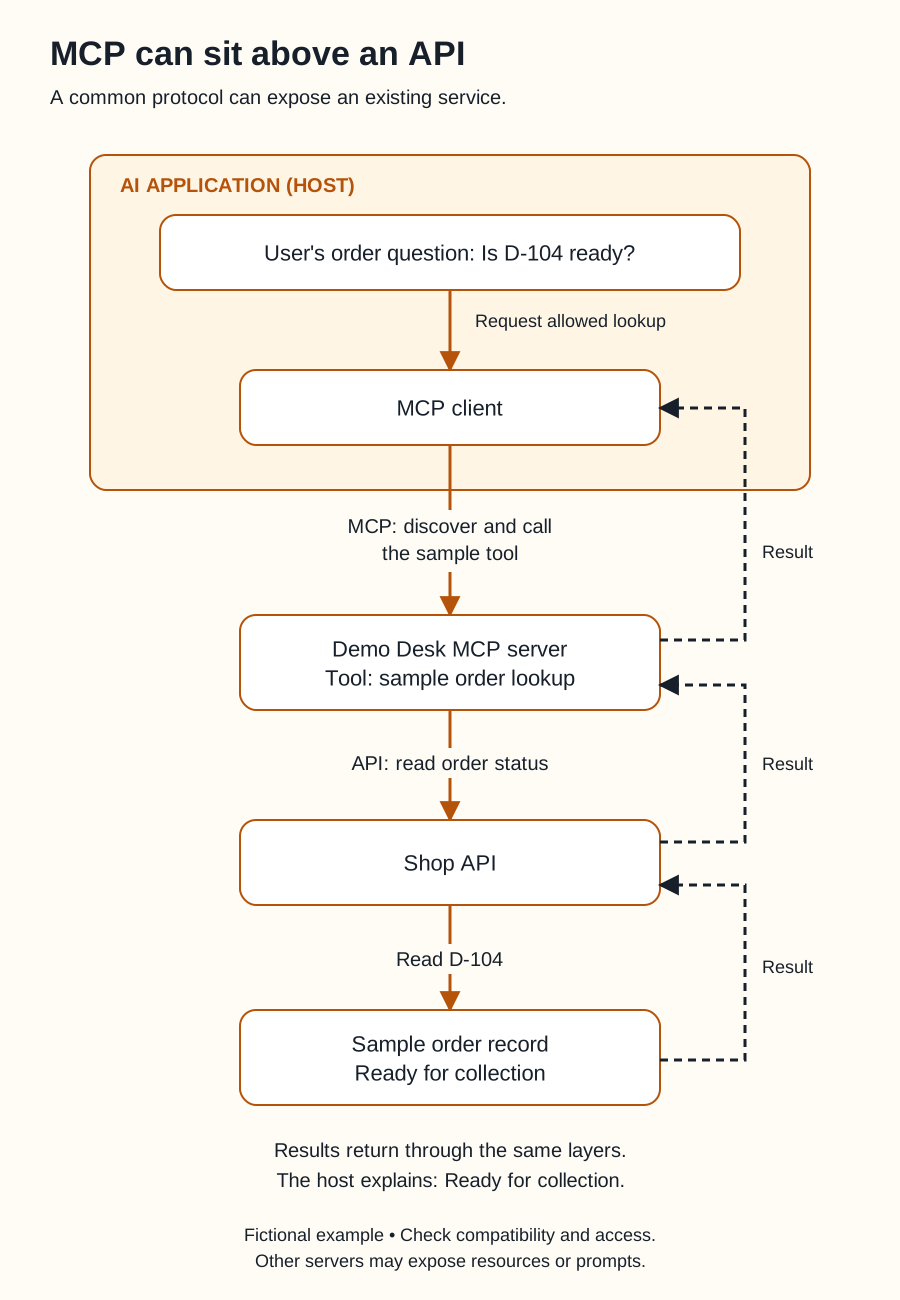
Swipe sideways to see the whole diagram, or open it full size.
Figure explanation: The AI application is the host and contains the user's question and an MCP client. The client discovers and calls an allowed sample order-lookup tool on the Demo Desk MCP server. That server uses the shop API to read D-104 from a sample record. Solid amber arrows show requests. Separate dashed ink arrows show each result returning to the layer immediately above it, until the host can answer that the order is ready for collection. No direct database-to-host path is shown. The example requires compatibility and access checks. Other MCP servers may provide resources or prompts; those are not asserted as features of this fictional lookup server.
The application discovers the sample tool and its expected input: an order ID. If the tool is available and allowed, the application can request a lookup for D-104. The result returns Ready for collection, and the bot explains that result to you.
What can a server offer?
MCP defines three useful building blocks: [2]
- Tools: Operations an application can request, such as looking up an order.
- Resources: Information an application can retrieve for context, such as a shop’s collection policy.
- Prompts: Reusable instruction templates, such as a template for summarizing an order and its collection instructions.
A server does not have to provide all three. An application may support only some capabilities. A promising entry in a server directory is not proof that your application can use it.
Where does the API fit?
Behind our fictional MCP server, the developer could use the shop’s existing API to fetch order data. Another server might read an approved local file or query a database.
The API handles the shop operation. MCP gives the AI application a common way to discover and request the exposed tool. MCP can work with APIs; it is not a replacement for all APIs. [2]
Return to APIs and connections for the wider comparison.
How we got here
Anthropic introduced MCP on November 25, 2024. The announcement addressed a recurring problem: connecting an AI application to each new information source could require another custom integration. A common protocol aimed to make those connections easier to reuse. [3]
That history explains its purpose. It does not promise that every server works with every application or exposes every feature of the underlying service.
A connection still needs boundaries
For Demo Desk, the allowed task is reading a sample order and producing a summary. The example does not require changing orders, contacting customers, or accessing other shops.
Being connected does not establish permission for every available action. The service’s access controls, the application’s settings, and your instructions all matter. A tool’s friendly name is not a substitute for understanding what it does.
Ask your builder which server would run, who maintains it, what information it receives, and what operations it exposes. Start with a harmless sample and inspect the result before expanding access. The MCP security guidance discusses risks in both remote connections and local server installation. [4]
For Grok Bot, verify current support in official documentation and your installed application. This lesson does not establish that an arbitrary MCP server can be added to Grok Bot. Botski’s connectors index is a separate starting point for documented product connections.
Sources
- MCP: Architecture overview. Host, client, server, and local or remote operation. Accessed September 25, 2026.
- MCP: Understanding MCP servers. Tools, resources, prompts, and tools calling APIs. Accessed September 25, 2026.
- Anthropic: Introducing the Model Context Protocol. Published November 25, 2024; accessed September 25, 2026.
- MCP: Security best practices. Connection and local installation risks. Accessed September 25, 2026.
The Demo Desk integration is an original teaching example. Compatibility and access must be checked for an actual product.