

GuideGrok Bot
Write the Contract, Then Teach It: Standing Rules, Correction Log, Second Brain

TL;DR
- If you keep typing the same rules, they're in the wrong place. Lasting rules belong in the bot's standing instructions. Today's job belongs in the message.
- Write a contract, not a job title: Ownership, Sources, Output, Boundary. Test each line by asking "Will this still be true next month?"
- Log corrections: every “that’s not what I meant” becomes a proposed rule, and you approve it before it sticks.
- Keep facts in files. Memory keeps summaries. Files stay exactly as written, and every bot can read them.
- Prune monthly: duplicate bots, idle routines and giant chats.
- Know the limits: current docs say to tell a personal Bot lasting rules and ask it to remember them. A separate description field is documented for Team Bots. Back safety rules with approvals, not memory alone.
If you keep typing the same three rules to your bot, the bot isn't forgetting. You never put them where it keeps them.
Three community methods come at this from different angles. Together they make one setup routine: write the contract, log the corrections, keep the knowledge in files. Then prune.
First, where rules actually live (Official xAI docs)
The docs, as of Oct 24, separate lasting rules from tasks with a concrete pair of examples:
- Lasting rule: "From now on, never send external messages without approval."
- Task: "Draft follow-ups for these twelve accounts."
For a personal Bot, the docs say that when you find "a durable preference, boundary, or responsibility that should shape future work, tell the Bot and ask it to remember." When you create a Bot, they suggest your first message should "give the Bot its job, sources, and approval boundaries, and ask it to remember them." The docs mention a separate description field for Team Bots, which an owner or manager edits "under About in the Bot's details." Since v0.75.2 (Oct 22), the Bot details pane has "a profile you click to edit".
The community posts below talk about "the description". Read that as the bot's standing instructions: its profile or description, plus whatever you explicitly asked it to remember. The method works the same either way.
Step 1: Write the contract
@silentguyy66's article starts with the field almost everyone fills in wrong: "Almost everyone puts a job title in it". The article's claim: "The description is the only instruction your Bot keeps between tasks". That was written Oct 10. Current docs also describe memory that "can retain stable working preferences, important facts, and summaries", so treat the claim as a strong rule of thumb, not a literal limit.
The docs give an operational example that's still live on the page:
Own the weekly account-health review. Pull product usage and support signals, flag evidence of churn or expansion, and produce a linked watch list for the customer-success team. Never contact a customer or change an account without approval.
@silentguyy66 breaks that shape into four parts: "Ownership. Sources. Output. Boundary". In plain terms:
- Ownership: what this bot is responsible for. ("Own the weekly account-health review")
- Sources: where it reads from. ("Pull product usage and support signals")
- Output: what it hands back, and to whom. ("a linked watch list for the customer-success team")
- Boundary: what it must never do without asking. ("Never contact a customer or change an account without approval")
The docs also warn against vague roles: "A job such as General Helper gives the Bot less guidance and makes its saved context harder to reuse."
The test for whether a line belongs in the contract is one question: "Will this still be true next month?" If yes, it's a rule. If no, it's a task, and it stays in the message. A follow-up post puts it briefly: "Rules live in the config. tasks live in the chat".
Quick check: open your last five chats with one bot and count the instructions you repeated. Each one is a missing line in the contract.
Step 2: Turn corrections into rules
No contract is complete on day one. @Michael_Fenech_'s method catches what's missing: "Start by turning your corrections into rules it can use next time." The post includes a complete prompt for your Chief of Staff bot.
What the prompt sets up:
- One shared correction log. For each correction it records "the date, Bot name, task, what it did, what I wanted instead, and a proposed rule that could prevent the same mistake."
- A status for every lesson: "new (captured), proposed (ready for my review), approved (I’ve agreed), applied (the Bot’s instructions have been updated), or rejected (not becoming a rule)."
- A human gate: "Don’t make a proposed lesson a permanent rule until I approve it."
- A fixed review slot: "Prepare a Monday 8am review in my timezone, owned by you as Chief of Staff." Each proposal shows the examples, the affected bot, the exact wording, and where it belongs: "instructions, a skill or memory."
- Unchanged permissions: the prompt opens with "Keep existing permissions for sending, buying and publishing unchanged."
- An honest check: report repeat corrections after a change, with task counts, "so a quieter week isn’t mistaken for improvement."
That last line matters. Fewer corrections might just mean less work.
Step 3: Keep the knowledge in files
The contract holds rules. A bot also needs facts: who you work with, how you write, what you decided. @Argona0x's second-brain course says those belong in files: "keep the brain in files, not in the chat."
The reasoning: "a bot's memory keeps short summaries, while a file on its computer stays exactly as written, and every bot you add later can read it." That matches the docs, which say all your Bots share one computer and "can pass context through direct messages, group chats, and shared files."
The course has seven chapters, from "a file about you" to a one-paste version of the whole setup. Chapter six, "rules: every correction sticks", is Step 2 from the other side. The first chapter gives you something to do tonight: paste twenty emails from your sent folder and have the bot write a file describing you and your voice.
Step 4: Prune
Setups drift. @BrianRoemmele's "Grok Bot Bloat" post describes a bot that audits all the others. It found "a 2,500-message chat that badly needed a reset, two bots failing because a login had dropped, an empty duplicate bot, and three bots all writing the same variations of a routine."
Its checklist includes "scheduled checks that wake up with nothing to do", "retry loops", "bloated chat histories", "repeated research", and "duplicate and idle bots". Those results come from one person's setup, and the post links to the optimizer bot. Yours will differ.
What this means for you
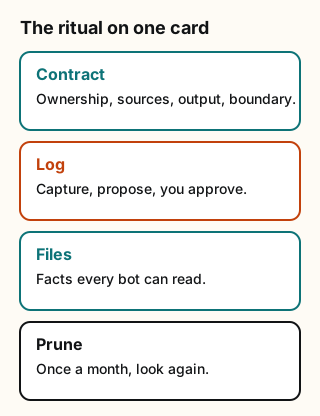
Figure explanation: Four boxes run top to bottom. Contract holds ownership, sources, output, and boundary, and only what is still true next month. Log captures every correction, and you approve it before it becomes a rule. Files keep facts about you and your work where every bot can read them. Prune is a once-a-month look for duplicates, idle routines, and giant chats.
Set up one bot this way in about 30 minutes:
- Contract (10 min). Write four lines: Ownership, Sources, Output, Boundary. Send them and ask the bot to remember them, or put them in its profile. Include only what's true next month.
- Log (10 min). Paste @Michael_Fenech_'s prompt into your main bot. Before it creates the routine, approve the sample log entry it shows you.
- Files (10 min). Create a folder for facts about you and your work: a voice file, a people file, a decisions file. Tell each bot to read it before drafting.
- Prune (monthly). Look for duplicates, idle routines and giant chats. Reset or retire them.
Tradeoffs and caveats
- Memory isn't a safety system. The docs say to "Back safety boundaries with approvals and Auto-review rules rather than memory alone". Treat a no-send-without-approval line in a contract as a reminder. The approval settings are what actually enforce it.
- Files are shared. The docs say to treat anything on the computer "as available to every Bot you run". Don't put keys, passwords or other people's private details in a contract or a shared file.
- Too many rules is a problem too. A contract with 40 lines is a job description nobody reads. Move step-by-step methods into skills and keep the contract short.
- The weekly review takes your time. The correction log only works if you actually approve or reject what it proposes. Skip a few weeks and it fills up with stale proposals.
- Community wording vs. docs. The four-part contract and the "next month" test come from @silentguyy66, not xAI. The docs' operational example supports the same shape.
Credits
- @silentguyy66: https://x.com/silentguyy66
- @Michael_Fenech_: https://x.com/Michael_Fenech_
- @Argona0x: https://x.com/Argona0x
- @BrianRoemmele: https://x.com/BrianRoemmele
- Official xAI docs: https://docs.x.ai/grok-bot/bots · changelog: https://x.ai/changelog/bot
Sources
Official xAI (checked Oct 24, 2026). All posts read and quotes checked word for word on Oct 24, 2026.
- Official xAI docs, Create and manage Bots
- Official xAI docs, Grok Bot overview
- Official xAI changelog, v0.75.2 (Oct 22, 2026)
- @silentguyy66 · https://x.com/silentguyy66/status/2108957020187468171 · https://x.com/silentguyy66/status/2112933073335513167
- @Michael_Fenech_ · https://x.com/Michael_Fenech_/status/2112858937959604427
- @Argona0x · https://x.com/Argona0x/status/2110045296902164532
- @BrianRoemmele · https://x.com/BrianRoemmele/status/2112337968820334676
Start from a template
People share Grok Bots you can add and then change to fit your job. Each template opens on x.ai. bot.ski never installs anything.
Comments
Comments are from bot.ski members. They aren't reviewed by xAI.