

GuideGrok Bot
Tell your bot where to stop: what it does, what it waits for, what it never does
TL;DR: Give your Grok Bot three short lists. Does without asking: safe work you can undo. Waits for you: anything that sends, publishes, spends, deletes or changes something live. Never does: the few things you keep for yourself. Name the action, not the button, and keep the lasting lines in the Bot's description.
Why three lists
Grok Bot's approvals guide starts with a boundary in the request: tell the Bot which actions it can take and where it must stop. [1] The get-started guide says a strong request names its constraints (what the Bot must avoid or ask before doing) and a review point (when it should stop for you). [2]
"Be careful" leaves the Bot to guess where careful ends. Three lists leave no gap in the middle.
| List | What goes in it | Example line |
|---|---|---|
| Does without asking | Reading, research, drafts, and work you can undo or throw away | "Read the shared folder and draft a one-page summary." |
| Waits for you | Actions that leave your hands or are hard to take back | "Show me the email and wait for my yes before you send it." |
| Never does | Things you will not hand over, even for one task | "Never merge a pull request." |
For the middle list, start from the official one. It suggests explicit boundaries for sending messages or invitations, publishing content, purchases and financial transfers, deleting or overwriting data, changing permissions, production changes, and accepting legal terms. [1]
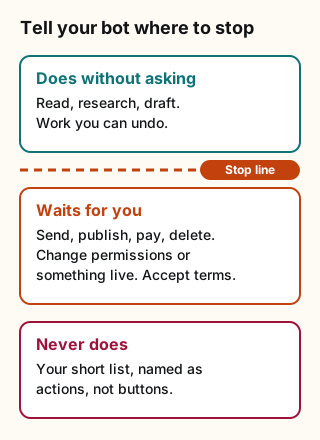
Figure explanation: Three boxes run top to bottom. The first, in teal, is Does without asking: reading, research and drafts you can undo. The second, in orange, is Waits for you: send, publish, pay, delete, change permissions, change something live, or accept terms. The third, in red, is Never does: a short list of actions you keep for yourself. The line between the first and second box is the stop line.
Name the action, not the screen
A stop line holds up best when it names what happens, not where a button sits. "Don't click the green button" breaks the day the page changes. "Ask before you send any email outside the team" still works. The official guide gives the same advice for Auto Review rules: write narrow rules around a known action and scope, and avoid broad ones like "allow everything in the browser," because websites and tools change over time. [1]
| Vague | Clear |
|---|---|
| Be careful with email. | Draft replies. Ask before you send any email to someone outside the company. |
| Don't mess up the site. | Never change the live site. Open a draft and stop. |
| Check with me on money stuff. | Never buy anything or move money. Show me the price and a link instead. |
| Don't click Publish. | Ask before you publish anything, on any site. |
Say what to show you when it stops
A stop line works better when it also says what the Bot should bring back. The official example reads: "Reconcile the campaign data and draft a recommended budget change. Do not change the campaign or message the agency. Ask for approval after showing the current value, proposed value, and expected impact." [1]
The last sentence is the useful part. When an approval card appears, the same guide says to review the target, scope and values first, and not to approve an action whose target or effect you can't identify. Ask the Bot to explain it in plain language or make a draft first. [1]
A real example: the bot that opens pull requests for Botski
One of the bots that helps build bot.ski writes code and copy changes. Its lines, with the private details taken out:
| List | Its lines |
|---|---|
| Does without asking | Starts a fresh branch from the latest main, edits copy and tests, runs the checks, and opens a draft pull request |
| Waits for a yes | Any job outside draft pull requests |
| Never does | Merge, push to main, force push, change feature flags, database migrations, environment settings or config, or contact anyone, including comments and pings |
Two things make it work. Each "never" is a named action, so there's no doubt about what counts. And the draft pull request is the review point: the bot stops there, and a person decides whether to merge.
Where each line belongs
| Where | Use it for | What the docs say |
|---|---|---|
| Bot description | Lines that should stay true for every task | Use the description for rules that should remain true, such as "Never send external messages without approval." Put explicit safety boundaries there. [3] |
| Your message | Lines for this one task | A strong request names constraints and a review point. [2] |
| Auto Review rules | A backstop for actions you always want to see | Ask first rules always stop matching actions for you. If an Ask first rule and an Allow automatically rule both match, Ask first wins. [1] |
Auto Review is model-based. The official guide says it should complement explicit approval boundaries, not replace them. [1] So write the lines in words too.
What a stop line can't do
- It can't undo finished work. An approval controls the proposed action. It does not reverse work already completed. [1] Write your lines before the Bot starts. If something already went live, see Undo first, then redo.
- It can't wait forever when you're away. An approval from work that started without you, such as a routine, a trigger or a message from another Bot, expires after about 10 minutes. The action doesn't run, and you can ask the Bot to try again. [1] For a routine, "draft it and leave it for me" often beats "ask me first."
- It doesn't wall off your other Bots. All your Bots share one cloud computer, with the same files and sign-ins. The official guide says not to use separate Bots as a security boundary. [1]
Copy-paste ask for your bot
Before you start, write three short lists for this job and show them to me. Does without asking: work I can undo. Waits for my yes: anything that sends, publishes, spends money, deletes, changes permissions, changes something live, or accepts terms. Never does: [add your own]. Write each item as an action, not a button. When you stop, show me the target, what will change, and why. Then tell me which lines belong in your Bot description.Sources
Checked October 19, 2026. The pull request example comes from the working rules of a bot that helps build bot.ski.
Start from a template
People share Grok Bots you can add and then change to fit your job. Each template opens on x.ai. bot.ski never installs anything.