
Learn


GuideAutomation & integrations
APIs, connectors, and plugins: how bots connect to other software
An API is a way for software to work with other software through defined operations. A connector packages a connection for a particular product. A plugin adds capabilities to an application. These pieces can work together, but their names describe different things.
Imagine asking a bot: “Tell me which orders are ready for collection.” The bot needs a reliable way to reach the order information. Knowing what an order means does not give it access to your shop.
We will use a fictional shop called Demo Desk. Every order and result below is made up. There is no live account or payment system.
Five names you will meet
| Term | Plain meaning | Example in Demo Desk |
|---|---|---|
| API | Defined operations that software can use | An operation for reading an order’s status |
| Connector | A prepared connection to a service | A shop connection offering “Find order” |
| Plugin | An extension installed or enabled in an application | A package that adds the shop connection |
| Webhook | An event message sent to a configured receiver | “Order D-104 became ready” |
| MCP | A shared protocol for AI applications to connect with tools and data | A compatible application discovers an order lookup tool |
Products use connector and plugin differently. Some use them almost interchangeably. Check what a package actually adds, which account it reaches, and which actions it exposes. The label alone does not answer those questions.
What an API request does
API stands for application programming interface. APIs exist inside browsers and local software as well as across the internet. Here, we are discussing a service reached over a network. [1]
An endpoint is a particular address used for an operation. A request supplies the information that operation expects. The service returns a response, such as data or an error.
For our fictional lookup, the input is order D-104. The response says its status is Ready for collection, last updated at 10:00. The bot turns that structured result into a readable answer:
“D-104 is ready for collection. The shop record was last updated at 10:00.”
The update time matters. A clear answer should not make old information sound current. If the lookup fails, “I couldn’t check” is more useful than a confident guess.
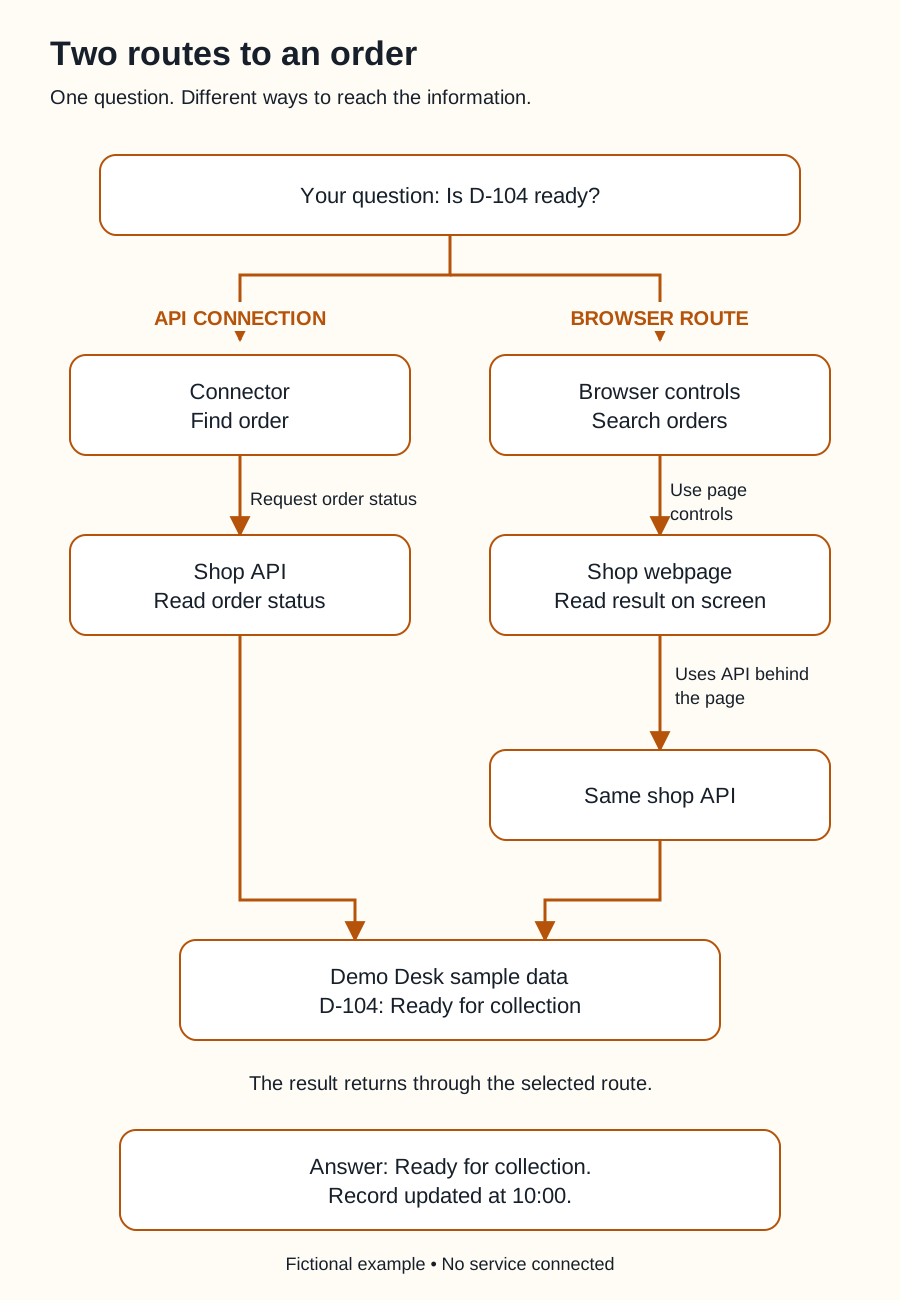
Swipe sideways to see the whole diagram, or open it full size.
Figure explanation: The user asks whether D-104 is ready. In the API route, a connector's Find order operation requests its status from the shop API. In the browser route, the bot searches through browser controls and reads the shop webpage; this sample webpage uses the same API behind the scenes. The diagram repeats the API node to keep the two routes readable. Both routes reach the same sample record. The result returns through the selected route: D-104 is ready for collection, with a record update time of 10:00. No live service is connected.
What a connector adds
A connector can handle details such as sign-in and turning a tool request into the service’s expected format. It may expose only a small part of the service.
Suppose Demo Desk has twenty API operations, but its connector offers only “Find order” and “List ready orders.” Installing that connector does not automatically expose the other eighteen operations.
For Grok Bot, start with Botski’s connectors and plugins index, then check the linked official documentation and what your installed application offers. A general explanation of APIs is not evidence that a particular Grok Bot connection is available.
A browser is another route
A bot might instead open the shop’s website, use its search field, and read the result on screen. That is interaction with the website’s user interface, or UI.
An API route exchanges defined requests and responses. A browser route works through pages and controls. The page itself may use APIs behind the scenes, but that does not mean the bot has a direct API integration.
Both routes need appropriate access. A working browser login does not prove that a connector is installed, or that it has the same permissions.
Access and permission are separate checks
A credential, such as an access token, helps a service recognize a request and apply its access rules. Tokens can have limited permissions and can expire or be revoked; the details depend on the service. [2]
Your instruction to the bot is a separate boundary. A connection might technically allow editing orders, while your task allows only reading them.
For Demo Desk, use this rule: read order status and draft a summary; do not change orders or send customer messages. Where supported, restrict the connection itself to read access too. Instructions and technical restrictions should reinforce each other.
Continue with approvals, security, and privacy when deciding what your bot may do.
Choose the connection around the job
“Check now” suggests a request. “Tell me when it changes” may suit a webhook. An AI application that supports MCP may use it to discover and call a suitable tool. MCP can sit above an existing API; it does not replace every other connection method.
Before building, ask your bot to show the available operation, required access, expected result, and a harmless test. For this example, a successful test returns the known status of a sample order and identifies the sample as fictional.
When those pieces are clear, you can judge the connection by what it accomplishes.
Sources
- MDN: API. API definition and scope. Accessed September 25, 2026.
- GitHub: Authenticating to the REST API. A concrete service example of tokens, permissions, expiration, and revocation; other services differ. Accessed September 25, 2026.
- GitHub: About webhooks. Event delivery compared with polling. Accessed September 25, 2026.
- MCP: Understanding MCP servers. Tools can call external APIs. Accessed September 25, 2026.
Demo Desk, its operations, and its orders are original teaching examples.