

GuideGrok BotCompanion to Build a bot team that ships
Team Bots, and when not to add a bot
Part 4 of Build a bot team that actually ships.
TL;DR
- A Team Bot is "one Bot that your whole team talks to". One Team Bot can replace five people's copies of the same bot. It's available to Teams and Enterprise customers.
- Split bots by outcome, not by step. Two outcomes in one bot is too few seats; one outcome across four bots in a line is too many.
- Big teams can work. The 11-bot content team in this part runs only 3-4 bots at a time.
- Before adding a bot, answer four questions. If you can't say what new outcome it owns in one sentence, don't add it.
The first three parts were about adding bots well. This last part is about not adding them, and about the one kind of bot that often replaces several: a Team Bot.
1. Team Bots: one bot, many people
A Team Bot is an existing Official feature, not something new this week. The docs describe it as "one Bot that your whole team talks to." Its owner sets it up once, with the plugins, secrets, skills, and files it needs, and publishes it to the team. The key points from the Team Bots docs: [1]
- Set up once, used by everyone. What the owner adds is available in every teammate's conversation.
- It learns from the team. Facts the whole team should know go to team memory, which every teammate's conversation reads.
- Conversations stay private. Each teammate gets their own chat. The owner can't read teammates' chats, and teammates can't read the owner's.
- It acts as the person asking. A plugin that needs a sign-in uses the account of whoever is talking to the bot. In the docs' words, "A Team Bot never lends one person's access to another."
The docs say Team Bots suit "one shared job," such as answering metrics questions or triaging requests in a Slack channel, and suggest keeping a personal bot for an everyday assistant. [1]
@mattyp posted a video walkthrough: a simple example, why they're powerful, connecting your tools, how to make one, and a more complex example. The post notes Team Bots are "Currently available to Teams & Enterprise customers - more soon!". It's an explainer of an existing feature, not a launch.
Currently available to Teams & Enterprise customers - more soon!
For seat design, the lesson is this: if five coworkers each built their own metrics bot, you'd have five seats doing one job. One Team Bot is one seat that five people can use.
2. One bot doing ten jobs
The opposite mistake is just as common. @bl888m_eth's article puts it plainly: "One bot doing ten jobs is the mistake. Ten bots doing one job each is the system".
One bot doing ten jobs is the mistake. Ten bots doing one job each is the system
That sounds like it contradicts the arrow test from Part 2, which warned against splitting one job across a chain of bots. It doesn't. The two ideas fit together:
- Split by outcome: if a bot owns two different outcomes, it probably should be two seats.
- Don't split by step: if a single outcome passes through four bots in a straight line, it probably should be one seat.
3. Systems over smarter agents
@0xMortyx, quoting @0xRicker's multi-agent guide, put the idea in one line: "don’t make one agent smarter - turn it into a system". [5][8]
don’t make one agent smarter - turn it into a system
In this series, "system" has a specific meaning: seats with written contracts (Part 1), handoffs through files with hop limits (Part 2), and a person at every irreversible step (Part 3). A smarter single bot without those things still ends up guessing who owns what.
4. A big team, checked
Big teams aren't wrong by default. @ryangrowthh wrote up a "team of 11 Grok Bots" for content. Even so, the author notes: "I run only 3-4 bots at a time".
I run only 3-4 bots at a time
Rather than judge it from the outside, here's how to put a team that size through the arrow test yourself:
- Draw all eleven boxes and every handoff arrow.
- Mark which arrows run in parallel (research, drafting, and design happening at the same time) and which run in a line.
- For each box, write the one outcome it owns. If two boxes own the same outcome, merge them.
- For each straight-line segment, ask whether one bot with a checklist could do it.
- Find the approval gate. If the team publishes anything, there should be one point where a person approves before it goes out.
A team that passes all five is big for a reason. One that fails several is big by accident.
5. The four-question checklist
Before you add any new bot, answer these:
- What outcome does it own that no existing bot owns?
- Does it work in parallel with another bot, or does it only add a hop to a line?
- What starts it? A trigger, a handoff, or a person. Not a timer, unless it truly needs one.
- Where's the gate? What can it do without approval, and what can't it?
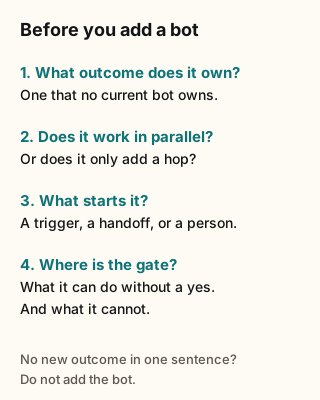
Figure explanation: Four questions from this part. What outcome does the new bot own that no existing bot owns? Does it work in parallel, or only add a hop to a line? What starts it: a trigger, a handoff, or a person, and not a timer unless it truly needs one? Where is the gate: what can it do without approval, and what can it not do?
If you can't answer question 1 in one sentence, don't add the bot. Add a line to an existing seat's standing instructions instead (tell that bot and ask it to remember, as the current docs suggest), or ask whether a Team Bot already does the job. [2]
6. What this means for you
- Count duplicate bots. If several people on your team built the same helper, and you're on a Teams or Enterprise plan, make it one Team Bot.
- Run the five-step check from section 4 on any team bigger than three bots.
- Use the four questions on every new bot before you create it.
- Retire before you add. If a bot hasn't done useful work in two weeks, pause its routines first.
7. Tradeoffs and caveats
- Team Bots aren't for everyone yet. They're for Teams and Enterprise customers, per @mattyp's post. On a personal plan, a shared seat means shared files and handoffs instead.
- Not every plugin acts as the person asking. Per the docs, each teammate connects their own account for sign-in (OAuth) plugins the first time they need it. A plugin set up with a key or token uses the Bot's own credential, so every teammate gets that access. Choose read-only keys where you can. [1]
- Fewer bots means longer instructions. Merging seats moves complexity into one bot's standing instructions. Keep them short and move methods into skills.
- Restraint costs some speed. Parallel seats are faster for big jobs. The four questions are there to make sure the speed is real.
Series wrap-up
Four habits, one idea each:
- Seats: every bot has a written job, an owned outcome, and a Never list.
- Handoffs: pass files, keep one owner per stage, cap the hops, stop on failure.
- Gates: a person approves the frozen batch before anything irreversible.
- Restraint: add a bot only when it owns a new outcome or runs in parallel.
None of these depend on a particular plan or feature. They're how the Official case studies from Rank'em and xAI's support team are built, and they're what the best community critiques keep asking for.
Next step: Browse team templates in the Botski directory and run each one through the four questions before you add it.
Credits
Checked Oct 24, 2026. Community posts are the writers' own reports, quoted where the words are theirs.
Start from a template
People share Grok Bots you can add and then change to fit your job. Each template opens on x.ai. bot.ski never installs anything.