

GuideGrok BotCompanion to Build a bot team that ships
The approval gate

Part 3 of Build a bot team that actually ships.
TL;DR
- xAI's support team uses IncidentWatch to spot ticket spikes and IncidentSweep to close affected tickets in one approved batch. A person decides there's an incident and approves the batch.
- The batch is frozen after approval, sent in small batches, and stopped on any failure. On September 18 that cleared 204 tickets in about 10 minutes.
- Grok Bot's draft cards are the same gate for one message. You can turn them off per bot, but routine sends still wait as drafts (Oct 23 changelog).
- The Grok Bot Terms make approval requirements and monitoring your job.
The fastest bot team in the world is a liability if it can send the wrong message to 200 people. This part is about the single habit that makes speed safe: a person approves the batch before anything irreversible goes out.
The best worked example comes from xAI's own support team. [1]
1. IncidentWatch: notice early, decide nothing
xAI describes two bots its support team uses during product incidents. The first, IncidentWatch, watches the support queue. In xAI's words: "Every five minutes, it reviews the previous 15 minutes of tickets for spikes around the same problem."
When it finds a spike that doesn't match a known incident, it alerts the on-call support engineer with "the apparent issue, number of matching tickets, and examples to investigate." It also holds tickets that clearly match. What it doesn't do is decide there's an incident. "A support engineer decides whether the reports point to an incident and works with engineering to investigate." [1]
@kiaraplds summed up the pattern well: "Three bots, each with one job, and a person approving before anything sends".
Three bots, each with one job, and a person approving before anything sends
(The third bot is Support Bot, xAI's customer-facing bot, which returns to held tickets once the incident is confirmed.)
2. IncidentSweep: one approved batch
After an incident is resolved, hundreds of related tickets may still need a final reply. xAI's post lays out the usual trade-off: answer each one by hand, which takes hours, or use a bulk action, which is fast "but leaves little room to catch a ticket that should not receive the message." IncidentSweep was built to get the control of the first with the speed of the second. [1]
Here's the sequence, as xAI describes it:
- A person defines the job. A support engineer tells IncidentSweep which tickets to consider, which to exclude, and exactly what message to send.
- The bot narrows the set. It finds matching tickets, reviews each one, and sets aside any it can't confidently connect to the incident.
- The bot shows its work. Before sending anything, it shows the engineer the proposed batch, the tickets included, and the exact message.
- A person approves. The engineer can spot-check and make changes before approving.
- The bot sends carefully. It sends "in small batches and records each action."
- The batch is frozen. "It never adds tickets after approval".
- Failure stops everything. In xAI's words: "if anything fails, it stops and reports what happened".
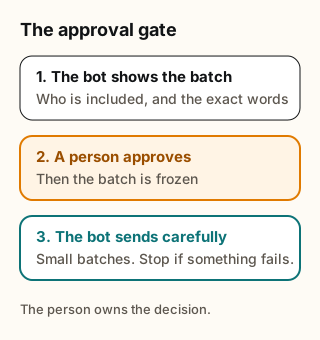
Figure explanation: Three steps from xAI's account of IncidentSweep. The bot shows the proposed batch and the exact message. A person approves, and the batch stays frozen so nothing is added after that yes. The bot then sends in small batches, records each action, and stops to report if anything fails. The diagram summarizes that sequence.
The result xAI reports: during one incident on September 18, IncidentSweep "cleared 204 tickets in about 10 minutes with a support engineer reviewing and approving the batch". The Official @bot account also announced the post on Oct 20. [2]
Notice what the person does and doesn't do. They don't write 204 replies. They write one message, set the rules, and check a sample. The bot does the volume. The person owns the decision.
3. Generalize the gate
You don't need a support queue to use this. Any job that ends in an action you can't take back (sending, posting, paying, deleting, closing) can follow the same shape: the bot proposes a frozen batch, a person approves, the bot executes in small steps and stops on failure.
Grok Bot already has a built-in version for messages: draft cards. When a bot sends email from its own address, it waits for your approval on a draft card (changelog v0.70.2). Draft cards are the approval gate for one message at a time. [3]
There's also a way to turn that gate off. Since the Sep 30 changelog entry, email and Slack draft cards offer Disable drafts for this Bot, and the v0.71.2 entry (Oct 14) adds that after you choose it, a bot "sends email from its own address right away, without a draft card." The v0.75.5 entry (Oct 23) changes things further: emails and Slack messages you ask a bot to send "go out once Auto-review allows them, while sends on routine and other turns still wait as drafts". [3]
When is it reasonable to disable drafts? Our suggestion:
- Keep drafts on for anything sent to people outside your household or team, anything sent by a routine, anything that goes to many recipients, and any new bot you haven't watched for a while.
- Consider turning drafts off only for a bot that sends a narrow, predictable kind of message to a known audience, such as a daily note to yourself, and only after you've approved enough drafts to trust its pattern.
If a bot would make the IncidentSweep kind of mistake, sending the right message to the wrong people, keep the gate.
4. Whose job the gate is
The Grok Bot Terms put this on the customer. They say the customer is responsible for "configuring appropriate permissions, approval requirements, and spending limits, and monitoring recurring or unattended activities", and for determining the scope of access, permissions, and authority granted to each bot. [4] Put simply: xAI provides gates like draft cards and approvals, and choosing where they go is up to you.
That makes the approval gate a design decision, not a default you can assume. Decide it per seat, and add it to the seat's Never line from Part 1, for example: You never send to more than one recipient without my approval. Then ask the bot to remember it. Current docs say lasting rules go to the bot that way ("tell the Bot and ask it to remember"), not into a description field. A remembered rule guides the bot. The draft card is what actually holds the message.
5. What this means for you
- List the irreversible actions each seat can take: send, post, pay, delete, close.
- Put a gate in front of each one. For messages, leave draft cards on. For batches, copy IncidentSweep: rules from a person, a proposed batch with the exact message, approval, small sends, a frozen list, stop on failure.
- Decide what passing looks like before approving, such as a spot-check of five items.
- Write the gate into the seat and ask the bot to remember it.
- Review drafts for a week or two before you turn drafts off for any bot.
6. Tradeoffs and caveats
- Gates are slower. That's the trade. IncidentSweep shows the gate can still be fast when the person approves one batch, not 204 replies.
- Approval fatigue is real. If you approve without reading, the gate is decoration. Fewer, bigger batches beat many small cards.
- The Oct 23 change means fewer cards for messages you ask for in your own words. Routine sends still wait as drafts.
- xAI's results are xAI's. 204 tickets in about 10 minutes came from xAI's own support team, with its own tools and data.
Next step: Look for templates in the Botski directory that keep a person in front of every send, and check how each one handles drafts before you turn it on.
Credits
Checked Oct 24, 2026. Community posts are the writers' own reports, quoted where the words are theirs.
- Using Grok Bot to detect and respond to incidents (Chris Bowie and Isaac Hopkinson, Oct 20, 2026)
- @bot announcement, Oct 20, 2026
- Grok Bot changelog (Sep 30 entry; v0.70.2, Oct 11; v0.71.2, Oct 14; v0.75.5, Oct 23)
- Grok Bot Terms
- @kiaraplds
- @bot (Official xAI account)
Start from a template
People share Grok Bots you can add and then change to fit your job. Each template opens on x.ai. bot.ski never installs anything.