
Learn


GuideAutomation & integrationsCompanion to APIs and connections
What is a webhook? Follow a change from event to result
A webhook sends a message to a configured receiver when a chosen event happens. Instead of repeatedly asking a service whether something changed, you arrange to receive an event message. [1]
In the fictional Demo Desk shop, order D-104 changes from Preparing to Ready for collection. We want a local practice dashboard to reflect that change. All information in this example is made up.
Asking versus being notified
With polling, the dashboard asks for the order’s status on a schedule. It might receive “Preparing” several times before receiving “Ready for collection.”
With a webhook, the shop sends a message after the status changes. The receiver is an endpoint: an address set up to accept these deliveries. The message’s data is called its payload. [1]
In our example, the payload contains an event ID, an order ID, and the new status. The event ID identifies this occurrence of a change; the order ID identifies the order itself.
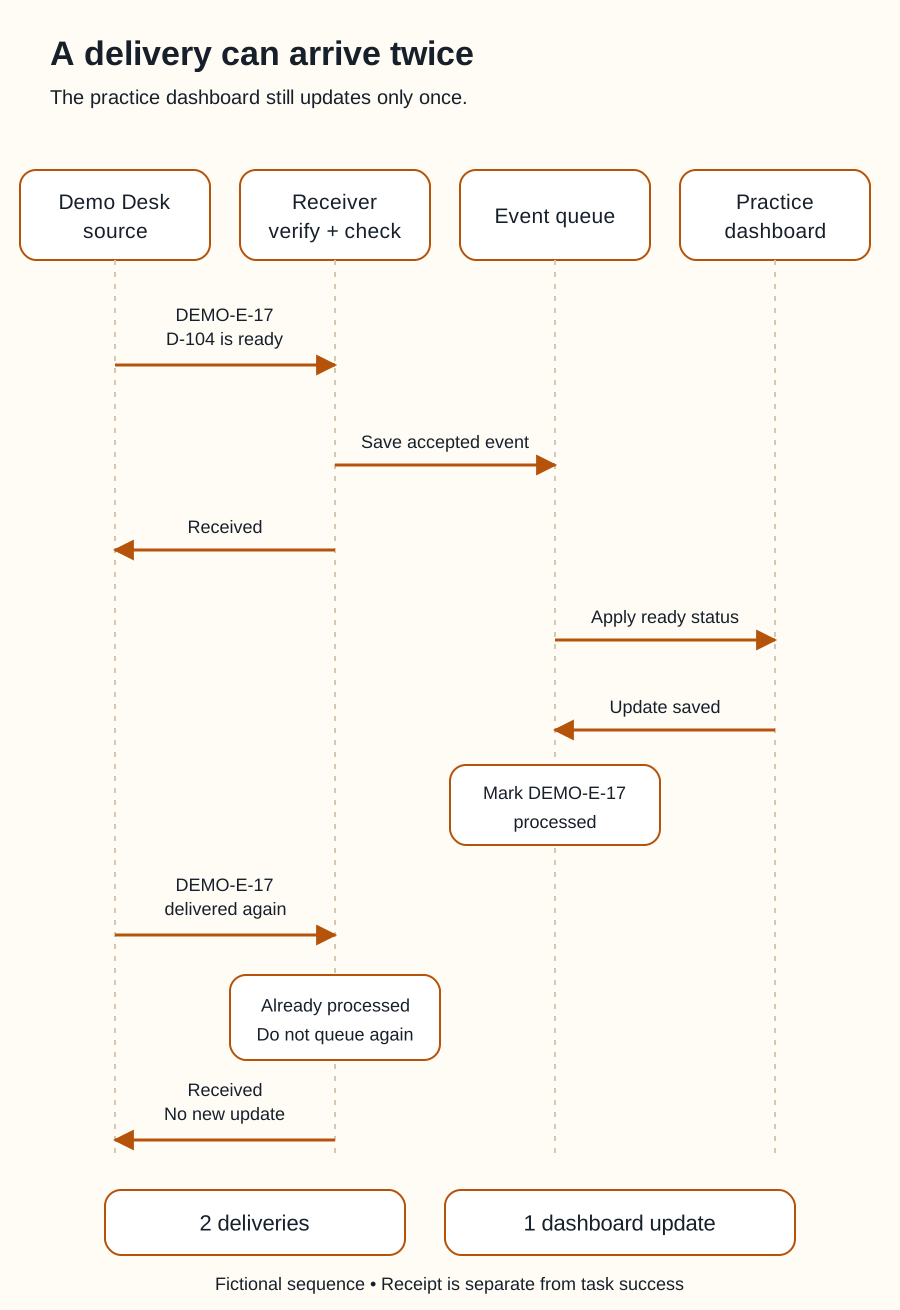
Swipe sideways to see the whole diagram, or open it full size.
Figure explanation: Four participants are shown: Demo Desk, a receiver, an event queue, and a practice dashboard. Demo Desk delivers event DEMO-E-17 saying D-104 is ready. The receiver verifies the sender and checks the event, saves an accepted event to the queue, and acknowledges receipt. The queue applies the ready status to the dashboard, receives confirmation, and marks the event processed. A later delivery of DEMO-E-17 is recognized as already processed and is not queued again. The receiver acknowledges it. The final counts are two deliveries and one dashboard update. Acknowledgment and successful downstream work are separate steps.
The message starts a process
Receiving “D-104 became ready” does not by itself update a dashboard. The receiving software needs instructions for what to do next.
Our practice handler does four things:
- Checks that the delivery is authentic using the provider’s supported verification method.
- Checks whether it has already handled this event.
- Saves the accepted event for processing and acknowledges receipt.
- Updates the local practice dashboard, recording whether the update succeeded.
The acknowledgment means the receiver accepted the delivery. It does not automatically mean every later task succeeded. A dashboard update can still fail after the message arrives.
GitHub’s guidance recommends verifying deliveries, checking the event type, and responding promptly. Its delivery deadline is specific to GitHub; another provider can have different requirements. [2]
What if the message arrives twice?
Our practice event is DEMO-E-17. The first accepted delivery updates D-104. A second delivery with the same event ID should not create another “ready” entry.
This is one use of idempotent processing: repeating the same operation has the same intended effect as doing it once. The practice handler keeps a record of successfully processed event IDs.
Do not assume events always arrive once, immediately, or in order. For example, Stripe documents duplicate deliveries, retries, and events arriving out of order. Delivery behavior varies by provider. [3]
If an older “Preparing” event arrives after “Ready,” blindly accepting it could move the dashboard backward. For this practice design, the handler rechecks the current order record when event order is uncertain. In a real integration, use the provider’s documented versioning or reconciliation method.
What your bot needs to know
“Watch for ready orders” is incomplete. Explain the event to watch, the result to produce, and what to do after a failure.
A useful practice instruction is: “Use the fictional order events. Update the local dashboard once per event. Keep an error record if an update fails. Do not contact customers.”
An event is information, not permission for every possible response. Sending a notification to a real person requires its own authorization. See approvals and security.
If you only need an occasional check, polling may be sufficient. If you need changes promptly, ask whether the service supports a suitable webhook and how missed deliveries are recovered.
Return to APIs and connections.
Sources
- GitHub: About webhooks. Event subscriptions, payload delivery, and polling. Accessed September 25, 2026.
- GitHub: Best practices for using webhooks and Validating webhook deliveries. Verification, acknowledgment, event checks, and delivery identifiers. Accessed September 25, 2026.
- Stripe: Webhooks. Provider-specific examples of duplicates, retries, and ordering limits. No Stripe account or payment is used in this lesson. Accessed September 25, 2026.
Demo Desk and the practice handler are original teaching examples, not a description of an installed integration.