

TroubleshootingGrok Bot
When your bot gets stuck mid-task: loops, sign-ins and blocked sites
TL;DR: Look before you restart. Open the Bot's computer and see what's on screen. Most stalls are a card waiting for you, a sign-in, a site that blocks the Bot, or the same step repeating. Clear that one thing and tell the Bot to continue. For a loop, send a short redirect, then "Stop now." Keep Reset for last.
Look first
Grok Bot's troubleshooting guide says to start with the least destructive step. It also notes that a Bot's cloud work can keep going when the desktop or mobile app is disconnected. [1] So a quiet chat doesn't always mean the Bot stopped.
- Check the status shown in the sidebar and the conversation. [1]
- Open the computer to see whether the Bot is waiting on a page. [1]
- Look for a question, approval, login, CAPTCHA, or secret request. [1]
- Keep in mind that one Bot runs one computer-use task on its screen at a time. A task already running may need to finish or be redirected before another can start. [2]
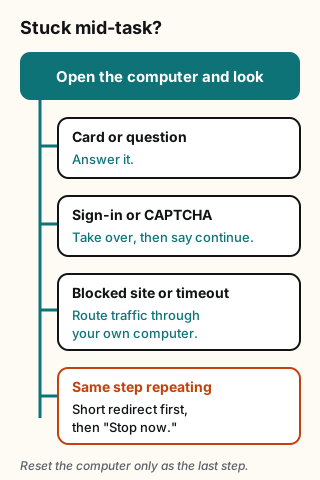
Figure explanation: The top box says open the computer and look. Four paths lead down from it. A card or question: answer it. A sign-in or CAPTCHA: take over, finish only that step, then tell the Bot to continue. A blocked site or timeout: route traffic through your own computer. The same step repeating: send a short redirect, then Stop now. The diagram is a simplified guide, not a record of a real session.
Match what you see to a fix
| What you see | What it usually means | What to do |
|---|---|---|
| An approval card or a question | The Bot is waiting for you | Answer it. A card from work that started without you, like a routine, expires after about 10 minutes. Then ask the Bot to try again. [3] |
| A sign-in page, two-factor prompt or CAPTCHA | The step needs a person | Choose Take over, finish only that step, choose I'm done, and tell the Bot to continue. [3] |
| A site keeps asking you to sign in | The site expired the session or wants a fresh check | Take over, sign in, finish two-factor or the CAPTCHA, wait for the signed-in page to load, then tell the Bot to continue from the current page. Some sites ask again for each sensitive action, and that can't always be avoided. [1] |
| A site blocks the Bot or shows a CAPTCHA every time | Some sites block traffic from cloud computers | Sign in yourself on the Bot's computer, or turn on Route traffic through this computer in Settings → Computer, under Your computer, so the site sees your own connection. [4] |
| A timeout, a secure connection error, or a page that never loads | Some sites drop connections from the Bot computer's shared network | Update, Recover and Reset don't change this, so skip them. Turn on Route traffic through this computer. It works while the Grok Bot desktop app is open. [4] |
| The same step over and over | The approach isn't working | Send a short redirect. If the work should end, send "Stop now." [1] |
| "Bot failed to respond" or "Model provider is overloaded" | It may be a service problem | Check the Grok Bot row on status.cursor.com. During an incident, wait and don't Reset or reinstall. With no incident, wait a moment and send your message again. [4] |
| A message that you hit your usage limit | Your weekly usage is used up | It isn't broken. Usage resets each week, or you can add usage now. [4] |
Break a loop in three messages
- Redirect. One short line that names the problem: "That page keeps failing. Try the export button instead." The troubleshooting guide suggests a short redirect when the current approach is wrong. [1]
- Stop. If it keeps going, send "Stop now." The guide names that message for work that should end. [1]
- One next step. Once it stops, ask what it already finished, then give one clear instruction. A new long task stacked on a stuck run tends to make things worse.
To head off the next loop, give the Bot a stop line up front: "If the same step fails twice, stop and tell me what you saw." The official computer guide says that when a site asks for verification again, you should ask the Bot to pause and notify you rather than try to get around the check. [2]
Sign-ins: do and don't
| Do | Don't |
|---|---|
| Take over the computer and type the password, passkey, code or CAPTCHA yourself. [3] | Paste a password or one-time code into the chat. [3] |
| Use a secure secret request when a supported connection shows one. The value is masked and left out of the conversation. [3] | Treat that request as a general password manager. [3] |
| Sign in once. The session stays on the shared computer, so your other Bots can use it too. [2] | Sign in to things another Bot of yours shouldn't use. All your Bots share that browser. [2] |
When the whole Bot is the problem
If the computer itself can't be reached, the official order is: Retry or reopen the conversation, restart the app, choose Recover computer when it's offered, then Update Bot's Computer, and Reset only if recovery and update fail and you accept losing recent unsynced work. Recover and Update keep durable files and logins. Reset restores the last saved snapshot. [1]
For the full calm playbook, read When your Grok Bot gets stuck. If only a scheduled job seems missing, see Why did my routine not run?.
If you still need support, the troubleshooting guide lists what to collect: your Grok Bot version, operating system, the exact error, the Bot or routine name, the time and time zone, any request or conversation ID, and what retry, restart or update changed. Leave out passwords, codes, private keys and secret values. [1]
Copy-paste ask for your bot
You seem stuck. Stop what you're doing and tell me three things: the last step you finished, the step you're on, and what you see on screen. If it's a sign-in, CAPTCHA or security check, pause and hand it to me instead of trying to get around it. If the same step has failed twice, don't try it a third time. Suggest one other way and wait for my yes.Sources
Checked October 19, 2026.
Start from a template
People share Grok Bots you can add and then change to fit your job. Each template opens on x.ai. bot.ski never installs anything.