
Learn


GuideInstructions & context
Context and memory: what your bot can use right now
Context is the information supplied to an AI model for the step it is taking now. Memory is information retained for later use. A saved detail helps only when the system makes that detail available at the right time. [1][2]
That distinction explains a familiar frustration: “I already told the bot this.” The detail may still exist somewhere, yet be missing from the information used for the current reply.
Four things that sound similar
| Term | Plain meaning | Example |
|---|---|---|
| Current context | Information included for this step | Your request, the latest page draft, and the approved event date |
| Saved memory | Information kept beyond the immediate exchange | A retained preference to use short sentences |
| Retrieval | Finding and loading relevant stored information | Opening the note that contains the venue address |
| Compaction | Shortening earlier working context into a more manageable form | Keeping key decisions from a long conversation in a summary |
These are general concepts. Products implement them differently. Some supply memories automatically; others need files, tools, or explicit setup. Compaction can omit details, so a summary is not a complete archive. [1][2]
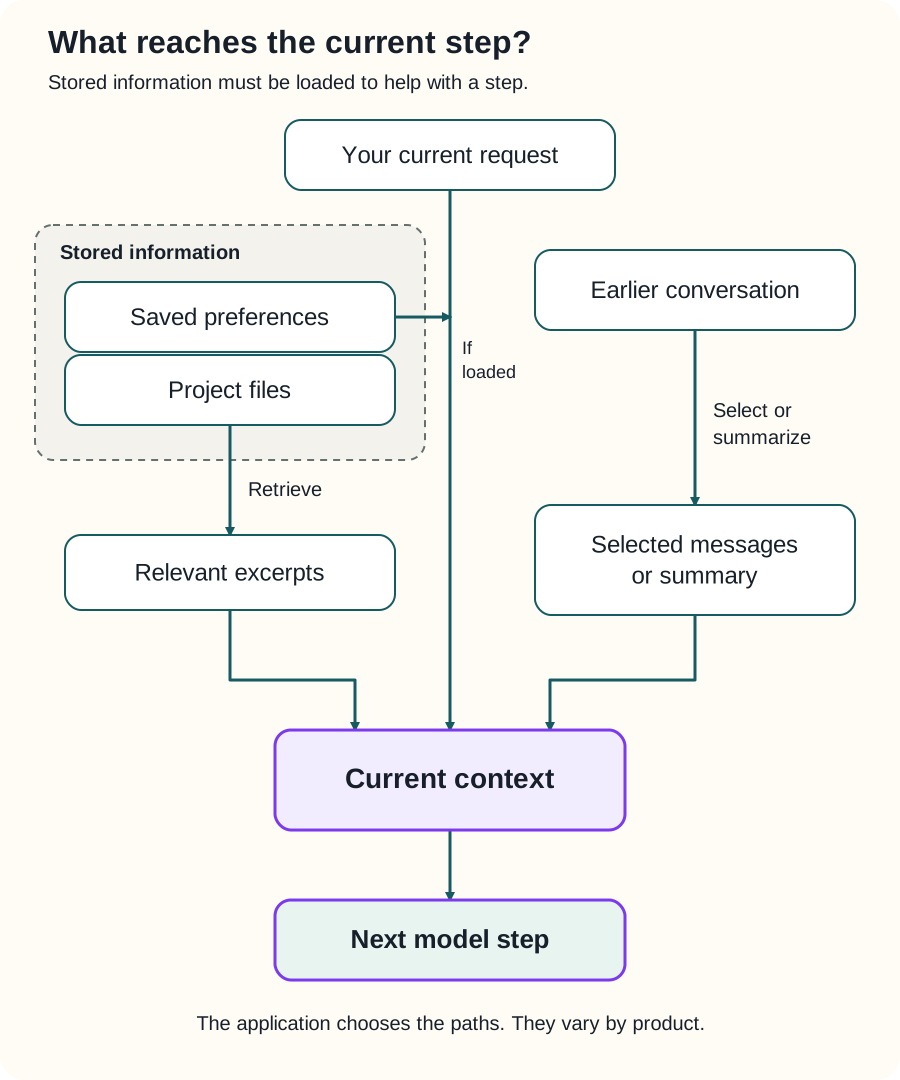
Swipe sideways to see the whole diagram, or open it full size.
Figure explanation: The current request enters the current context. A stored preference also enters if the application loads it. A project file goes through retrieval, producing relevant excerpts that enter the context. Earlier conversation can be selected or summarized before entering. The current context is supplied to the next model step. Which paths exist depends on the product and its configuration.
Follow a detail through a project
Suppose you are building a plant-swap website. At the beginning, you say:
The event is on October 17. Use the community center entrance on Oak Street. Registration is optional.Later, you discuss page colors, photographs, sign-up forms, and twenty possible headlines. Then you ask for a reminder post.
If the bot supplies the wrong entrance, repeating “you already knew that” does not fix the underlying setup. Find out which note or version it used. There might be an old draft naming a different entrance, a summary that dropped the street, or a source the bot never loaded.
Create a short approved event note with the current date, address, entrance, registration rule, and last update date. Ask the bot to use that note before writing event material. When the entrance changes, update the note and clearly mark the old version as outdated.
Now the next task has a specific source to check. You can also inspect it yourself.
The context window has limits
A context window is the model’s capacity for the information involved in a request. It is measured in tokens, the units models process. Input, generated output, and other categories can share or have related limits, depending on the model and application. [3]
A long conversation therefore needs management. An application might select relevant messages, summarize earlier work, retrieve stored notes, or reject a request that is too large. The exact behavior depends on the product. [3]
Capacity also does not guarantee attention to every detail. Keeping the decisive information clear and relevant helps more than surrounding it with every file you have. [1]
For the plant-swap reminder, the current event note and approved tone guide are useful. Last month’s abandoned page designs probably are not.
Make a small project handoff
Here is an example you can adapt:
Goal: Prepare a reminder for the plant swap.
Current source: Approved event note, updated October 8.
Decisions: Registration is optional. Mention the Oak Street entrance.
Finished: Website draft checked.
Open question: Rain location has not been confirmed.
Next action: Draft the reminder and flag the rain question.
Boundary: Do not publish it.
Keep the handoff close to the project’s actual files. Include enough detail to restart the work, but avoid copying the whole conversation. When you correct a decision, update its existing entry instead of leaving two equally authoritative answers.
If the bot can read files, ask it to identify the source it used. If it cannot, paste the relevant excerpt and say when it was last checked. Either method is more concrete than assuming all past conversations are available.
What “remember this” does not prove
It does not prove a durable record was created. Check the product’s supported memory behavior or ask where the information was saved.
It does not mean a model was retrained. Storing a preference and loading it later can change the answer without changing the model itself. [2]
It does not prove every saved record is suitable to share. Keep public writing notes separate from private customer information. A website draft usually needs the approved event details, not the full attendee list.
Give the next task a clear starting point
Before a longer task, identify the current source, settled decisions, unresolved questions, and intended output. At the end, save the result and a short handoff. Check the handoff after important corrections.
Learn how retrieval and RAG work, explore AI tokens, or return to AI agents to see how context supports each action.
Sources
- Anthropic, Effective context engineering for AI agents, published September 29, 2025; checked September 25, 2026. Supports finite context, selective retrieval, compaction, and saved notes.
- Anthropic, Context engineering: memory, compaction, and tool clearing, checked September 25, 2026. Supports the distinct roles of stored memory and context management. It documents Claude implementations; it is not evidence of Grok Bot features.
- OpenAI, Conversation state, checked September 25, 2026. Supports context/output limits and the need to manage conversation state. The event note and handoff are original teaching examples.