Menu

Assistant guide

Perplexity Computer

Cloud work orchestration with optional desktop variants

Perplexity Computer is an autonomous work product combining research, tool use, document/app creation and workflows; it is not a single model.

Updated

Computer is accessible on desktop web, iOS and Android; paid subscriptions provide access. Eligible non-paying US accounts can try Computer on the web with included turns. This is a limited eligibility statement, not worldwide free access.

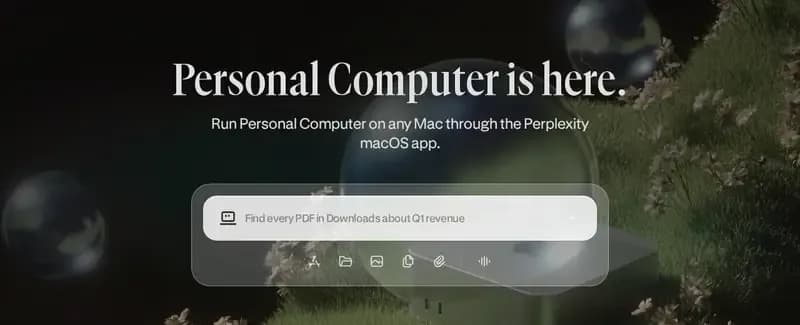
Screenshot of the Perplexity's Personal Computer page.
Perplexity's page: Personal Computer for Mac (Perplexity). Captured October 2, 2026, cropped.

Overview

Perplexity Computer is a multi-step work product that orchestrates research and tools. The core cloud product, desktop Personal Computer and local-first Portable Computer are related experiences with distinct requirements.

What stands out

Brain adds source-linked context in a Research Preview. Shared Projects and reusable skills provide further ways to carry work forward, with account and administrator boundaries that still matter.

Local is not one setting

Desktop operating-system support and installed-app control differ. Mac hybrid compute splits work between cloud and device; Portable Computer runs locally on supported hardware and seeks permission for cloud escalation.

Cost and continuity

Computer work uses credits. Scheduled runs also spend credits and can stop when credit is insufficient. Check the actual plan allocation and refill settings before assigning recurring work.

Before you choose

Choose the execution model first: cloud task, desktop-connected task or supported local-first setup. Then check what data can leave the device, which steps incur credits and whether the machine must remain running. Avoid comparing unlike configurations under a single “local” label.

Capabilities

Who it's built for

Maker's positioning: autonomous research-heavy work across hundreds of connectors, schedules and subagents.

Underlying model

Multi-model work product; no one fixed model is asserted here.

Chat channels

Desktop web, iOS and Android. Personal Computer for Mac adds voice and phone-initiated work.

App access

Hundreds of connectors include Gmail, Outlook, GitHub, Linear, Slack, Notion, Snowflake, Databricks and Salesforce.

Memory/context

Cross-session preferences; Brain adds source-linked context in a Max/Enterprise Max Research Preview.

Schedules and triggers

Recurring cloud work runs with the laptop closed and can use connectors and subagents. Minimum interval is one hour; each conversation supports up to 15 scheduled tasks. One-time waits are distinct.

Background work

Computer normally executes asynchronously in an isolated cloud sandbox, with no local installation required.

Computer use

Cloud Computer is separate from Personal Computer desktop access. Mac needs macOS 15+; Windows 10/11 lacks installed-app control.

What it can make

Research, documents and apps, built through tool use and subagents.

Shared use

Projects replace Spaces with shared persistent files, Brain context and project-scoped connectors. Teammates can share work; personal memories and connector accounts remain individually scoped.

Multiple assistants

Computer delegates to specialist subagents and coordinates tools and parallel research.

Reusable skills/templates

A public Skills Marketplace offers reusable capabilities. Enterprise users can share skills, with administrator controls on creation and installation.

Voice

Personal Computer for Mac documents voice and phone-initiated work; this is a desktop-variant feature.

Free tier or paid entry

Paid subscriptions provide access and work spends credits. Eligible non-paying US accounts can try Computer on the web with included turns.

Availability

Computer is accessible on desktop web, iOS and Android; paid subscriptions provide access. Eligible non-paying US accounts can try Computer on the web with included turns. This is a limited eligibility statement, not worldwide free access.

Pricing

Max is US$200/month or US$2,000/year; annual billing is web-only. Computer uses credits: currently 100 credits = US$1. Consumer Pro has no recurring monthly allocation; Max includes 10,000/month. Enterprise Pro includes 500/month and Enterprise Max 15,000/month.

Limits & permissions

  • Scheduled runs spend credits; insufficient credits can skip runs and eventually pause an automation, which then needs re-enabling.

  • Credit allowances/prices may vary by plan, region or promotion. Auto-refill starts off. Ordinary active tasks pause when credits run out; monthly credits do not roll over.

  • Brain entries can be inspected, corrected or deleted; it can be disabled. Incognito is excluded. Brain maintains memory itself rather than directly taking actions or messaging users.

  • Mac hybrid compute splits cloud planning/research from local private-file processing. Portable Computer runs models and the agent locally on supported Windows/Linux hardware, with permission before cloud escalation. Local-model work uses no Computer credits; cloud steps do.

  • Computer is available with an active subscription. Eligible non-paying US accounts can try it on the web with included turns before adding credits.

Compare & keep reading

Grok Bot

Named Bots retain a role over time, work across connected apps and websites, and coordinate with other Bots.

Access: Free trial, then paid individual Cursor plans (Pro, Pro+, Ultra) or Cursor Teams; Enterprise requires enablement. Individual SuperGrok, Plus, Heavy or X Premium+ can link usage. Apps on macOS, Windows, Linux, iOS and Android.

OpenAI dot

A personal agent in ChatGPT for research, documents, data analysis, software work and ongoing responsibilities. This entry covers dot, not Workspace Agents.

Access: Gradual rollout: Pro 100/200/500 for adults outside the EEA, UK and Switzerland; Business Premium worldwide; Enterprise (including Edu and Healthcare) worldwide with admin enablement. Create on the desktop app or desktop web; the mobile app follows a supporting update.

Sources

  1. What is Computer? · Perplexity
  2. What is Brain? · Perplexity
  3. What is Personal Computer? · Perplexity
  4. Shared workspaces, Personal Computer for Windows, and Model Council · Perplexity, August 4, 2026
  5. Effort Mode, GPT-6 Astra, and Skills Marketplace · Perplexity, September 21, 2026
  6. Perplexity Max · Perplexity
  7. How Credits Work on Perplexity · Perplexity
  8. Scheduled Tasks in Computer · Perplexity
  9. Personal Computer for Mac · Perplexity

Cookie preferences