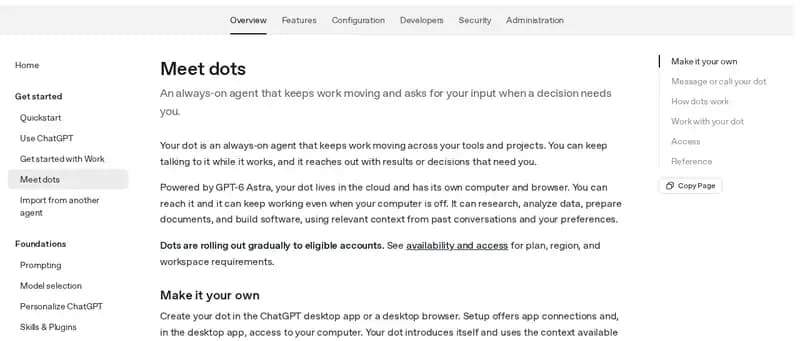
A personal agent in ChatGPT for research, documents, data analysis, software work and ongoing responsibilities. This entry covers dot, not Workspace Agents.
Source-checked · Not tested by bot.ski
Gradual rollout: Pro 100/200/500 for adults outside the EEA, UK and Switzerland; Business Premium worldwide; Enterprise (including Edu and Healthcare) worldwide with admin enablement. Create on the desktop app or desktop web; the mobile app follows a supporting update.
Official page: Meet dots (OpenAI). Captured October 2, 2026, cropped.
Overview
OpenAI dot is the personal-agent entry in this guide. It is designed for ongoing work and context between conversations in ChatGPT. Workspace Agents are a separate product boundary: their capabilities are not attributed to dot here.
Persistent task context and parallel background work are documented. Connected apps and optional personal-computer access extend the places where work can happen; cloud and local browser sessions remain distinct.
Availability is rolling out by plan and region. The included dot and its work allowance do not make every deeper task unlimited; Work and Codex have their own limits.
Disconnecting an app is not the same as erasing previously obtained information. Review memory/reset controls and computer permissions before connecting broad sources.
Texting is not a universal capability claim here: the channels guide says it is coming soon, while Help describes a limited US Pro beta. Verify the actual account.
Decide whether the task needs a cloud browser, a connected app or a local computer. Check that the intended environment stays available. Define what completion looks like and where you expect the finished result, especially for work that continues between conversations.
Capabilities, access & open questions
Evidence labels describe the sources, not independent testing. The methodology page explains each label.
Who it's built for
Documented
Maker's positioning: an always-on agent for ongoing responsibilities across your tools, with ChatGPT Work and Codex links for research, documents, data and software.
ChatGPT desktop app, desktop web and the mobile app (mobile web unsupported); user-started voice calls; Slack DMs and channel mentions; Microsoft Teams. Texting: “coming soon” in the Messaging guide, a limited beta in the Help Center.
Research, data analysis, documents and software. Can start ChatGPT Work and Codex tasks; OpenAI's examples include revised copy, slides, speaker notes, comparison charts and code fixes for review.
Can engage others in Slack when instructed, and can be messaged in Microsoft Teams; a shared team-owned dot is not established. Workspace Agents are outside this personal-dot entry.
Gradual rollout: Pro 100/200/500 for adults outside the EEA, UK and Switzerland; Business Premium worldwide; Enterprise (including Edu and Healthcare) worldwide with admin enablement. Create on the desktop app or desktop web; the mobile app follows a supporting update.
First dot included with Pro or Business Premium, with a deeper-work allowance. Work/Codex tasks consume their respective limits. No standalone dot price verified.
Claim checked . Provider access and charges can change; check the current plan before spending.
Disconnecting an app does not erase previously obtained information; the Help Center says resetting the dot deletes its conversations, saved memories, and schedules.
Start with a bounded task and review consequential actions. A documented approval control is not a guarantee that a workflow is safe.
What reviewers found
Nate Herk compared OpenAI dot and Meta Muse in his YouTube video “I Tested OpenAI's Dots vs. Meta's Muse. What You Need to Know.” (published September 30, 2026). These are his hands-on impressions, not bot.ski test results.
Nate Herk tested each for about a day. He describes both as persistent cloud agents that run schedules, use connected tools and have their own cloud computers, which matches the official documentation.
He expected dot to work like Grok Bot, where you create several Bots that talk to each other. Instead he found dot closer to Muse: one main agent that helps with everything.
He found dot's interface minimal and buggy at launch, found scheduled tasks hard to manage from the dot itself, and says it misdescribed how it filed Codex threads. OpenAI's Help Center says scheduled tasks are listed in the dot's profile and in ChatGPT's Scheduled section.
In his view GPT-6 Astra is the stronger model, especially for coding, while Muse felt a little faster and good enough for everyday knowledge work. Neither company publishes a head-to-head test of the two.
His verdict: dot suits people who already work in ChatGPT and Codex and want a dot their team can reach in Slack. Muse is the one he would recommend to non-technical friends and family, with a free start and WhatsApp access. He expects Muse, dot and Grok Bot to converge on similar features over time.
Named Bots retain a role over time, work across connected apps and websites, and coordinate with other Bots.
Access · Documented: Free trial, then paid individual Cursor plans (Pro, Pro+, Ultra) or Cursor Teams; Enterprise requires enablement. Individual SuperGrok, Plus, Heavy or X Premium+ can link usage. Apps on macOS, Windows, Linux, iOS and Android. Regional coverage not verified.
Core comparison · Not tested by bot.ski
Change note
1 October 2026: reconciled source scope and caveats. Original source-check timestamps retained; no hands-on benchmark has been completed. 2 October 2026: rechecked public sources, corrected changed facts, and added chat channels, what it can make, free tier or paid entry, and who it is built for.
Sources & check dates
Sources open in a new tab. A check means the public source was reviewed, not that the product was tested. Dates below are recorded evidence dates, not the build date.
Meet dots · OpenAIPrimary source · Publication date not verifiedSource checked
Tasks and memory · OpenAIPrimary source · Publication date not verifiedSource checked