Menu

Assistant guide

Grok Bot

Persistent personal and team AI coworkers

Named Bots retain a role over time, work across connected apps and websites, and coordinate with other Bots.

Updated

Free trial, then paid individual Cursor plans (Pro, Pro+, Ultra) or Cursor Teams; Enterprise requires enablement. Individual SuperGrok, Plus, Heavy or X Premium+ can link usage. Apps on macOS, Windows, Linux, iOS and Android.

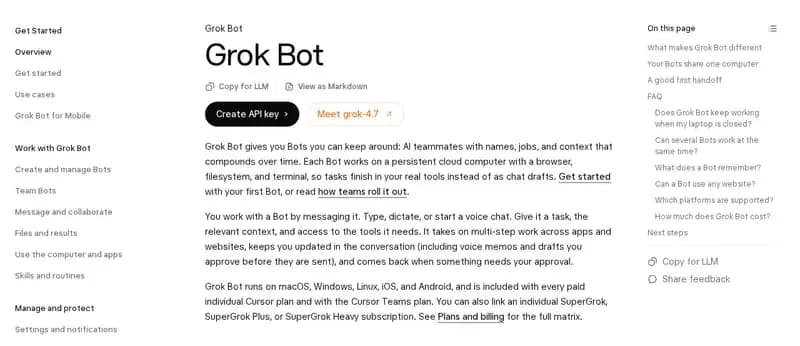
Screenshot of the Grok Bot overview in SpaceXAI's documentation.
Official page: Grok Bot (SpaceXAI). Captured October 2, 2026, cropped.

Overview

Grok Bot centers on persistent, named Bots that keep a role and coordinate ongoing work. Current product documentation uses SpaceXAI branding; Cursor supplies execution and billing. The applicable agreement determines the contracting entity.

What stands out

Multiple Bots can collaborate, and templates can be copied without transferring the original owner’s sessions or conversation history. Team Bots add a shared-work option, with individual conversations and memory remaining private.

Access and cost

Access is tied to eligible paid plans and usage allowances. On-demand usage is enabled by default for self-serve Teams and can add charges. Check linked usage rules and spending controls before treating a long-running job as included.

Privacy and permission questions

Your Bots share a computer and its sessions. Separate Bot names are not separate security boundaries. Removing a Bot may not remove shared files or account access.

Before you choose

Write down which Bot owns each responsibility and which files or accounts it should touch. Test a bounded workflow first, then inspect its result and remaining access. For site work, agree affected paths and a review point before parallel edits.

Capabilities

Who it's built for

Maker's positioning: named AI teammates with their own jobs and memory for ongoing work, several Bots that coordinate, and Team Bots for shared team context.

Underlying model

Cursor manages the model; the docs name no single model for every task. SpaceXAI says Grok 4.7 (September 21) was trained to natively understand the Grok Bot harness.

Chat channels

Grok Bot apps on macOS, Windows, Linux, iOS and Android: type, dictate or start a voice chat, with voice-memo updates. Team Bots have a handle you can invite to Slack channels.

App access

Connect Apps connectors plus browser use; installed connectors are account-wide.

Memory/context

Role context, preferences, and work summaries persist; conversations and learned memory remain separate per Bot.

Schedules and triggers

Reusable skills, scheduled routines, and supported event triggers. Demonstration-based teaching is gradually enabled.

Background work

Cloud work continues with the app closed. Bots can reason, use tools, and coordinate concurrently.

Computer use

Persistent Cursor cloud computer with browser, terminal, and files. Local commands require enabled capability and approval.

What it can make

Creates files, drafts, briefings and approved website changes using its cloud browser, filesystem, terminal and connected tools.

Shared use

Team Bots public beta on Teams and Enterprise: shared skills/context with private individual conversations and per-user memory; Slack collaboration and starter Bots for sales, product, marketing, and analytics.

Multiple assistants

Multiple named Bots coordinate via direct messages, groups, and shared files.

Reusable skills/templates

Public or team-only template links create a copy; they do not transfer the sender's computer, logins, or conversation history.

Voice

Dictation, voice chats, and voice memos; desktop and iOS/Android apps.

Free tier or paid entry

Free trial: a usage credit with a 7-day window. Ongoing use needs a paid Cursor plan or a linked individual SuperGrok or X Premium+ subscription.

Availability

Free trial, then paid individual Cursor plans (Pro, Pro+, Ultra) or Cursor Teams; Enterprise requires enablement. Individual SuperGrok, Plus, Heavy or X Premium+ can link usage. Apps on macOS, Windows, Linux, iOS and Android.

Pricing

Cursor lists Pro at $20/month and Teams at $40/user/month, excluding taxes; Pro+ and Ultra also include Grok Bot. The free trial is a usage credit with a 7-day window. Weekly Bot allowances apply. On-demand usage is enabled by default for self-serve Teams and can add charges; review spending controls.

Limits & permissions

  • All your Bots share files, credentials, and browser sessions; separate Bots are not security boundaries.

  • On-demand usage is enabled by default for self-serve Teams. Cursor and linked SuperGrok/X usage grants do not stack; an already-running task may exceed an on-demand spending limit.

  • Deleting a Bot may leave shared computer data and sessions behind; remove access separately.

  • Approval controls are aids, not guarantees; consequential actions need appropriate human review.

Who provides the product?

SpaceXAI supplies current product branding and documentation; Cursor supplies cloud execution, plans, and billing. Contracting entity depends on the customer's agreement.

What reviewers found

Nate Herk compared OpenAI dot and Meta Muse in his YouTube video “I Tested OpenAI's Dots vs. Meta's Muse. What You Need to Know.” (published September 30, 2026).

  • He expected dot to work like Grok Bot, where you create several Bots that talk to each other. Instead he found dot closer to Muse: one main agent that helps with everything.

From the product account on X

@bot

Grok Bot can now suggest ways to help without you needing to ask.

View on X

Compare & keep reading

OpenAI dot

A personal agent in ChatGPT for research, documents, data analysis, software work and ongoing responsibilities. This entry covers dot, not Workspace Agents.

Access: Gradual rollout: Pro 100/200/500 for adults outside the EEA, UK and Switzerland; Business Premium worldwide; Enterprise (including Edu and Healthcare) worldwide with admin enablement. Create on the desktop app or desktop web; the mobile app follows a supporting update.

Meta Muse

A proactive personal agent for errands, longer-term goals, and business work. Muse for Small Business adds skills and connectors inside the same product.

Access: Meta's pages conflict: the September 29 small-business announcement names the US and Canada; the launch article, updated September 30, still names the US. iOS, Android, Mac, web and WhatsApp are documented. Adults need a Meta account; check actual account and subscription eligibility.

Start with the existing Grok Bot introduction →

Sources

  1. Grok Bot · SpaceXAI
  2. Grok Bot Terms · Cursor / Anysphere
  3. Team Bots: AI coworkers that learn from your team · SpaceXAI, September 28, 2026
  4. Use the computer and apps · SpaceXAI
  5. Plans and billing · Cursor
  6. Cursor Pricing · Cursor
  7. Skills and routines · SpaceXAI
  8. Create and manage Bots · SpaceXAI
  9. Introducing Grok 4.7 · SpaceXAI, September 21, 2026
  10. I Tested OpenAI's Dots vs. Meta's Muse. What You Need to Know. · Nate Herk | AI Automation (YouTube), September 30, 2026

Cookie preferences