

GuideGrok Bot
This Week in Grok Bot: 0.75.2 and 0.75.5, Vault, 1Password, Action Button, Spaces & Lists

TL;DR
- v0.75.2 (Oct 22): Pages, redesigned chat cards, video from a description or image, Shop Pay, one-tap X Money, and routines that can read the Bot's inboxes.
- v0.75.5 (Oct 23): Vault for logins, cards and contact info, email forwarding with attachments, fewer approval cards for things you asked for in your own words, and routine limits raised from 100 to 300 runs an hour.
- 1Password: @bot said on Oct 22 the new integration is rolling out "over the next few days". You approve each login; 1Password says it fills the credential so the agent can't see it.
- iPhone Action Button: press it to start a voice chat with your Bot. Steps below.
- X Spaces & Lists: announced by an xAI staff member. We found no changelog line as of Oct 24, 2026.
- Rumor: gift links and sharing a single bot by email. Not live, not confirmed.
- Do this week: audit your routines (the higher limits cut both ways) and check what's in Vault.
Two releases in two days, a password-manager partnership, and a new button on your phone. Here's what changed, with one thing to do for each.
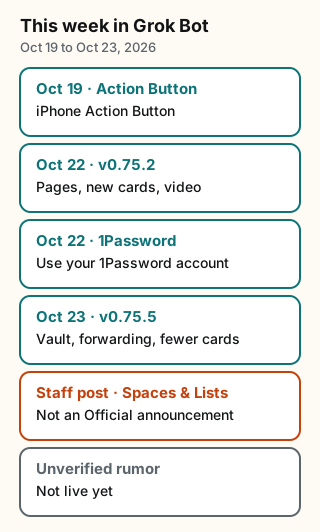
Figure explanation: Six cards run top to bottom on an ivory ground. Oct 19 is the iPhone Action Button. Oct 22 has two cards: version 0.75.2 (Pages, new cards, and video) and 1Password. Oct 23 is version 0.75.5 (Vault, email forwarding, and fewer approval cards). The fifth card is a staff post about X Spaces and Lists, labeled not an Official announcement. The sixth card is an unverified rumor about gifting and sharing one bot, which is not in the changelog or an @bot post.
0.75.2: Pages, new cards, video (Oct 22)
The changelog titles v0.75.2 "Pages, new chat cards, and video creation". It rolls up seven smaller versions (0.72.0 through 0.75.1). @ericzakariasson, whose bio lists @spacexsi, summarized it on X on Oct 22:
- "pages: reports, memos and dashboards your bot builds and keeps up to date"
- "new cards in every desktop chat"
- "bots can make videos from a description or an image"
Other items in the changelog worth knowing:
- Payments: "Bots can pay with Shop Pay", through Shop checkout where a store accepts it and with a one-time Shop card elsewhere. X Money connects in one tap from a chat, the connector page or checkout.
- Routines: "Routines can read the Bot's inboxes." A routine can now act on mail that arrives at a bot's own address.
- Approval cards now describe the action in one sentence, show the app's logo, and flag irreversible or sensitive changes.
- Memory: "What a personal Bot saves to memory in one chat is remembered in all your chats with it, and only you can change it."
- Deletion is permanent: deleting a Bot "permanently erases its conversations, memory, routines, and attachments, and removes its Slack app."
Pages get their own article: Pages in Week One.
Do this: ask for a Page to replace one message you send every week.
0.75.5: Vault, forwarding, fewer approval cards (Oct 23)
The changelog titles v0.75.5 "Vault, email forwarding, and fewer approval cards". @ericzakariasson's version, posted Oct 23:
- "vault: save logins, cards and contact info, and your bot fills them in"
- "bots forward email with the original formatting and attachments"
- "fewer approval cards for things you asked for"
The changelog lines that change how your setup behaves:
- Routine limits: "Your routines can run up to 300 times an hour in total instead of 100, and each routine up to 200 times."
- Direct sends: "Emails and Slack messages you ask a Bot to send go out once Auto-review allows them, while sends on routine and other turns still wait as drafts."
- Fewer prompts: "Auto-review asks less often for an action you asked for in your own words."
- No retry after a no: "After you deny an approval card, the Bot stops and doesn't try that action again until you send another message."
- Stricter about drafts: Auto-review "no longer waves through an action your request said to stop before, such as sending a message you asked only to draft."
- Slack accountability: bots record who asked for each message they post in Slack, so anyone in the thread can ask who requested it.
- X Money: connecting X now also connects X Money through the same account.
Vault and email forwarding both need Grok Bot 0.75.2 or later.
Do this: the higher routine limits mean a runaway routine can run longer before it hits a ceiling. List your routines this week and turn off any that wake up with nothing to do.
Vault
The Official @bot account: "Grok Bot can now save your logins, cards, and contact information." The changelog puts Vault "in Settings" and says bots "fill them in to sign in or check out."
Do this: open Settings and review what's saved. Remove anything you don't want a bot filling in.
1Password
@bot on Oct 22: "Grok Bot can now use your 1Password account." It adds: "Approve the logins you want to share, and your Bot signs in for you. This new integration is rolling out to users over the next few days."
1Password's own announcement on Oct 22 describes how it works: "When an agent reaches a sign-in form, it requests a credential from your vault. If you approve the request, 1Password directly auto-fills the credential in the destination site so the agent can’t see or take possession of the credentials."
1Password sign-in itself isn't brand new: the changelog has listed a 1Password connection on Mac since v0.53.0 (Sep 15). The Oct 22 news is 1Password for Agents and a wider rollout.
Vault or 1Password? Vault stores the credential inside Grok Bot. With 1Password, each login stays in your 1Password vault and you approve each one. If you already use 1Password, connecting it means you don't keep a second copy of your passwords.
Do this: as of Oct 24, 2026, it may not have reached you yet. @bot said "over the next few days."
iPhone Action Button
@bot on Oct 19: "Set it as your iPhone's Action Button and press it to talk with Bot."
@mattyp (bio: "cursor & @bot at @spacexsi") posted the steps on Oct 21:
- "Open Settings"
- "Search for Action Button"
- "Swipe to Shortcut"
- "Tap Choose a Shortcut"
- "Search for Grok Bot"
- "Tap Start Voice Chat under Grok Bot"
- "Press the Action Button to start a voice chat"
Only some iPhone models have an Action Button. If yours doesn't, start a voice chat in the app instead.
X Spaces & Lists (staff post, not an Official announcement)
@pjvann (bio: "@spacexsi & @x api") wrote on Oct 20: "we heard you, and launched @X spaces & lists in @bot!" and "want to find a space to listen on? ask @bot!" The post also says "want to manage your lists? ask @bot!"
We found no @bot post, changelog line or docs page for this as of Oct 24, 2026. So it's a staff member's post, not an Official announcement.
Catch-up video
@mattyp's Oct 20 "What's new in Grok Bot" walkthrough has chapter times in the post: new chat cards (00:00), speed (00:31), draft edits (00:53), email aliases (01:08), X DMs (01:33), Tag @bot (01:55), connectors (02:31), voice calls (02:48), notifications (03:27), invites and Android Assistant (03:56), and access lists, unread, routines and sign-in (04:19).
Rumor: gifting and sharing one bot (unconfirmed)
@GrokBotRadar, whose bio reads "Fan Account" and "Independent + unofficial", posted on Oct 22 that an early build shows you'll be able to "gift a friend 2 weeks FREE" and "share ONE of your Bots with anyone by email." The same post says "Not live yet" and credits @Kevin_Logan ("h/t").
Status: UNVERIFIED. It isn't in the changelog, the docs or any @bot post we found. Don't plan around it. You can already share a bot as a template link, which gives the other person their own copy, not access to yours.
What this means for you
- Update to 0.75.2 or later. Vault and email forwarding require it.
- Audit routines. The ceiling is now 300 runs an hour across all routines. Your bill and your attention are the real limits.
- Decide where credentials live: Vault, 1Password, or neither for a given site. Don't paste passwords into chat either way.
- Retest your approval habits. If you ask a bot to send an email in your own words, it may now go out after Auto-review without a draft card. If you want a draft, say "draft only". The changelog says Auto-review now respects that.
- Try one Page and one voice shortcut. Both are low-risk ways to see what's new.
Tradeoffs and caveats
- Fewer approval cards means less friction and less review. That's good for messages you dictated word for word. It's worse for messages you described loosely. Routine sends still wait as drafts, unless you chose Disable drafts for that Bot.
- Saved cards and logins are powerful. A bot that can fill a card can buy things. Keep purchase approvals on, and only save what you'd trust every bot on your account to use. All your bots share one computer.
- Rollouts are staggered. 1Password was announced as coming over several days. As of Oct 24, 2026, features can reach you at different times on different platforms.
- Staff posts aren't the changelog. We label them separately because a staff member's post can come before, or differ from, the shipped release.
Credits
- @bot (Official xAI): https://x.com/bot
- @ericzakariasson: https://x.com/ericzakariasson
- @1Password: https://x.com/1Password
- @mattyp: https://x.com/mattyp
- @pjvann: https://x.com/pjvann
- @GrokBotRadar (rumor, flagged): https://x.com/GrokBotRadar
- @Kevin_Logan (h/t): https://x.com/Kevin_Logan
- Official xAI changelog: https://x.ai/changelog/bot (Oct 22 and Oct 23, 2026)
Sources
Official xAI (checked Oct 24, 2026): the Grok Bot changelog for v0.75.2 (Oct 22, 2026) and v0.75.5 (Oct 23, 2026), and @bot (Official xAI account) for the Action Button (Oct 19), 1Password (Oct 22), and Vault (Oct 23).
- Official xAI changelog, Grok Bot: v0.75.2 (Oct 22, 2026), v0.75.5 (Oct 23, 2026). Checked Oct 24, 2026.
Partner and community: @1Password, @ericzakariasson, @mattyp, @pjvann, @GrokBotRadar (rumor, flagged). All posts read and quotes checked word for word on Oct 24, 2026.
Start from a template
People share Grok Bots you can add and then change to fit your job. Each template opens on x.ai. bot.ski never installs anything.
Comments
Comments are from bot.ski members. They aren't reviewed by xAI.