
TL;DR
- Memory Reel is a free, official Botski template for Grok Bot. It turns your public X history into a reel on bot.ski.
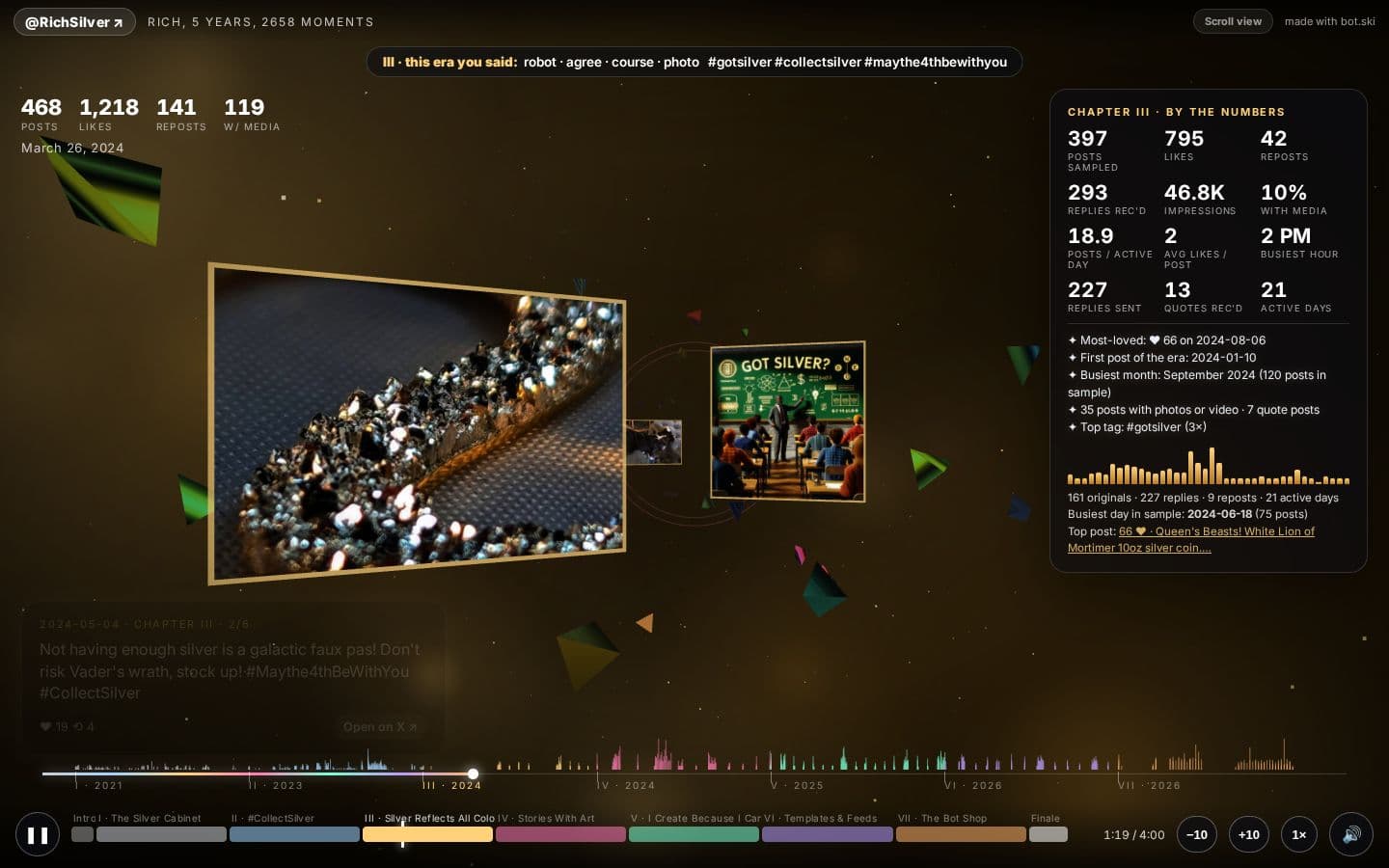
- A reel is two things: a 3D fly-through of your eras, and a scroll story with your posts, photos, music videos, articles, stats and a soundtrack.
- The first official reel is live at bot.ski/x/richsilver. Open it before you read on. It explains the idea faster than we can.
- It reads public posts only, never asks for a password, never posts to X, and a person at bot.ski reviews every reel before it goes live.
Why we made it
Most of us have years of posts on X. The photos from a trip, the thread you were proud of, the song you couldn't stop sharing one summer. They're all still there, but nobody scrolls back that far, including you.
Memory Reel gathers them into something you can actually sit through. Your Grok Bot reads your public posts, sorts them into the eras of your time on X, and builds a short reel you can watch, scroll and share with a link.
We built the first one for our own account. You can see it at bot.ski/x/richsilver: five years and 2,658 public posts in seven chapters, with a soundtrack.
How it works
The whole thing happens in a chat with your Grok Bot. Here's every step.
1. Add the template
Open the Memory Reel template and add it to your Grok Bot. Adding a template gives you your own copy.
2. Answer four questions
The Bot introduces itself and asks four things about your X account:
- Which account. Your own.
- What to include and what to leave out, in your own words. Money screenshots, kids, other people's faces and DMs are left out by default, so you only need to add what's special to you.
- The size. Light is about 1:00, Medium about 1:40, Heavy about 2:15.
- The soundtrack. A is a generated soundtrack. B is a Suno prompt timed to the exact length of your reel, if you'd rather make the music yourself. C is no music.
3. Review your eras
It reads your public posts. There's no password and it's read-only. It finds 5 to 9 eras in your history and shows you three things: an outline of the eras, a privacy review of anything that might be sensitive, and a contact sheet of the photos it picked.
This is where the reel becomes yours. Rename an era, cut a post you'd rather forget, swap a photo for a better one. Take as long as you like.
4. Agree and upload
When you're happy, the Bot shows you a short rights sentence. You agree to it word for word, then say "upload". It sends one zip file to bot.ski. No password or key changes hands.
5. Confirm it's you
You get a confirm link. Open it within 24 hours, sign in with X as the same handle, and confirm. This is how we know the reel belongs to the person whose posts are in it.
6. A person reviews it
Someone at bot.ski looks over every reel, within 12 hours at most. Then it's live at bot.ski/x/ followed by your handle.
7. Optional: record it, and keep it fresh
There's no built-in video export. If you want a video, the Bot walks you through recording the reel yourself. It can also suggest a monthly update, at most once a month and only if you've posted something new since.
Privacy and safety
We kept the rules short so they're easy to check:
- Your own account, public posts only. It uses your Grok Bot's built-in X reads. It never asks for your password and it can't change anything on your account.
- Sensitive things are out by default. Money screenshots, kids, other people's faces and DMs stay out unless you decide otherwise. The privacy review shows you anything it isn't sure about.
- It never posts to X. The only thing it ever sends is the one zip to bot.ski, and only after you say "upload".
- Nothing goes live without two checks. You confirm by signing in with X, and a person reviews the reel.
- Updates wait for approval too. A new version replaces your live reel only after it's been approved. Until then, the old one stays up.
- Copyright. If you think a reel uses your work without permission, our copyright policy explains how to report it.
What it costs
Nothing. The template is free, and it uses the X reads your Grok Bot already has built in. There's no API key to buy and no paid plan on bot.ski. Signing in with X to confirm your reel is free too.
FAQ
Can I make a reel of someone else's account? No. Memory Reel is for your own account. The confirm step asks you to sign in with X as that handle, so a reel only goes live for its owner.
Will it post anything for me? Never. It doesn't post, reply or like anything on X. Sharing your reel is up to you.
Does it read my DMs or private posts? No. It reads public posts only, and DMs are left out by default.
How long does it take? The chat takes as long as you want to spend on your eras. After you confirm, review takes up to 12 hours.
Can I change it after it's live? Yes. Ask your Grok Bot for an update. The new version replaces the live reel once it's approved.
Can I get a video file? There's no built-in export, but the Bot shows you how to record the reel as a video yourself.
What if I change my mind about a post? Leave it out in the next update, or tell the Bot what to cut before you upload. You can also contact us.
Get the template
The template is free and takes four questions to start. Add Memory Reel to your Grok Bot, or look around the Memory Reel page first.
Memory Reel is an official Botski template by @RichSilver.