
GuideGrok Bot
Grok Bot tips and tricks the tutorials agree on
Creators have posted plenty of Grok Bot tutorials this month. We picked the tips that the official changelog or help pages back up, and skipped ones Botski has already covered, like turning a skill into a routine or setting a Primary Bot.
The tutorials we drew from are by @1920web1080 [1], Riley Brown [2], Alex Finn [3] and Sawyer Merritt [4]. Sawyer Merritt's post links to a hands-on 20-lesson course, published as a Grok Bot template.
Tips from the tutorials, checked against the docs
| # | Tip | From | What the official docs say |
|---|---|---|---|
| 1 | Get past "bot blockers" on websites | @rileybrown (17:40 in the video) | Some sites block traffic from cloud computers. The Bot hands you that step so you can sign in yourself on its computer, or you can turn on Settings → Computer → Route traffic through this computer so sites see your own connection. |
| 2 | Hand huge jobs to Projects | @1920web1080 | A Bot can start a Project when you ask: a Cloud Agent that plans the work and runs its own agents (changelog, Sep 18). |
| 3 | Handle approvals without leaving Slack | @1920web1080 | In Slack threads, a Bot that needs your approval posts a Review an action card only you can answer (changelog, Sep 29). |
| 4 | Review several files at once | @1920web1080 | Bots can submit one pull request review covering several files (changelog, Sep 17). |
| 5 | Start work from Slack or GitHub | @1920web1080 | Routines can start from a Slack message, a mention, a phrase or a reaction, or from GitHub, Linear, Sentry and PagerDuty events. Keep Slack triggers narrow, because a trigger on every message in a busy channel spends usage on messages that don't need the Bot. |
| 6 | Don't hunt for a model setting | @AlexFinn ("Opus in Grok") | Grok Bot picks the model for each task, and there's no model picker. A task routed to Opus 5.5 doesn't cost more per token. |
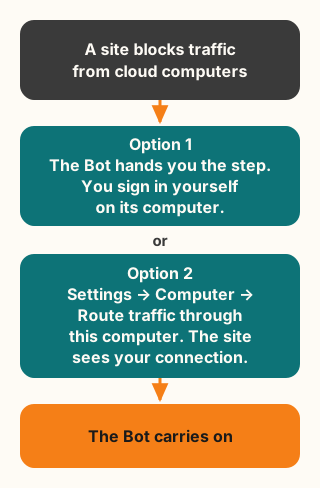
Figure explanation: The top box says some sites block traffic from cloud computers. One arrow leads to the first option: the Bot hands you that step, and you sign in yourself on its computer. A second arrow leads to the second option: Settings, then Computer, then Route traffic through this computer, so the site sees your own connection. Both paths end at the Bot carrying on with the task. The diagram is a simplified illustration, not a record of a real session.
More tricks from the official help pages
| Trick | How |
|---|---|
| Group Bots by project or client | Desktop: right-click a Bot → Move to new section. iOS: swipe the row → Move to. Sections sync between devices. |
| Quote part of a reply in your next message | Select the text and press Cmd/Ctrl+L, or choose Add to prompt. |
| Test a routine now instead of waiting | Open the routine → Test. A test does real work, so use a safe input. A new routine otherwise waits for its next scheduled time. |
| Keep a Bot's replies in the group chat | Say "Reply here in the group," or add the rule to the group's description under Bot settings. |
| Check whether it's Grok Bot or you | Look at status.cursor.com (the Grok Bot row). Don't Reset during an outage. |
| Report a bug the useful way | Right-click the message → Copy request ID, and include your version from About → Copy version info. |
| Choose a different voice | During a voice chat, Show settings changes Voice, Speed and Language. |
| Save keys safely | Use the secure secret card or the Bot's Secrets section. Values are write-only, so a blank field doesn't mean the key was deleted. |
One tip we couldn't confirm
@rileybrown's video covers "Inline Mini Apps for Slack and Gmail." We didn't find that name in the changelog or help pages, so we've left it out until there's an official source.
Sources
- @1920web1080 on X, "30 Grok Bot features/tricks" (Oct 3, 2026, 10:10 AM CT)
- Riley Brown on X, four features video (Oct 5, 2026, 6:00 PM CT)
- Alex Finn on X, update video (Oct 7, 2026, 7:37 PM CT)
- Sawyer Merritt on X, 20-lesson course (Oct 3, 2026, 3:27 PM CT)
- Grok Bot changelog
- Grok Bot help, FAQs
- Grok Bot help, How Tos
- Grok Bot help, Routines
- Grok Bot help, Group chats
- Grok Bot help, Voice chat
- Grok Bot help, Store secrets securely
- Grok Bot help, Which AI models power Grok Bot?